Last week’s post introduced Org Builder and what it is for. This one is about the thing it produces: a class.
The site we built this for teaches its own platform engineers, in house, on its own VCF estate. No internet in the room, and no appetite for a week of lab building beforehand.
What a student gets
One lab, theirs, requested from a catalog.
A finished lab is not a toy. The one in this example is a domain controller, a jump host, the nested ESXi hosts their site asked for, a vCenter and a vSAN datastore built from those hosts’ own disks. On top of that sit VCF Operations watching the cluster, NSX Manager, and a three-tier application to put a firewall policy around. Another site describes a different stack in its site file and gets that instead.
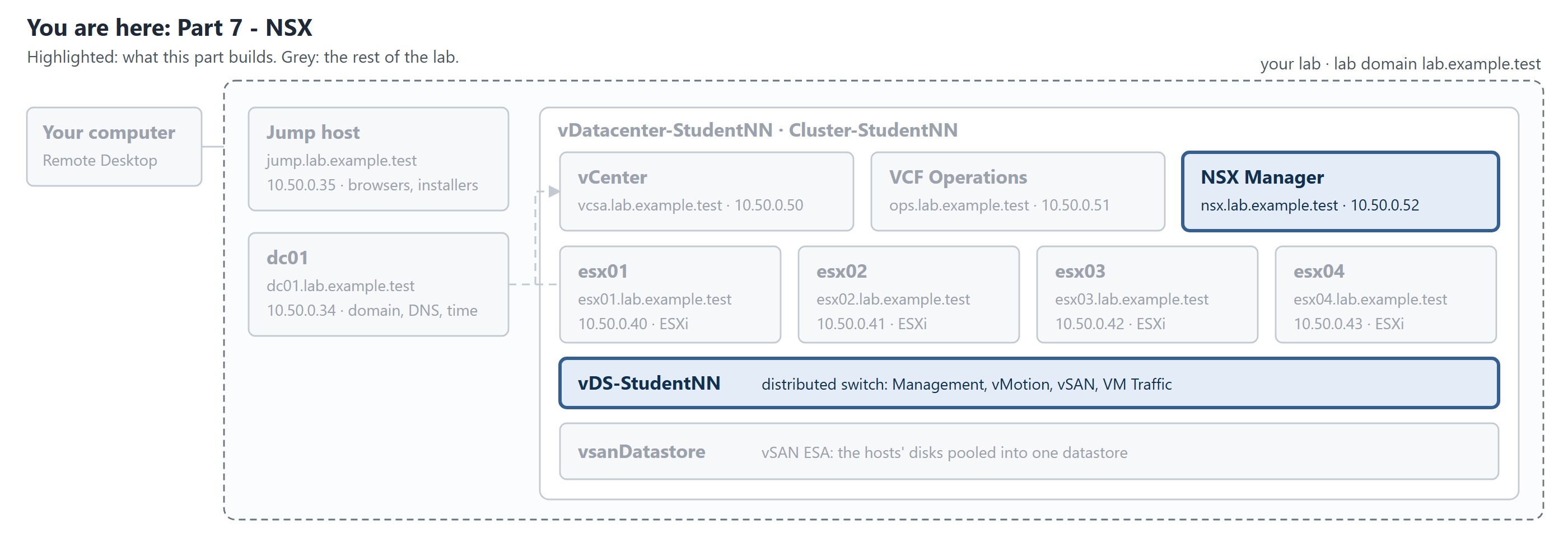 One student’s lab, drawn from their site’s own values. The runbook opens each part with this picture, with that part’s pieces lit and the rest left grey.
They reach it by Remote Desktop to their own jump host, and everything they need is on that desktop: the installers, the browsers, a file telling them the addresses and a shortcut to the runbook. No VPN gymnastics, no jump box shared with the rest of the room, no “who has the console open”.
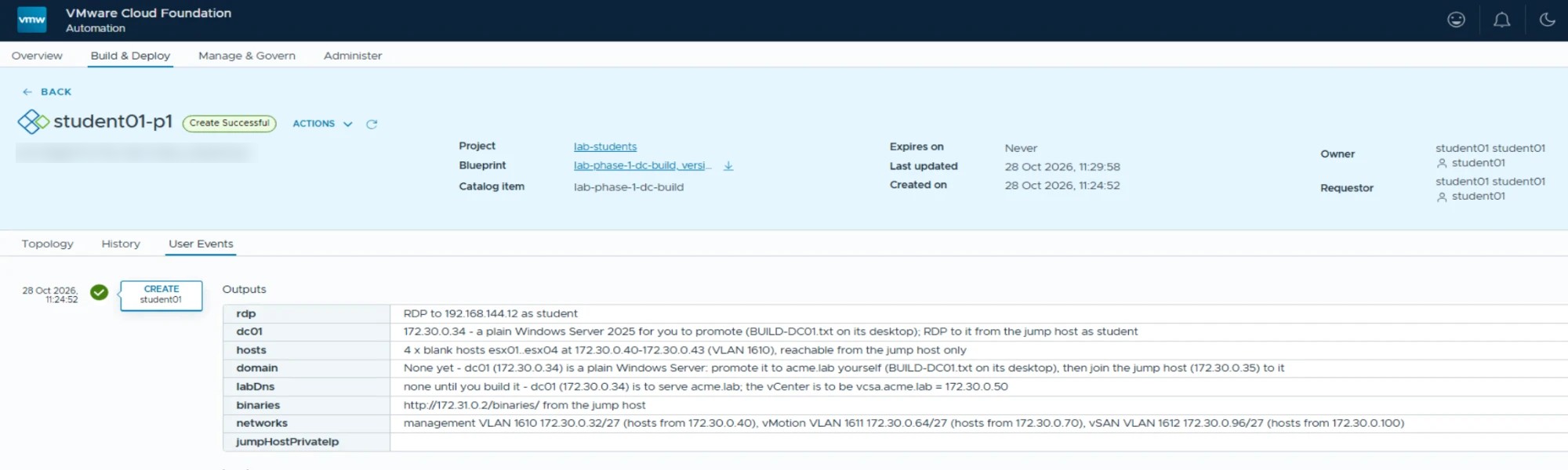 A real lab on our own platform, six minutes after it was asked for. It belongs to student01, who requested it, and the outputs are where their addresses come from: Remote Desktop in, the plain Windows server to promote, the four blank hosts, and where the installers live. This one is Phase 1, so the domain is theirs to build.
Phases, so a lesson starts in the right place
The useful part is not that a lab can be built. It is that a lab can be handed over half built, on purpose.
Each phase is a catalog item. A trainer teaching the vCenter deployment hands out a lab with the hosts already installed, because watching ESXi install is nobody’s lesson. A trainer with a whole week hands out a blank Windows server and lets the class build the domain first.
The phases in this example run:
| Phase | What is already built | What the student does |
|---|---|---|
| 1 | A plain Windows server and a jump host | Promotes the domain controller, joins the jump host |
| 2 | The domain, and blank hosts | Installs ESXi on each host |
| 3 | Hosts installed and addressed | Deploys the vCenter onto the first host |
| 4 | The vCenter | Builds the cluster, the switch and vSAN |
| 5 | The cluster | Adds VCF Operations, and NSX with a firewall policy |
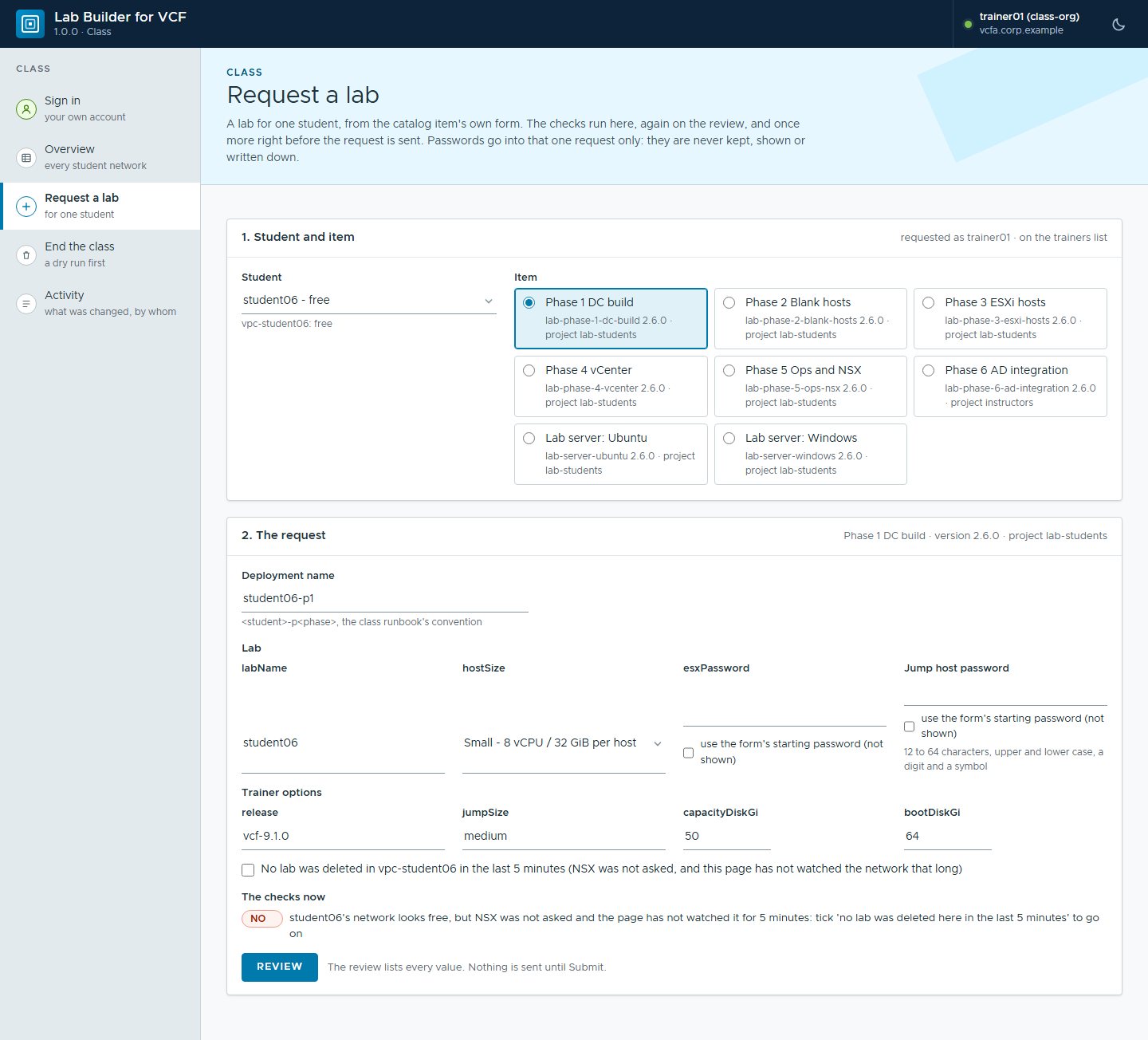 Requesting a lab for one student, with example values. The items are whatever that
site’s catalog holds: this one also carries a trainers-only AD integration item and
two lab servers. Nothing is sent until the review.
A student who finishes early moves on. A student who breaks something badly asks for a fresh one, and has it in minutes rather than tomorrow.
Separation that holds up
Labs sharing infrastructure only works if the separation is real.
Each student works inside their own NSX VPC, and each lab sits in a namespace of its own. Roles come from the site’s own directory: trainers hold the rights to release a phase to the class, students can deploy and manage only what belongs to them. A student cannot see a neighbour’s deployment in the portal, because the portal does not believe it is theirs.
At a site running vDefend, the perimeter is deny by default at the Transit Gateway firewall. The one way into a lab is Remote Desktop to that student’s own jump host. Curiosity about a neighbour’s vCenter meets a dropped packet, which is a tidier lesson than a lecture about it.
As many as the hardware carries
There is no student count anywhere in the product. A class is however many networks the site set up, and how many labs run at once is decided by memory, vSAN capacity, addresses and the organization’s quota.
That makes sizing a conversation about hardware rather than licences. The trainer’s page does the arithmetic in the open. It shows what is left, and how many more labs of each shape would fit, so a trainer knows before the lesson whether the room’s next exercise will land.
The timings that matter to a trainer
A class runs to a clock, so the numbers that matter are the ones that decide whether a lesson fits in a morning.
- The shell a class builds on - the jump host, a plain Windows server and the blank hosts - is ready about five minutes after the request.
- A complete lab, the vCenter and vSAN with VCF Operations, NSX and the three-tier application, took about an hour and a half unattended, measured at this site on 19 October 2026. Slower hardware takes longer, and the catalog says so on the card.
- Disposing of a finished lab takes under five minutes, and the student’s network is free for the next exercise.
The build is unattended, which is the point. A trainer sets a class building over lunch and comes back to a room of finished stacks, rather than to a wall of progress bars and a decision about which one to nurse.
Watching a class move
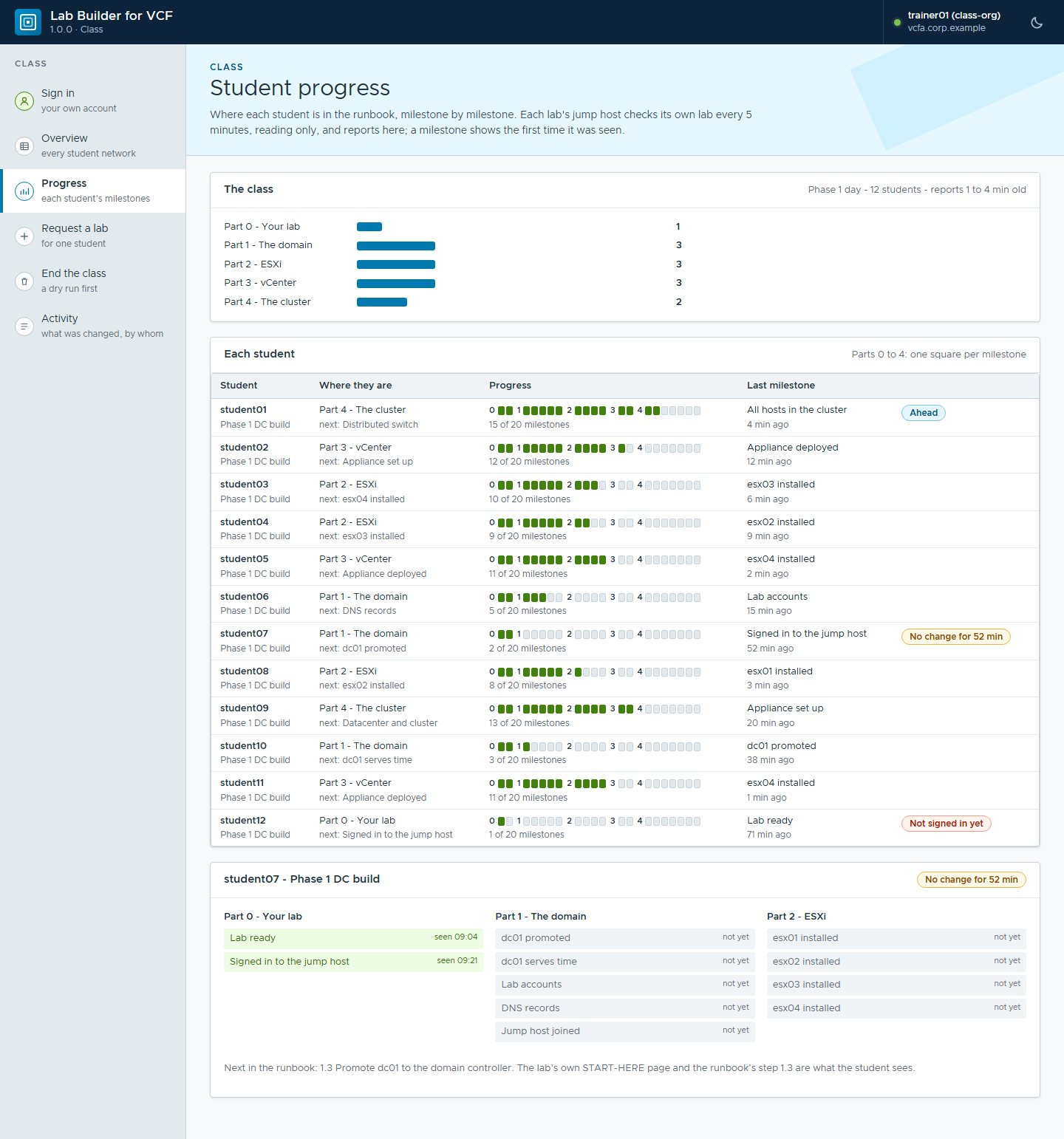
Each lab’s jump host checks its own lab every five minutes, reads only, and reports where that student has got to. The result is a page of milestones: a bar per part of the runbook, a row per student, and each student’s progress as a row of squares.
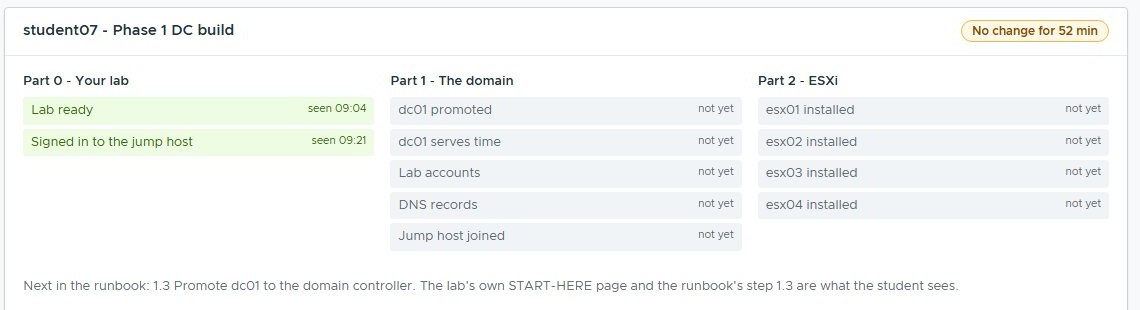 One student, opened up: what they have reached, what is next, and the runbook step they are on. With example values.
It is the flags that earn it, though. One student is ahead, one has not signed in yet, and one has not moved for fifty minutes, which is the one worth walking over to. That beats asking the room how everyone is getting on, one person at a time.
The runbook is part of the product
A lab nobody can follow is a lab nobody uses, so the student runbook is built from the same site file as the labs.
It carries the student from first sign-in to a working VCF stack, with a screenshot at nearly every step: 190 pictures in the edition we ship. Each part opens with a map of the lab showing what that part builds and what is still grey, so a student who joins on day three can see where they are.
Because it is generated, it shows that site’s own domain, addresses and host names. Nobody is mentally translating from our lab’s values to theirs while also learning vSAN.
What this is worth
Measured against what the site did before, which was an engineer building labs by hand:
- Students build their own labs from the catalog; no engineer builds labs for them.
- A change to the course is a change to a blueprint, not a rebuild of every lab in the room.
- Classroom capacity is limited by hardware, not by engineer time.
- The site’s own trainers run the environment after handover.
That last one was the acceptance test, really. We left, and the class ran.
Why this matters outside the lab
A classroom is a demanding tenant, which is what makes it a useful test.
A roomful of people, each wanting root on their own stack, each able to misconfigure a network, all on shared hardware, all at once. Separation that holds for a class will hold for a team of engineers sharing a platform. The pattern moves with it: a tenant per person, a catalog of ready things, and rights that come from the directory rather than from a spreadsheet.
Rules learned
- Hand out phases, not labs. A lesson should start where the lesson starts, and a two-hour build before the teaching is two hours of nobody teaching.
- Make a fresh lab cheap. If re-requesting is quick, a student will experiment; if it costs them a day, they will be careful, and careful is not the point of a lab.
- Put the separation in the platform, not in the instructions. “Please don’t touch other people’s labs” is not a control.
- Let the hardware set the class size, and show the arithmetic. A number baked into the product is a number that will be wrong at the next site.
- Generate the runbook from the site file. A student should never have to translate someone else’s addresses while learning.
Broadcom documentation
- VPCs in VCF: the network each lab sits in.
- vDefend Distributed Firewall: the policy that keeps a class apart.
Lab environment; opinions my own. Org Builder is our own tooling, not a Broadcom product. VMware, VCF, VCF Automation, NSX and vDefend are trademarks of Broadcom Inc. or its subsidiaries.