
Every platform needs a demo stack: something that looks alive on a projector and quietly exercises every layer underneath. Ours is seven apps on a vSphere Kubernetes Service (VKS) cluster that VCF Automation provisioned, in a tenant VPC, each behind its own load-balancer VIP.
kubedoom       192.168.144.20:5900   (VNC — yes, it kills pods)
kubeinvaders   192.168.144.21
kube-ops-view  192.168.144.22
pacman         192.168.144.23        (+ MongoDB on a PVC — persistent high scores)
podinfo        192.168.144.24
goldpinger     192.168.144.25        (DaemonSet incl. control plane)
prometheus     (in-cluster: KSM + node-exporter, 11/11 targets up)
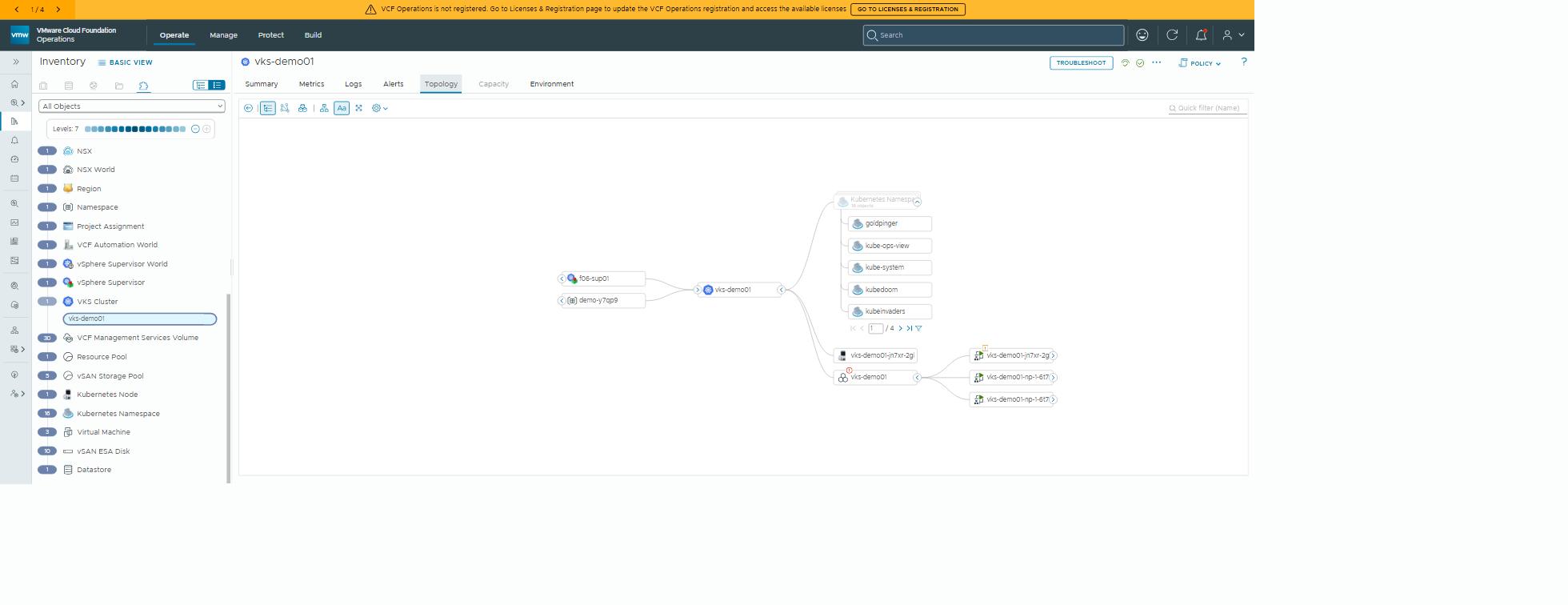
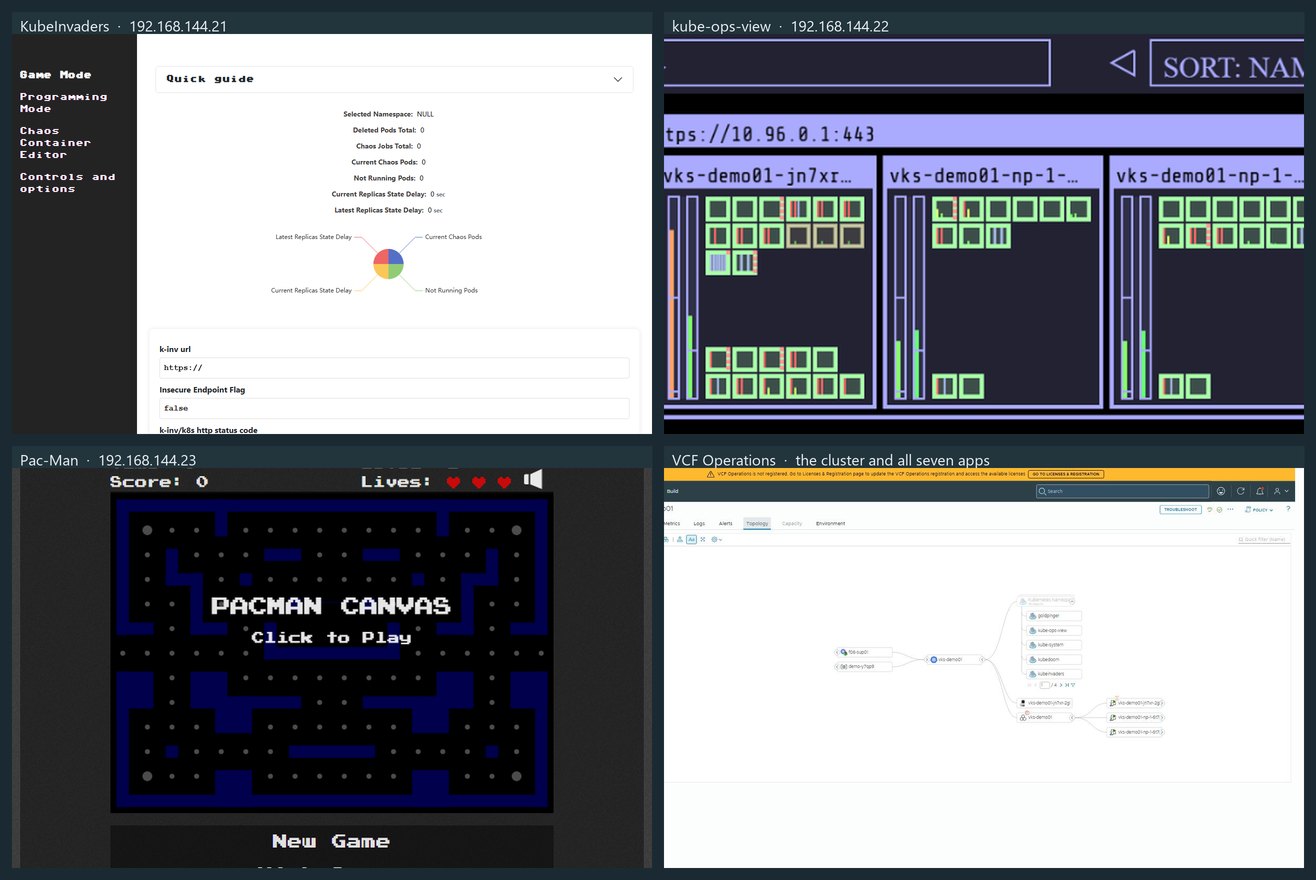 Captured from the VIPs the platform handed out. KubeDoom is VNC-only and podinfo is an API, so they sit this one out; the Ops topology tile shows all seven by name.
The path that matters: tenanted, not shortcut
I deployed the first version of this stack against the supervisor: an
admin kubeconfig, a vSphere namespace, kubectl apply. It worked, and it
was wrong, for the reason the previous
post spells out. Nothing about it
was provided to anyone.
So I tore it down: seven apps, cluster, VPC and VIPs, gone in about seven minutes. Demolition, as ever, was the quick part. Then I rebuilt it the proper way:
dev-01 org → default-project → SupervisorNamespace (class large, region f06, VPC default-f06)
          → VKS cluster vks-demo01 → seven apps
Everything went in through VCF Automation: the Cloud Consumption Interface (CCI) API for the namespace and cluster, then the apps through the cluster’s own kubeconfig. Two auth facts are worth writing down; each cost me a cycle:
- A provider service account reaches the cloud API only. CCI
(
/cci/kubernetes/apis/...) rejects provider tokens with a 401. It needs an org-scoped service account. - Device-flow login uses the service account’s own UUID as the
client_id(not its software ID), against the tenant endpoint/oauth/tenant/<org>/device_authorization.
What the platform does for free
Each app is an ordinary Deployment plus a Service of type LoadBalancer.
The supervisor turns each service into an NSX VPC load-balancer virtual
server, and hands back a VIP from the org’s external block. No ingress
controller, no MetalLB, no port-forwarding. Seven services, seven VIPs, done.
Pac-Man’s MongoDB asks for a persistent volume and gets one on vSAN, through the CSI driver the supervisor already installed. The high scores are on enterprise storage. Priorities.
Goldpinger runs as a DaemonSet on every node, the control plane included, and draws the node-to-node mesh live.
That’s three platform services (load balancing, storage and networking) exercised by apps that know nothing about VCF.
The traps
The supervisor refuses cluster-scoped RBAC, even to admin. Demo apps that need ClusterRoles (kube-ops-view, Goldpinger, KubeDoom) must live on a guest cluster. You can’t run them as vSphere Pods on the supervisor.
PodSecurity restricted is the VKS 1.35 default. Half the demo set
runs as root. The symptom: the Deployment shows 0 UP-TO-DATE, the
ReplicaSet exists, zero pods, and the events say FailedCreate. The fix:
label the namespace pod-security.kubernetes.io/enforce=privileged. Then
say so in the demo, because it’s a teaching moment.
node-exporter without hostNetwork. The VPC fabric blocks scrapes from
a pod to a node IP, so the stock DaemonSet’s hostNetwork: true doesn’t
help. Run it as a normal pod and let Prometheus scrape it in-cluster.
Docker Hub is flaky from behind a proxy. TLS handshake timeouts put pods into kubelet’s image-pull backoff, where they sit and sulk. Deleting the stuck pods gets round the backoff. A Harbor proxy-cache project fixes it properly.
Pod CIDR shadowing. The stock 192.168.0.0/16 pod range hid the
org’s 192.168.144.0/21 external block from inside the cluster, so apps
couldn’t reach their neighbours’ VIPs. The pod CIDR is now 172.16.0.0/16.
Automation notes
The whole stack is one checkbox on the lab’s catalog item that deploys a
supervisor. installDemoApps creates the cluster, with the newest
compatible Kubernetes release and the newest built-in ClusterClass, both
auto-detected. Then it applies the seven apps and reports their URLs in the
deployment summary.
On a fresh environment, an integrated run takes 16.7 minutes to
CREATE_SUCCESSFUL. An immediate re-run takes 3.3 minutes, every step
idempotent. That’s the number I actually care about: it makes a broken demo
a re-run, not a rebuild. Demos have an uncanny sense of when they’re being
watched.
Why this matters outside the lab
A demo stack sounds like a toy. To be fair, one of the apps is Pac-Man. But it’s actually the fastest way to make a platform legible to people who don’t read YAML. A customer watches a request become a cluster, watches seven services get their own addresses, then opens one and plays it.
Everything underneath gets exercised (self-service Kubernetes, load balancing, persistent storage, isolation), and a non-technical stakeholder can see it working. The same stack is what we put in front of a new team on day one. And the same idempotent deploy is what makes it safe to demonstrate live: if it breaks on stage, it re-runs in three minutes.
Rules learned
- Demo apps that need cluster-scoped RBAC must run on a guest cluster. The supervisor won’t grant it, even to admin.
- Build the stack through the tenanted path: org service account, then CCI, then namespace, then cluster, then apps. Same apps, but now they’re provided, quota’d and visible in Ops.
- VKS 1.35 has
restrictedPodSecurity by default. Label the namespace and say why. - One
LoadBalancerper app means one NSX VIP per app. No ingress needed for a demo. - Pick a pod CIDR that doesn’t overlap the VPC external block.
- Make the deploy idempotent. A demo that re-runs in 3 minutes is one you can afford to break on stage.
Broadcom documentation
- Creating and Managing Namespaces: a
SupervisorNamespacewith a class, region and VPC, through the All Apps API - Create a Service Account in Your VCF Automation Organization: organization service accounts and their device-bound API tokens
- Pod Deployment with Load Balancer Service: a
Serviceof typeLoadBalanceron a VKS cluster and its external IP - Storage for VKS Clusters: persistent volumes from the storage classes assigned to the namespace
- Configure PSA for VKr 1.25 and Later:
restrictedenforced by default from VKr 1.26, and the namespace label that relaxes it
Previously: one VKS cluster, two ways. The Pac-Man instance here is the one from What’s a VPC?.
Lab environment; opinions my own.