
The nested hosts exist. Now they need to become a VCF instance: vCenter, NSX, SDDC Manager and the fleet components. The VCF 9.1 Installer appliance does that through an API, from a deployment spec of a few hundred lines of JSON.
This post is the vRO workflow that drives it. Three design constraints shaped it:
- nobody edits the spec by hand;
- the request gets two hours by default;
- nested hosts fail hardware validation.
Unlike stage 1, this isn’t VM provisioning, so it’s not a cloud template. It’s a vRO workflow published directly as a catalog item through an Orchestrator content source.
The spec is generated, never edited
A vRO action, buildVcfDeploymentSpec(environment, hostFqdns, labPassword, …), returns the whole spec as a string. Its structure was reconciled
against a validated export from a real bringup (the installer UI lets
you export the spec it accepted). Everything variable derives from the
environment number X:
| Element | Pattern | f03 |
|---|---|---|
| Names | f0X-m01-* | f03-m01-vc01.res.lab |
| Subnets | 10.(20+X).<sub>.0/24 | 10.23.1.0/24 (mgmt) |
| VLANs | 2X0<sub> | 2301 mgmt … 2306 TEP |
| Gateways | .254 | 10.23.1.254 |
| vMotion / vSAN ranges | .1–.16 | 10.23.3.1-16 |
| NSX TEP pool | .6.1–.6.32 | 10.23.6.1-32 |
| SDDC Manager | f0X-vcf01.res.lab | f03-vcf01.res.lab |
var n   = parseInt(environment.substring(1), 10);   // "f03" -> 3
var pfx = environment + "-m01";
var net = "10." + (20 + n);
function vlan(o) { return 2000 + (n * 100) + o; }
function gw(sub) { return net + "." + sub + ".254"; }
Some things are static across environments: DNS, NTP, subdomain, component sizes, vSAN ESA FTT=1, and the component build versions pinned to the installer binaries.
One lab password feeds every credential field. The UI export scrubs them, and the action puts them back as the API schema expects.
Two spec-level decisions worth stealing:
skipEsxThumbprintValidation: trueinstead of carrying per-hostsslThumbprint. Supported, and the right trade-off for a lab.- Ops and Automation are checkboxes that add their blocks to the spec.
The installer only accepts a
licenseServerSpecwhen Ops is present, so the action adds them together or not at all.
The workflow: authenticate → validate → start → return
1. POST /v1/tokens                 installer login
2. POST /v1/sddcs/validations      the installer's OWN pre-flight on the spec
   (poll until COMPLETED; fail on any FAILED check)
3. if validateOnly -> return the validation report; touch nothing
4. POST /v1/sddcs                  start bringup -> sddcTaskId
5. return { sddcTaskId, installerUrl }
Step 2 is the validateOnly story made
concrete. In seconds, the installer will tell you that
f03-m01-nsx01.res.lab doesn’t resolve, that an IP is in use, or that a
host isn’t reachable. Two hours into a bringup is a bad time to learn that.
Seconds in, it’s merely embarrassing.
Every one of the roughly 40 DNS records the pre-flight wants is created
ahead of time by a one-shot PowerShell script (New-LabEnvDnsRecords.ps1).
DNS is a prerequisite, not a step.
The two-hour leash, and how to slip it
A request from the catalog carries a token with a roughly two-hour
lifetime, and a bringup takes around eight. The arithmetic is not
encouraging. When the token runs out, the workflow dies with
Delegating token is not service token.
The project’s request timeout also defaults to two hours, and its Provisioning tab can raise it. We never tried, because eight hours is too long to hold a request open.
So by default the workflow is fire-and-forget: waitForCompletion=false,
return the task id, and watch progress in the installer UI. A watchTaskId
input lets you re-attach later, and poll an already-running bringup from a
new request.
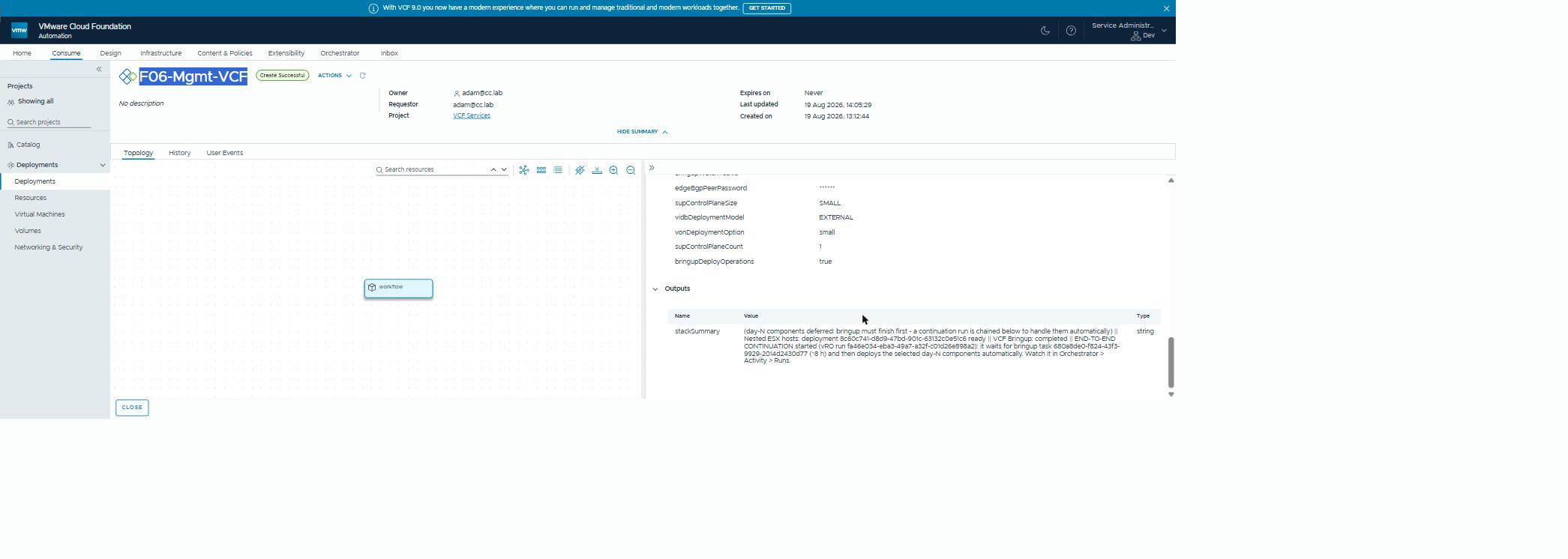
The wrapper that chains everything (the hosts, then bringup, then the day-N components that need bringup to be finished) has a neater trick.
The catalog-bound parent deploys the hosts, submits bringup, and then
re-executes itself as a plain vRO run (Orchestrator > Run: no catalog
token, no two-hour kill). It carries the hidden bringupWatchTaskId with
it. That continuation polls the installer task to completion (eight hours,
fine), and then runs certificates, fleet items, edge, supervisor and
identity.
Watch it under Orchestrator > Activity > Runs. The catalog request itself completes in under an hour (47 minutes on the run pictured below), having started the work correctly and handed off.
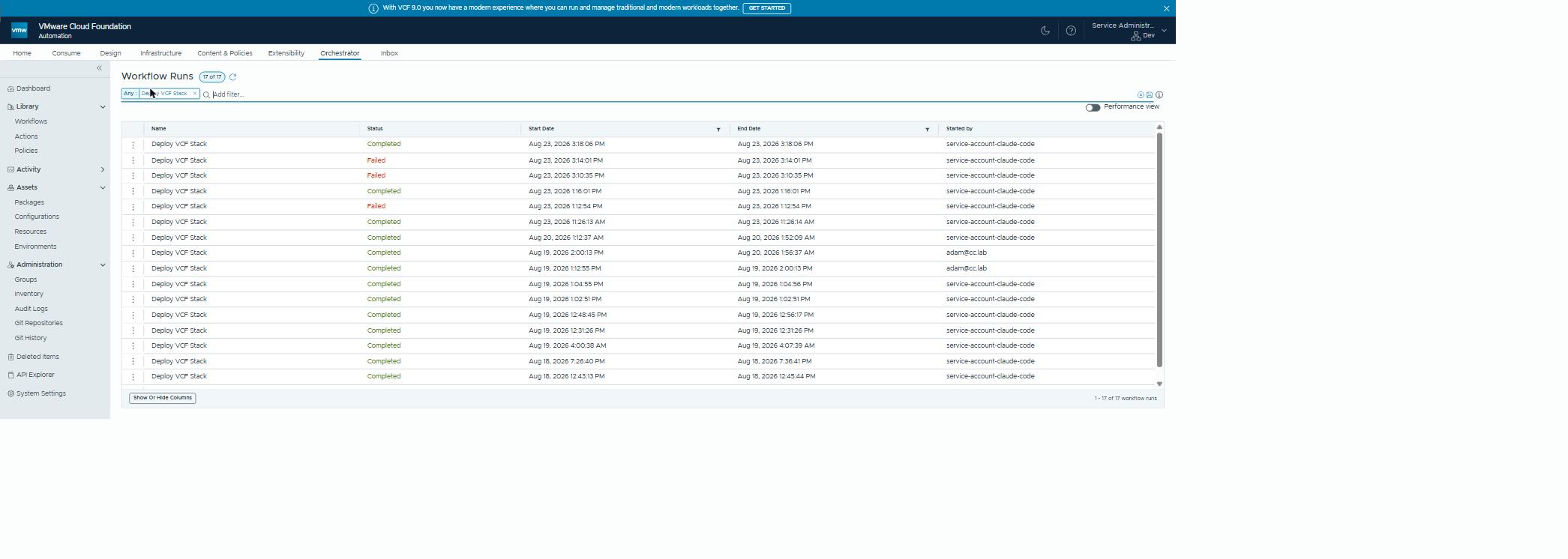 Two rows, one build. The parent returns inside the catalog’s window; the continuation waits out the bringup and does the day-N work.
Nested-host frictions
Three things a physical bringup never meets:
- HCL validation vs virtual NVMe. The installer’s hardware
compatibility list (HCL) check blocks the virtual NVMe controller. Fix it
at the vSphere Lifecycle Manager (vLCM) layer:
enforce_hcl_validation=falseon the image policy. The vSAN health testnvmeonhclalso complains. We silence it through the vSAN API, best-effort, with a manual fallback. - DVS compatibility appears late. After bringup, NSX takes 1–2 hours to settle before the supervisor’s zones endpoint stops returning 500. If the supervisor stage fails with “No compatible DVS” on a fresh instance, wait and re-run just that item. Patience, it turns out, is a deployment step.
- TSM-SSH. Bringup wants SSH on the hosts, so the wrapper enables it host-direct through SOAP before submitting.
Stale schema: the failure that looks like a bug and isn’t
Add an input to the vRO workflow after the catalog item exists, and three things happen. The form shows the new field. The request records its value. And the workflow receives null, because Service Broker keeps the old request schema until the content source re-imports. Two out of three, which here counts as a fail.
The workflow null-guards every boolean, and aborts with “inputs not mapped” rather than running with silently wrong options. The fix: re-import the content source, confirm the schema, and submit a new request. Resubmitting an old one reuses the old payload.
There are actually three asynchronous layers between “publish” and “mappable request”:
- vRO processing the import;
- the catalog schema after re-import;
- the form service still enforcing the previous custom form for a minute or two.
Same symptom for all three. Check timing before assuming a bug.
Why this matters outside the lab
Repeatable, generated VCF deployments matter well beyond a lab: a second site, a disaster-recovery instance, a new business unit, an environment per supported release.
Generating the specification from a validated reference removes a whole class of errors: the ones that come from editing hundreds of lines of JSON by hand. Running the installer’s own validation first turns “find out in hour two” into “find out in minute one”. It’s the difference between a VCF deployment being a project and being a procedure.
Rules learned
- Generate the spec from a validated export plus one number. Nobody hand-edits JSON at 2am.
- Run the installer’s own validation first, and make it a mode you can request on its own.
- Pre-create DNS. Enable SSH. Disable HCL enforcement on virtual NVMe.
- Respect the request lifetime: start, return a task id, re-attach. For a long chain, have the workflow re-run itself outside the catalog.
- Null-guard every input and fail loudly. Stale schemas are a fact of life after adding inputs.
- On a fresh instance, give NSX an hour before you expect DVS compatibility.
Broadcom documentation
- Use a JSON Specification File to Deploy VMware Cloud Foundation or vSphere Foundation: the deployment spec, its validation and retrying failed tasks; points to the VCF Installer API reference
- First VCF Instance FQDNs and IP addresses: the FQDNs and forward and reverse DNS records to plan for every component
- vSAN ESA Deployment: Override HCL Validation for Non-Certified Hardware: the installer’s vSAN ESA HCL check, and the documented override for non-certified disks
- Add VCF Operations Orchestrator Client workflows to the VCF Automation catalog: a vRO workflow as a catalog item, through an Orchestrator content source
- Bill of Materials 9.1.0: the component versions and builds of VCF 9.1.0
- Add a project for your VCF Automation for VM Apps development team: a project’s request Timeout on its Provisioning tab, two hours by default
Part of The Lab Factory. Previously: porting the host script.
Lab environment; opinions my own. Bringup verified end-to-end on a
rebuilt environment: 305/305 tasks, COMPLETED_WITH_SUCCESS.