
Logs from a Kubernetes cluster and logs from a Windows server end up in the same place: VCF Operations for Logs. The roads there couldn’t look more different.
On VKS, fluent-bit is a package: declare a values secret, reconcile, done. On Windows it’s a service: install it, write a config by hand, restart, tail the debug log. Same binary, same output plugin, same endpoint. This post puts the two side by side, so the shared shape is easy to see.
The endpoint
VCF Operations for Logs ingests over its CFAPI on port 9543:
https://<ops-logs>:9543/api/v2/events
Auth is enabled but optional by default. The endpoint accepts events with or without a token, unless strict authentication is turned on in Global Settings. With that on, it drops any request without a valid Bearer token. Our shippers sent no token, and the lab ran the default.
What matters to fluent-bit is the URI, the port, TLS and a JSON body
shaped as {"events":[...]}. Both shippers below produce exactly that.
Eventually.
Way 1: VKS package
VKS ships fluent-bit in its standard package repository. On a cluster with the repo registered:
kubectl ... get packages -n tkg-system 2>&1 | Select-String -Pattern 'NAME|telegraf|prometheus|fluent|cert-manager|contour' | Out-String
NAME                                                                  PACKAGEMETADATA NAME                             VERSION                  AGE
...
fluent-bit.kubernetes.vmware.com.4.0.2+vmware.1-vks.1                 fluent-bit.kubernetes.vmware.com                 4.0.2+vmware.1-vks.1     55s
fluent-bit.kubernetes.vmware.com.4.0.5+vmware.1-vks.1                 fluent-bit.kubernetes.vmware.com                 4.0.5+vmware.1-vks.1     55s
fluent-bit.tanzu.vmware.com.2.2.3+vmware.1-tkg.2                      fluent-bit.tanzu.vmware.com                      2.2.3+vmware.1-tkg.2     56s
fluent-bit.tanzu.vmware.com.3.1.9+vmware.1-tkg.1                      fluent-bit.tanzu.vmware.com                      3.1.9+vmware.1-tkg.1     55s
fluent-bit.tanzu.vmware.com.3.2.7+vmware.1-tkg.1                      fluent-bit.tanzu.vmware.com                      3.2.7+vmware.1-tkg.1     55s
...
A values secret configures the output. The package’s own default output is already shaped for CFAPI, so the values are short:
namespace: tanzu-system-logging
fluent_bit:
  config:
    outputs: |
      [OUTPUT]
        Name          http
        Match         *
        Host          f06-flt-log01.res.lab
        Port          9543
        URI           api/v2/events
        Format        json
        tls.debug     4
        tls           on
        tls.verify    off
        json_date_key timestamp
Then a PackageInstall that points at it:
apiVersion: packaging.carvel.dev/v1alpha1
kind: PackageInstall
metadata: { name: fluent-bit, namespace: package-installs }
spec:
  serviceAccountName: pkgi-sa
  packageRef:
    refName: fluent-bit.kubernetes.vmware.com
    versionSelection: { constraints: 4.0.5+vmware.1-vks.1 }
  values:
  - secretRef: { name: fluent-bit-values }
Reconcile succeeded. The proof is in the pod logs, not the Ops UI. Ops
for Logs federates its API authentication through the identity broker, so
a script has a far easier time checking from the shipper’s side:
[ info] [output:http:http.0] f06-flt-log01.res.lab:9543, HTTP status=200
[ info] [output:http:http.0] f06-flt-log01.res.lab:9543, HTTP status=200
One 200 per batch. That’s the whole VKS side, and it almost felt like cheating. It’s also why the packaged path is the one to recommend. The inputs (container logs, kubelet, systemd) come pre-wired, the parsers are right, and the only decision you make is the output.
One trap (shared with Telegraf, next post).
A cluster created without clusterNetwork.serviceDomain gives in-cluster
service names of the form ...svc., with no domain. Some add-ons build
those into URLs that don’t resolve. The field is immutable after create,
so set it explicitly on every new cluster.
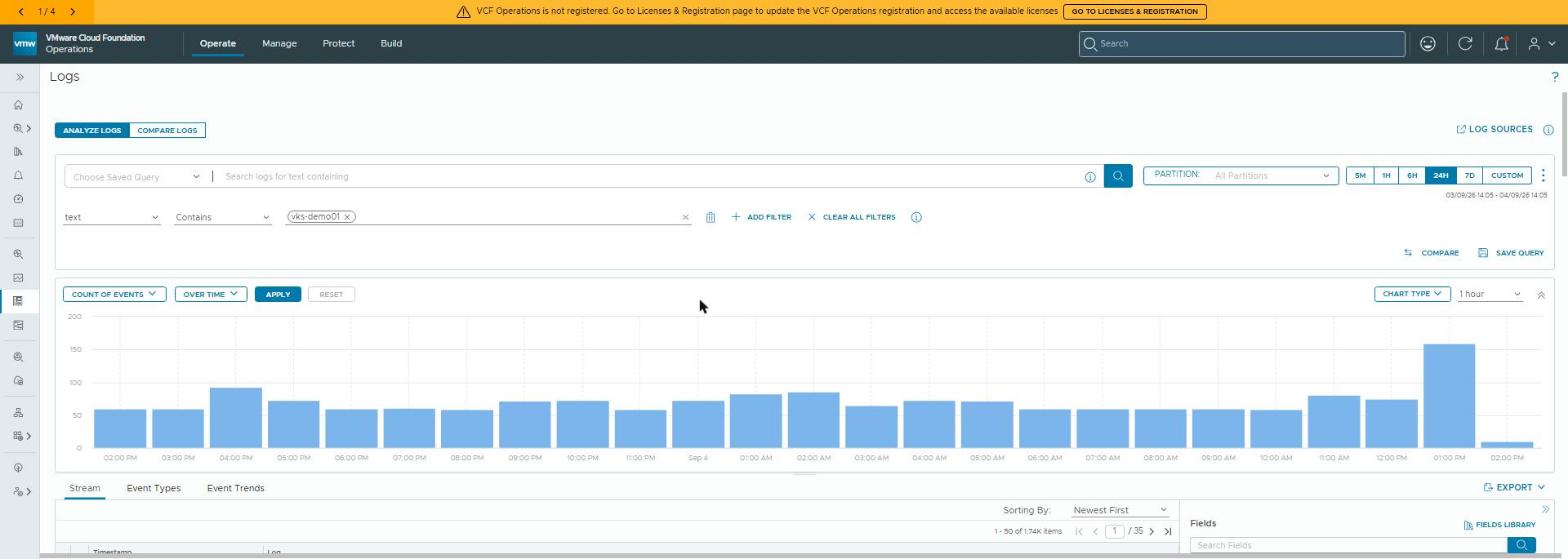 The receiving end. One filter (
text contains vks-demo01) and a day of the cluster’s logs, one bar per hour.
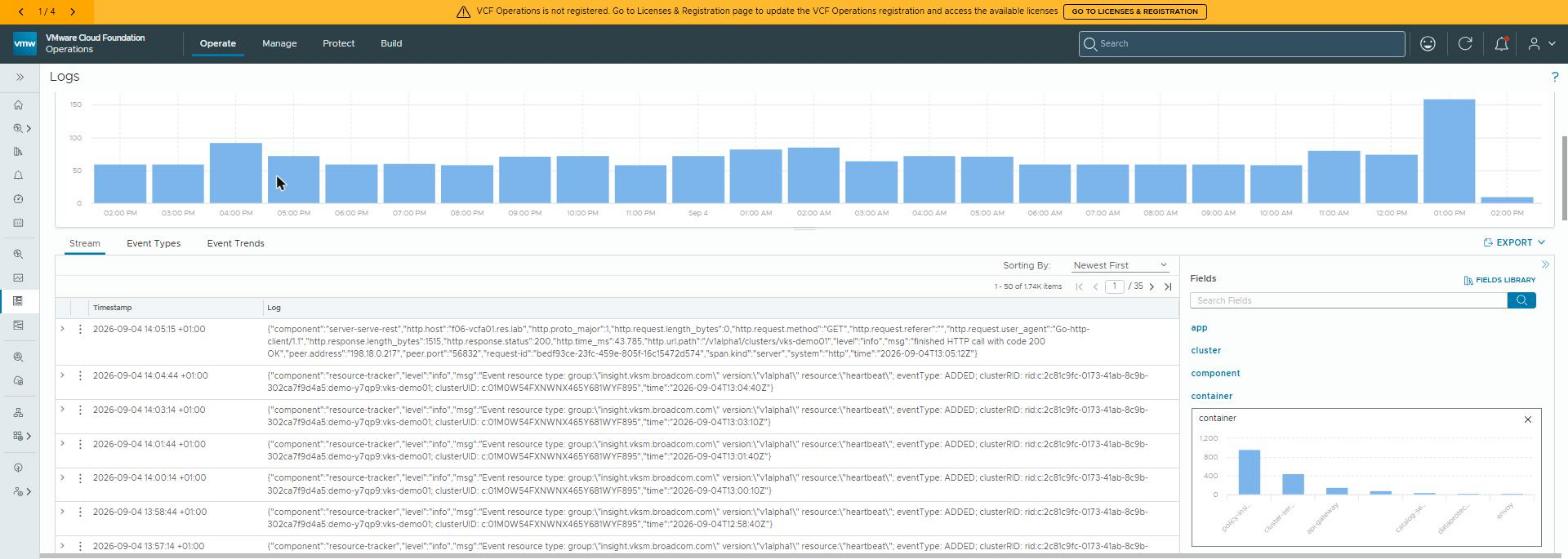 Every event carries the fields the package’s filters add:
 cluster, kubernetes_namespace, pod and container. That’s what lets Windows and VKS sit side by side in one explorer later.
Way 2: Windows Server 2025 service
fluent-bit ships a Windows build with a winevtlog input. On the
pipeline-built W2025 server I used the
portable zip rather than the MSI. No installer, just a folder under C:\
and a service registered with sc.exe.
A small script writes the config below ($LogsHost is the appliance’s
FQDN, $LogsPort is 9543). Four of its lines turned out to matter:
The config the script writes: input, filter and output
...

[INPUT]
    Name          winevtlog
    Channels      System,Application,Security
    Interval_Sec  5
    DB            $root\winevt.db
    String_Inserts On
    Tag           winevt

[FILTER]
    Name    modify
    Match   *
    Rename  Message  text
    Add     hostname $hostname
    Add     appname  v-windows
    Add     source   windows-server-2025

[OUTPUT]
    Name    http
    Match   *
    Host    $LogsHost
    Port    $LogsPort
    URI     /api/v2/events
    Format  json
    Header  Content-Type application/json
    tls     On
    tls.verify Off
    json_date_key    timestamp
    # ISO-8601 timestamps are rejected (400: not a valid Long); the API reads the number as epoch MILLISECONDS
    json_date_format epoch_ms
    net.dns.resolver LEGACY
    net.connect_timeout 20
    Retry_Limit      5
The service came up first time. Getting a single event to land took four attempts, and each failure taught me something the documentation doesn’t say:
[error] [output:http:http.0] no upstream connections available to f06-flt-log01.res.lab:9543
1. fluent-bit couldn’t resolve a name Windows could. Resolve-DnsName
worked. Test-NetConnection … -Port 9543 worked. fluent-bit’s own async
resolver didn’t. net.dns.resolver LEGACY hands DNS back to the OS.
[error] [output:http:http.0] 10.26.5.25:9543, HTTP status=404
2. The appliance routes on the Host header. Dodging DNS by using the IP gets a 404 for every path. Address it by FQDN.
{"errorMessage":"Cannot deserialize value of type `java.lang.Long` from String \"2026-09-16T10:55:00.000000Z\""}
3. Timestamps must be numeric. fluent-bit’s iso8601 output is a
string, and the ingest API wants a Long. Worse, it reads that number as
milliseconds. So on the Windows agent the default double (epoch
seconds) is accepted with a 200, and your events are filed in January
1970. That’s a long way to scroll back. The fix is epoch_ms. Our VKS
values set no format at all, and those events land on time.
{"received":0,"message":"events ingested","status":"ok"}
4. The message field must be called text. Anything else (Message
as winevtlog emits it, message, log) returns 200 and
received: 0. Silently dropped. Hence the Rename filter. Broadcom’s own
reference config for Windows carries exactly this line. I found it the hard
way first.
Then, finally:
[ info] [output:http:http.0] f06-flt-log01.res.lab:9543, HTTP status=200
[ info] [output:http:http.0] f06-flt-log01.res.lab:9543, HTTP status=200
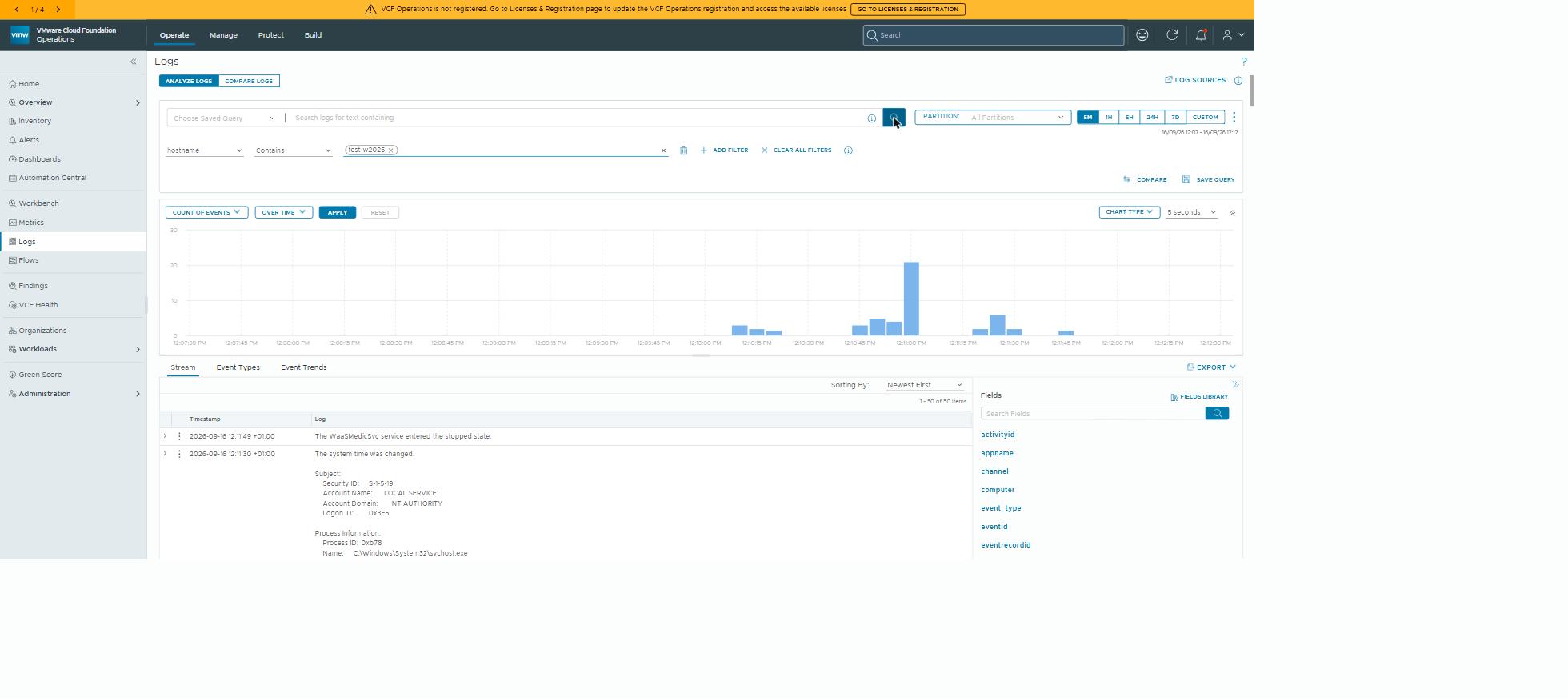 Fifty events in the first five minutes: service state changes, a “system time was changed” security event with its full subject block, all searchable with the same fields as everything else.
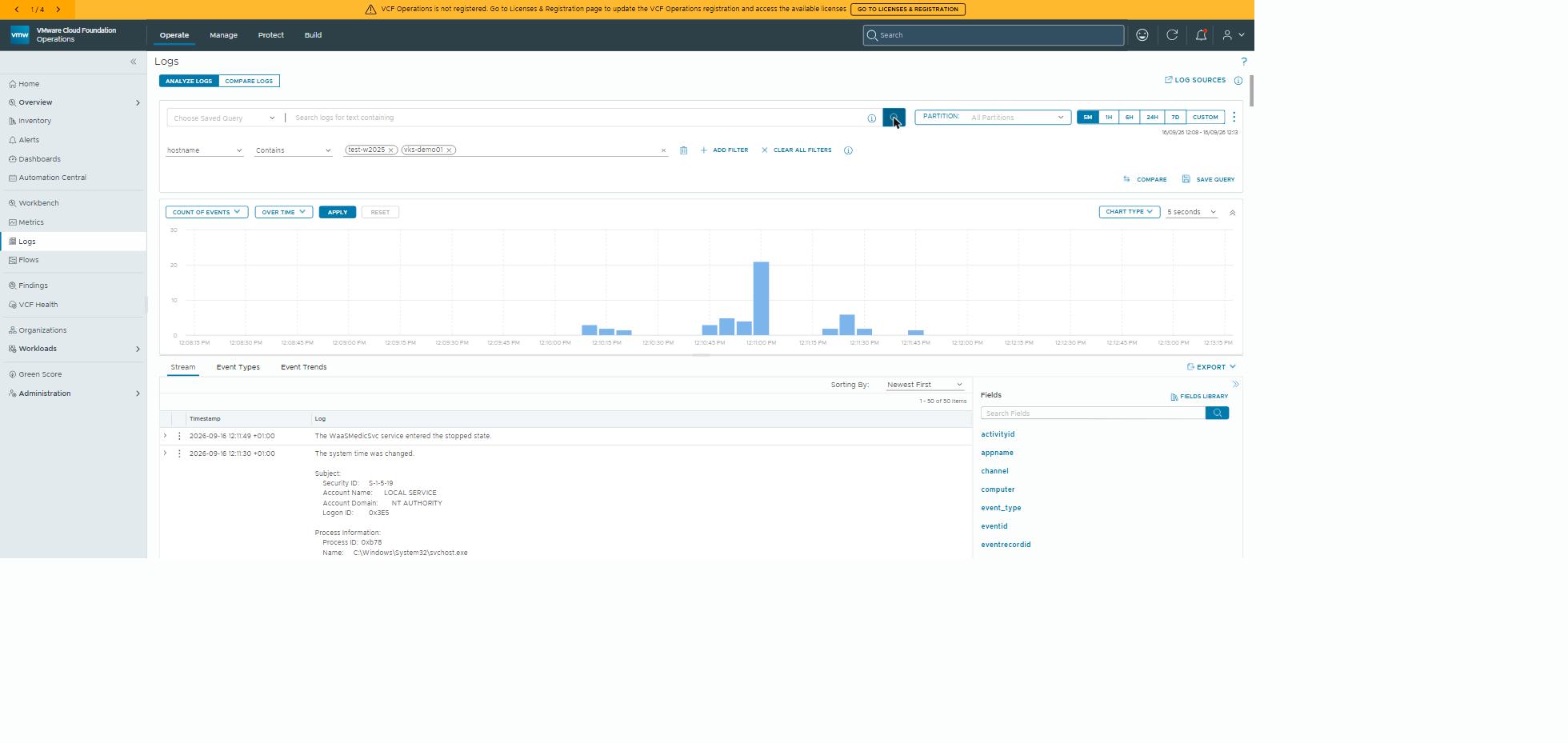 One filter, two worlds. A Windows server and a Kubernetes cluster, in the same query, in the same store.
One more Windows note. A bare fluent-bit.exe registered with sc.exe
isn’t a proper service binary. It ignores the stop signal, and Windows
sits at “waiting for service to stop” until you kill the process. The MSI
installs a real service wrapper, so use it for anything that isn’t a lab.
The shape they share
| VKS package | Windows service | |
|---|---|---|
| Install | PackageInstall | MSI / sc.exe create |
| Config | values Secret | fluent-bit.conf |
| Inputs | pre-wired (containers, kubelet, systemd) | winevtlog channels you choose |
| Output | http → CFAPI :9543 api/v2/events | http → CFAPI :9543 /api/v2/events, epoch_ms, resolver and header lines |
| Verify | pod log HTTP status=200 | service log HTTP status=200 — and check the date on what arrived |
| Restart safety | Kubernetes | DB bookmark file |
Both outputs post JSON events to the same :9543 endpoint. They differ in
the URI form, the date handling (fluent-bit’s default against epoch_ms)
and the resolver and header lines that only Windows carries. That’s the
lesson. Standardise the sink, and let each platform own its source.
Why this matters outside the lab
The business outcome is one place to look. Windows servers, Kubernetes clusters and the platform itself all ship logs to the same VCF Operations for Logs, with the same fields, searchable in one query. So an incident that spans a Windows service and a container gets investigated on one screen, not across three tools.
Standardising the destination, while each platform keeps its native shipper, is also what keeps the estate maintainable. There’s one endpoint to secure and retain, and no bespoke agent per team.
Rules learned
- Ops for Logs ingestion is CFAPI on
:9543/api/v2/events, in JSON. One endpoint serves every shipper. - On VKS, use the package and decide only the output. Verify from the pod log, because the Ops API is awkward to script against.
- Set
serviceDomainon every new VKS cluster. It’s immutable. - On Windows: the FQDN, not the IP (Host-header routing),
net.dns.resolver LEGACY,Rename Message textandjson_date_format epoch_ms. Each one fails differently, and two of them fail silently. - A
200is not proof.received: 0is a drop, and a seconds timestamp from the Windows agent is a 200 filed in 1970. Look for the event in the explorer before you call it done, however sincere the 200 looks. - Prove “one endpoint” with one explorer view showing both sources.
Broadcom documentation
- Install Fluent Bit Package: the VKS standard package,
fluent-bit.kubernetes.vmware.comfrom 4.0.x, installed with a data values file - Fluent Bit Package Reference: the package’s values, with an
httpoutput to VCF Operations on port 9543 - Set up the Windows system to collect logs in VCF Operations: Broadcom’s fluent-bit MSI and
winevtlogconfig for Windows Server 2022 and 2025,Rename Message textandepoch_msincluded - Agent Authentication for Log Ingestion: optional Bearer-token authentication on HTTP ingestion, fluent-bit included
Next: Telegraf on Windows Server 2025: unsupported, works anyway.
Lab environment; opinions my own.