Teaching VCF properly means letting people break it. Not a shared sandbox with a rota and a sign-up sheet, but a stack of their own: a vCenter they can misconfigure, a vSAN they can fill, an NSX they can lock themselves out of. Reading about a distributed switch is not the same as moving a host onto one and watching the ping stop.
The trouble is supply. Every student needs a stack of their own. In the classroom this example builds, each one is a domain controller, a jump host, a set of ESXi hosts, a vCenter, a vSAN cluster, VCF Operations and NSX. Build those by hand and you have spent days of an engineer’s time before anyone has learned anything.
We have been building nested labs on VCF Automation for a while, and writing about the parts as we went. This post introduces the thing those parts became. Lab Builder for VCF reached 1.0 today.
The problem with a lab per student
Nested labs are not new, and neither is scripting them. What gets awkward is everything around the lab.
A student needs somewhere to put it, which means an organization, a project and a network. They need to reach it without reaching anyone else’s. The lab needs images, installers and depots. At most of the sites we work at, there is no internet to fetch them from. Someone has to decide who may request what. A trainer has to hand out a class without raising a ticket.
Script the build and you have solved the smallest part of it. The lab exists. The classroom does not.
What Lab Builder is
Lab Builder builds the classroom. One file describes the site: its VCF Automation organization, its projects, the network plan for a lab, which VCF media it uses, who the students are and what the trainers may do. Everything else is generated from that file.
That includes the things you would expect, like the blueprints and the request forms. It also includes the things people usually write twice and then forget to keep in step. The implementation guide, the trainer’s runbook, the student’s runbook with a screenshot at nearly every step, and the diagrams inside all of them. Change the site file and the documents change with it.
The catalog it builds is a set of phases, and a lab can be handed out at any of them. A class with only an afternoon starts with the hosts already installed. A class with a week starts from a blank server and builds the lot.
- A student requests a lab from the catalog and gets their own.
- A build-it-yourself shell - their jump host, a plain Windows server and the blank hosts - is ready about five minutes after they ask for it.
- A complete lab in this example, with the vCenter, vSAN, VCF Operations, NSX and a three-tier application to put a policy around, took about an hour and a half unattended at the site where we measured it.
- When they are finished, it is disposed of in under five minutes.
Nobody files a request for a VLAN. Nobody waits for an engineer. The engineer, reader, gets to do something else.
One lab per student, properly separated
Each student works inside their own NSX VPC, with each lab in a namespace of its own. Access comes from the site’s own directory, so trainers hold the rights to release phases and students can only manage what is theirs.
The way in is a Remote Desktop session to that student’s own jump host. At a site running vDefend, everything else is turned away at the Transit Gateway firewall. A student who goes looking for a neighbour’s vCenter finds a closed door rather than a lesson in someone else’s homework.
A class, as it runs
The trainer’s page is the class at a glance: one row per student network, what that student has built, how old it is and the Remote Desktop address to hand them. It is all read from the platform, and nothing changes until a trainer says so.
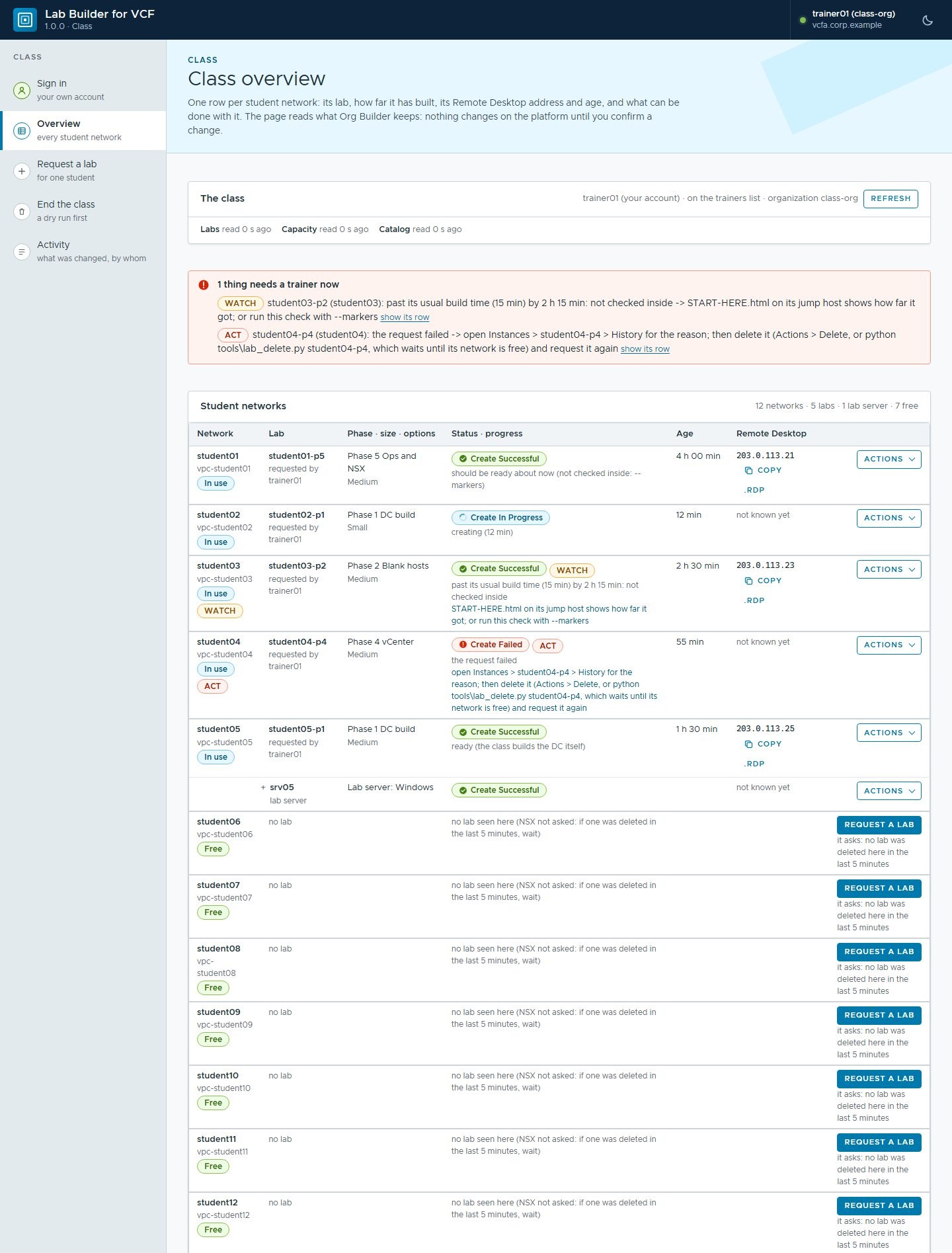 A class in flight, with example values. Two rows want attention: one lab is past its usual build time, one request failed and the page says what to do about it.
How many labs run at once is a hardware question rather than a product one. The same page works that out: free memory on each host, vSAN headroom, addresses left in the IP block, the organization’s quota, and from those how many more labs of each shape still fit. Add hosts and the numbers go up; there is nothing in the product that counts students.
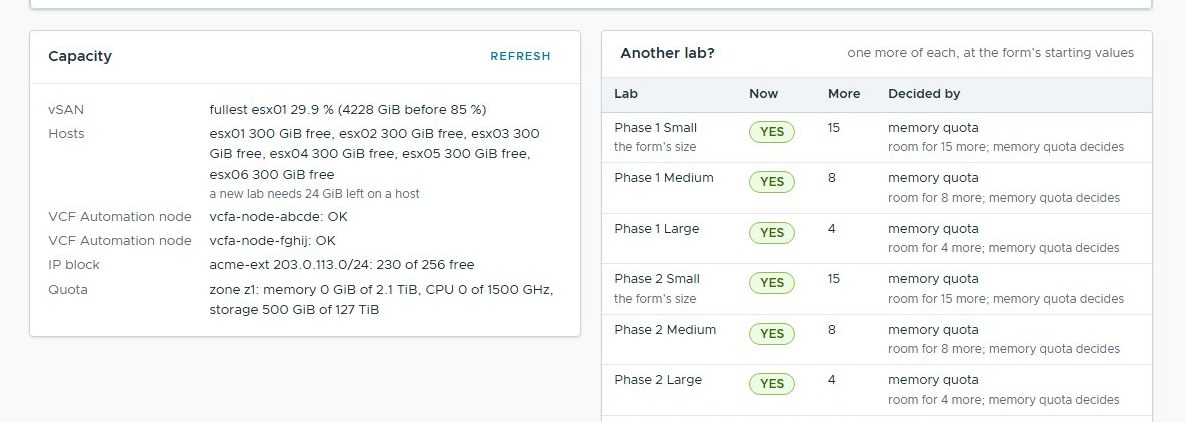 Further down the same page: what the hardware has left, and how many more labs fit at each size. Here it is the memory quota that decides.
It installs where there is no internet
Most of the sites we build these labs at are air gapped. That shaped the whole product rather than being bolted on at the end.
The kit is one zip. It carries its own Python 3.14.8 and PowerShell 7.6.7, so nothing is installed on the workstation and nothing is downloaded during an install. There is a full zip at 159.2 MB and a smaller core zip at 53.2 MB for machines that already have PowerShell 7. The VCF media sits beside the kit, not inside it, with a checklist saying exactly what goes where.
The build is reproducible: we build both zips twice, in different folders under different names, and compare them byte for byte. If they differ, the release does not go out.
Org Builder is inside it
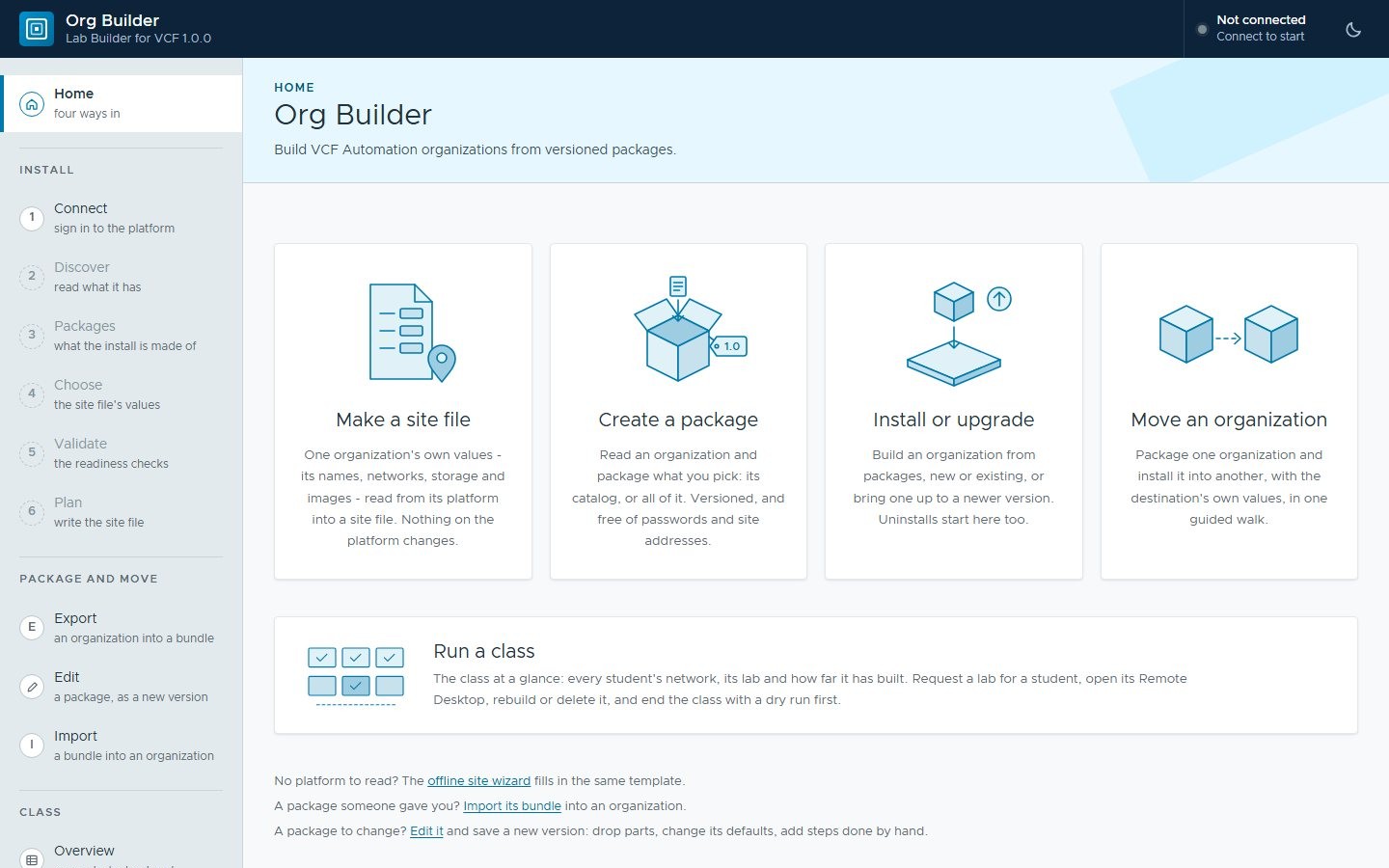
Readers of the Org Builder series will recognise part of this. Org Builder packages VCF Automation’s own constructs, such as blueprints, property groups, request forms and content libraries, and installs them into an organization with that organization’s own values.
Lab Builder carries Org Builder 1.0.0 and uses it for the catalog. Org Builder answers “how does this reach another organization”. Lab Builder answers “what should be in it, and how does a class use it”.
Making it your own course
A course is not a fixed thing, so neither is the catalog.
The shape of a lab is a handful of values in the site file. How many hosts a lab has, and how much CPU, memory and disk each one gets. Which VCF media release they build, which Ubuntu releases the lab server offers, and which phases the students’ project sees. Change those and regenerate: the blueprints, the request forms, the diagrams and the documents all follow from the same file.
The phases themselves are ordinary VCF Automation blueprints in an ordinary package. A site that wants a phase of its own adds a blueprint and a request form to the package and saves it as a new version. None of that is privileged: it is the same package format the Org Builder series took apart, and the same editor.
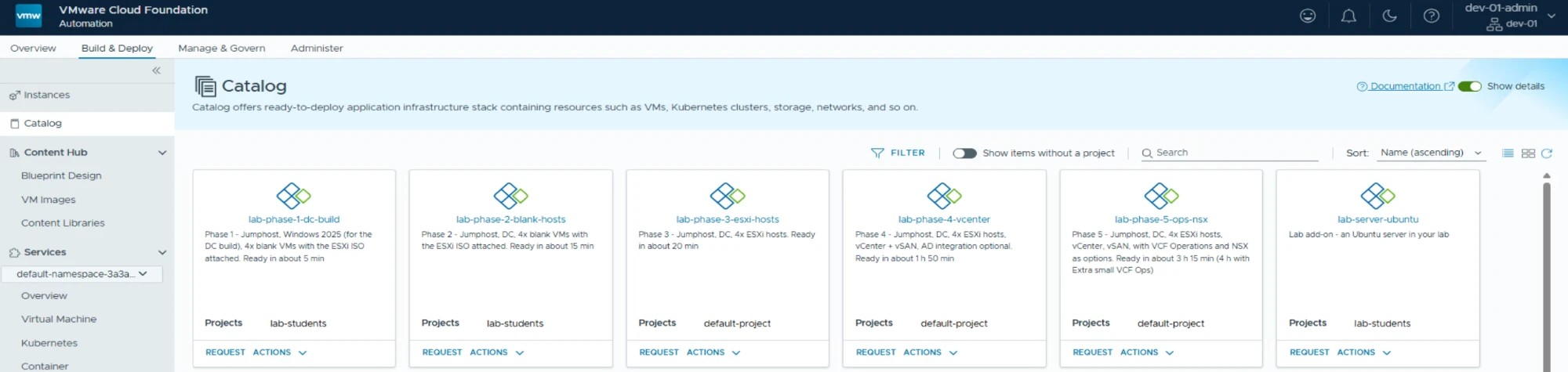 A site’s own catalog, in VCF Automation’s portal. Each card says what the lab arrives with and roughly how long it takes, from five minutes for the first phase to a few hours for the last.
The documents come out of that file too. The kit builds twelve of them, in Word and in Markdown. A datasheet and a site survey. The implementation guide and its checklist, the kit guide, and the design notes for student access and for the catalog. The trainers’ class runbook, and the students’ runbook with a screenshot at nearly every step. Change the lab’s shape and they change with it, which is the only way I know to keep a runbook honest past its second edit.
It needn’t be a classroom
A class is where this started, so a class is what the catalog in these posts builds. Nothing underneath it is about teaching.
The same site file, the same phases and the same offline kit fit anything that wants a disposable VCF stack on demand:
- Proof of concept and demo environments. Hand someone a stack to poke at instead of a slide about one, and take it back the same afternoon.
- Upgrade rehearsals. Build the version you run today, practise the upgrade on it, bin it, and do it again until the real change window is boring.
- Support reproductions. A problem that needs a particular shape of estate gets one, built to that shape rather than to yours.
- Feature practice. NSX policies, vSAN failure handling, Operations dashboards: better learned on something nobody minds you breaking.
- A platform team’s own sandbox. One VPC each, from the same catalog, with the separation a class gets.
The catalog needn’t even be nested labs. The phases are ordinary VCF Automation blueprints in an Org Builder package. A set of blueprints a site keeps rebuilding by hand can be packaged, versioned and installed the same way, with that site’s own values.
What’s next
Three posts, this one included. Next week: what a student actually gets, and what the week looks like from their side of the screen. The week after: delivering it, from an empty site file to a classroom, and what the site has in its own portal at the end of the day.
After that the Nested Labs as Code series picks up the inside of it: the blueprints, the lab network, the phases and the site file.
Why this matters outside the lab
Training is the use case we built it for, but the shape is not unique to training.
Any team needing a throwaway VCF stack on demand has the same problem. Somewhere to put it. A way in that does not expose everything else. Images with no internet to fetch them. A way to hand one out without a ticket. Proof of concept work, upgrade rehearsals and support reproductions all want the same thing: a stack that can be built, broken and binned on the same afternoon.
The site file is the portable idea. Describe a site once and generate everything from it. The gap between what you built and what you documented then stops growing on its own.
Rules learned
- Build the classroom, not the lab. The stack is the easy half; the organization, the network, the access and the documents are the half that decides whether a class can run.
- Generate the documents from the same file as the build. Two sources of truth for one site means the runbook is wrong by the second class.
- Make the kit carry its own runtime. An air-gapped workstation is not the place to discover a missing dependency.
Broadcom documentation
- VCF Automation: the product the catalog lives in.
- Managing blueprints in VCF Automation: blueprints, versions and releases.
- VPCs in VCF: the network each lab sits in.
Lab environment; opinions my own. Lab Builder for VCF is our own tooling, not a Broadcom product. VMware, VCF, VCF Automation and vDefend are trademarks of Broadcom Inc. or its subsidiaries.