Part 3 promised to leave the small team catalog behind for a bigger one. Here it is: our nested-lab catalog, the job Org Builder was first built for. Three packages install it into an empty organization, upgrade it, and take it away again.
On a Saturday morning, a script compared two snapshots of our f06 platform. The first was taken at 06:11, before anything was installed. The second was taken at 09:25. Here’s that comparison, re-run over the two saved snapshots while writing this:
NSX VPCs                   the same (11)
NSX external IPs in use    the same (21)
NSX load balancer pools    the same (10)
NSX projects               the same (3)
NSX subnets                the same (6)
NSX virtual servers        the same (10)
Supervisor namespaces      the same (10)
VMs                        the same (25)
content libraries          the same (3)
organizations              the same (3)
vSAN first class disks     the same (72)
datastore free space       f06-m01-cl01-vsan: 3395.9 GiB free, was 3429.1 (-33.2; not judged)
...
RESULT: nothing new and nothing gone
In between, three packages built a VCF Automation organization from nothing: its networking, projects, VPCs, content library, a binaries server and the whole lab catalog. Labs were requested in it and the catalog was upgraded. Then all three packages were uninstalled, and the organization went with them.
The platform ended as it started, apart from 33 GiB of vSAN that I’ll come back to. It’s the least exciting output of this whole project, and the one I’m proudest of.
Before packages, the kit ended with an install runner: the implementation guide’s steps, in order. It works, and it has one blind spot. A runbook only goes forwards. It can’t say what it made, so it can’t take anything back. Packages close that gap.
The tool, in plain terms
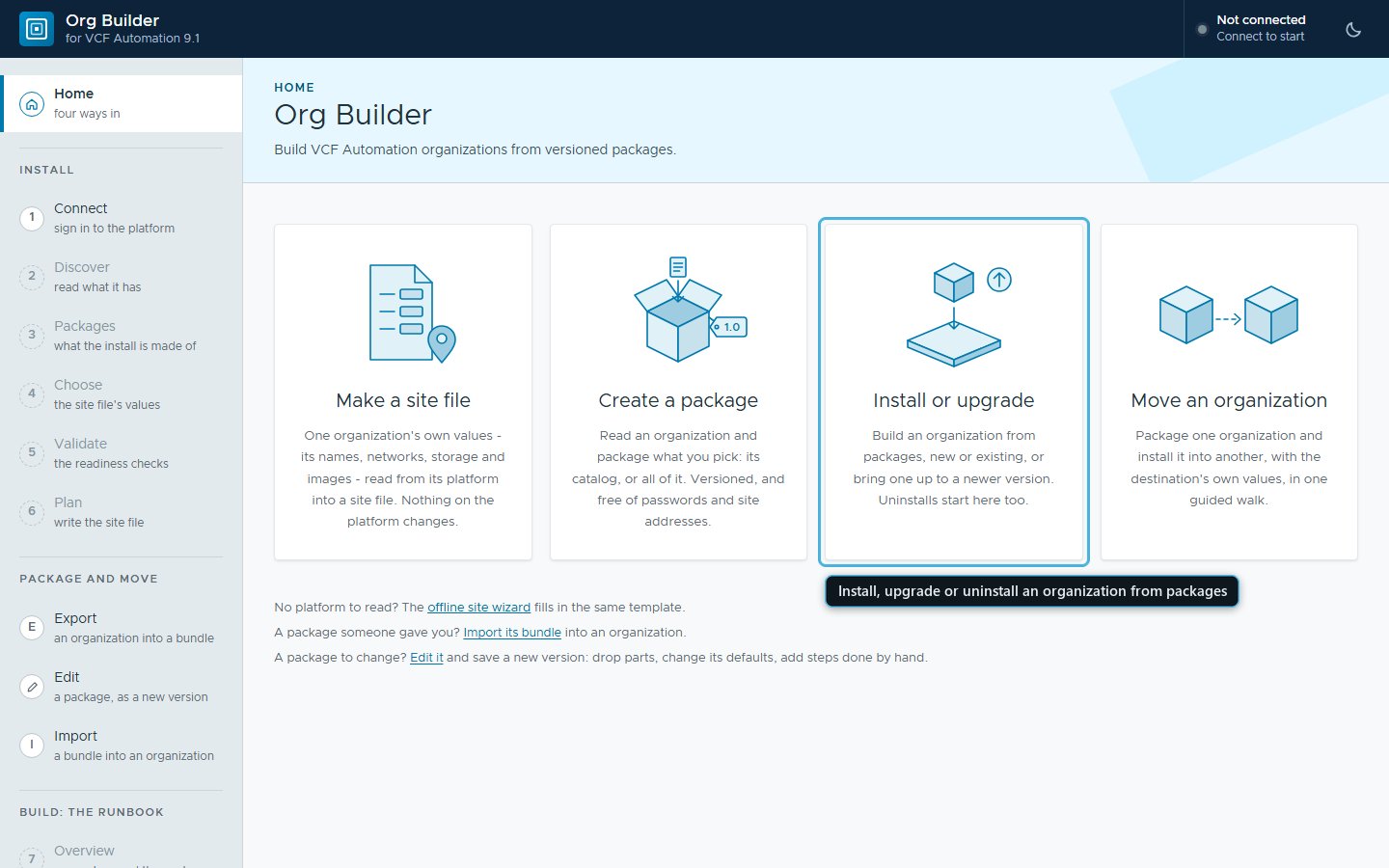
If VCF Automation isn’t your day job, here’s the short version. The packages below are installed by Org Builder, the tool the first part of this series introduces. It’s a web page that runs on an administrator’s workstation. It talks to VCF Automation, vCenter and NSX directly, so nobody clicks through several portals. It shows what it will do before it changes anything.
Setting an organization up by hand means one portal page at a time, with plenty of chances to miss a value. One Install does the same walk, asks for what only a person can do, and keeps a record of everything it made. The film further down shows it start to finish.
Four words you’ll meet on the way:
| Word | What it means here |
|---|---|
| Organization | the space a team or a customer gets in VCF Automation: its own portal, catalog, users and share of the platform |
| Site file | one file holding a site’s own values: addresses, names, networks, which images to use; never a password |
| Package | a small signed zip that says what to make; the site file says where |
| Media bundle | the big files, installer ISOs, appliances and templates, sent apart from the packages and named by SHA-256 |
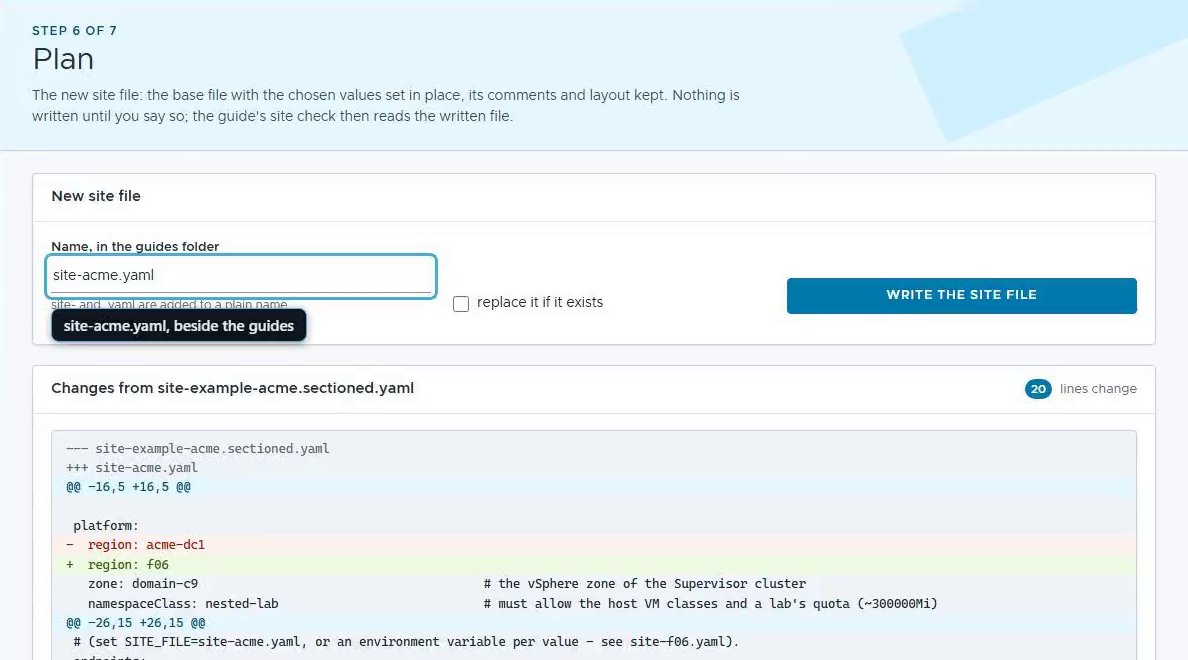 Plan writes the site file: the template with this site’s values, its comments kept. Nothing is written until you say so.
Three packages and a site file
A package is a zip holding package.yaml and a folder per kind of resource:
blueprints, request forms, icons, property groups, library items.
package.yaml lists the package’s components and the site values it needs.
The rule fits on one line: the package says what, the site file says where.
Nothing in a package names a site, so moving one means writing another site
file, not another package.
Ours comes as three:
| Package | What it makes |
|---|---|
foundation | the organization, its quota and networking, the tools’ sign-in, namespace classes, the content library, projects, VPCs, MAC learning, the directory |
binaries-server | the shared binaries server: its image, its keys of nestedLabSite, its blueprint and catalog item, the deployment, the files it serves |
nested-lab-catalog | the library images, two property groups, a secret, the lab blueprints with their catalog items and request forms, the acceptance tests |
The catalog requires the binaries server, which requires the foundation. So installing the catalog installs all three, in that order: one Install, from Install or upgrade on Org Builder’s Home page, with a few questions on the way. It still asks a person for what only a person can do, such as building the Windows template, and waits for their Done. The same walk runs from a console too, and both share one record, so either can carry on where the other stopped.
 One record for all three packages. Install walks to the right, uninstall walks back.
Each component installs the best way it has. A handler for its type makes it
through the platform’s API (native). Failing that, the installer’s own
tools run it, or the runbook’s steps do, or a person does it by hand. Plan
changes nothing and says which, and what each would do. From the live test’s
plan, trimmed:
== binaries-server 1.1.0: Binaries server (not installed here)
-- ubuntu-image  [native]  The kit's Ubuntu 24.04 cloud image, uploaded from the media - its vmi- id into binaries.server.kitImage
     library item ubuntu-24.04-server-cloudimg-amd64 in nested-lab: found by name in vCenter, else upload ubuntu-24.04 from the media bundle (and the uninstall deletes what it uploaded)
...
-- blueprint  [native]  The blueprint shared-binaries-server in the instructors' project
     blueprint shared-binaries-server in project default-project: package file blueprints/shared-binaries-server.yaml (8290 bytes, sha aca7a7ea316f), created or updated
...
-- first-boot  [automation]  The first boot finished; route B: the media's package folder copied to the server
     run: python tools\sync_binaries.py boot --wait --minutes 10
     marks runner steps 7.5a done
A blueprint component also has VCF Automation validate the file without saving it first, the same call the Lab Factory leans on, and writes nothing if it’s refused.
Now read the first component’s last bracket again: the uninstall deletes what it uploaded. The rest of this post hangs on that idea.
Made or found
Every native handler looks before it makes. What it creates is recorded as
made: true. What was there already is recorded as made: false, and no
uninstall ever removes it. The record sits beside the site file, as
packages-state-pkg-test01.json for the test organization: per component,
how it ran and every id it touched. It never holds a password.
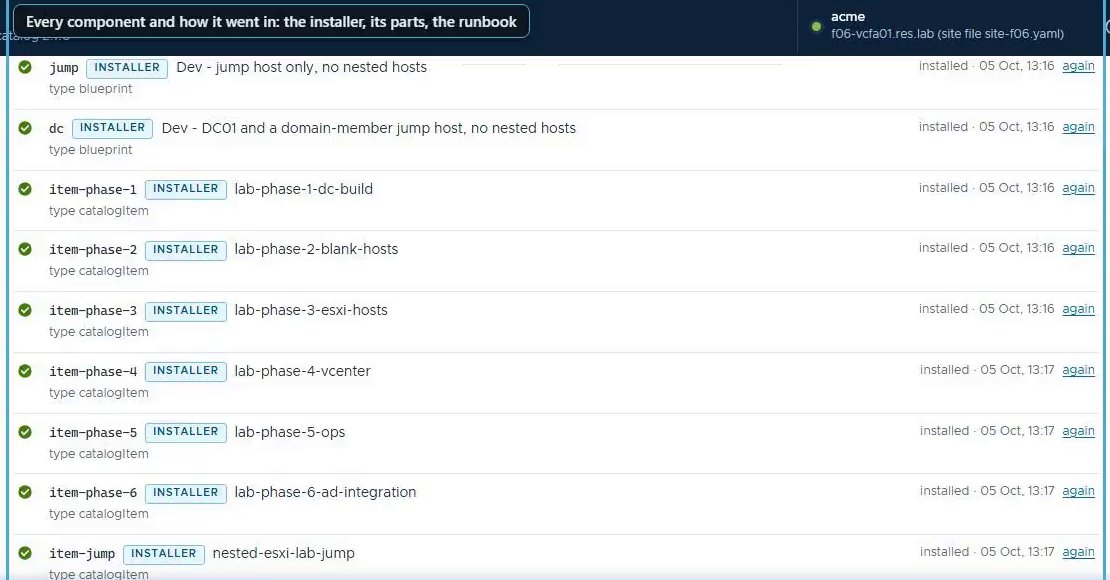 The record as the page shows it: every component, how it went in, and when.
Here’s the catalog’s uninstall from the live test, trimmed to one catalog item, the shared property group and one image:
-- item-phase-1  [native]  catalogItem
  withdrawn: lab-phase-1-dc-build 2.2.1 (HTTP 200)
  version 2.2.0 of lab-phase-1-dc-build: deleted
  its request form 349d91d9-1ac2-4695-8ec9-47c17b107f3b: deleted
  version 2.2.1 of lab-phase-1-dc-build: deleted
  its request form 538a181d-97ea-492c-9ead-bd146116404a: deleted
  request form b0eed542-1ded-4ecd-90fc-f7b31e0cfc1f: deleted
  item-phase-1: uninstalled
...
-- site  [native]  The property group nestedLabSite - the site values every blueprint reads at deploy time
  nestedLabSite: removed capacityStorageClass, dc, dnsForwarders, dnsSuffix, domain, hostSizes, jumpSizes, labDomain, namespaceClass, netbios, network, ops, quota, studentDefaults, trainers, vmService, windowsGuestId, windowsImage; 9 other key(s) stay
...
-- esxi-iso  [native]  The ESXi 9.1.0.0200 installer ISO (every nested host's CD drive)
  library item VMware-VMvisor-Installer-9.1.0.0200.25557999.x86_64: deleted
  site file: releases.[vcf-9.1.0].esxIso written
  site file: releases.[vcf-9.1.0].esxIso back to TBC-esx-iso
  esxi-iso: uninstalled
...
== nested-lab-catalog: uninstalled; left in place: 6
A catalog item is withdrawn before anything of it is deleted, and a refused
withdraw stops it there. The nine keys that stay in nestedLabSite belong to
the binaries server, which shares the group and takes its own keys out later.
The site file gets its placeholders back, so a fresh install asks for those
values again. The six left in place are checks and by-hand steps, with nothing
on the platform to remove.
The rule nearly came unstuck on its first outing, over icons. VCF Automation’s icon service is shared by every organization, and an icon’s id is a hash of its PNG. So when the installer uploaded the six phase icons, the service handed back the ids of the six I’d uploaded on 28 September, and the installer recorded them as made. The catalog’s uninstall would have deleted icons it never made, which is not the sort of tidiness anyone asks for.
Now an icon that’s already there counts as found. Those six records were put right by hand before the uninstall, and the icons survived it.
Found doesn’t mean untouched, though. An install makes what it finds match the package: a found blueprint gets the package’s content, and the keys a package owns in a found property group get the site’s values. The uninstall leaves those as the install left them. So read the plan first.
The same rule lets packages take over an organization built before they existed. Adopting one only reads, and records what it finds as found, so a later uninstall leaves it all in place.
A guard in front of the organization
The worst thing an uninstall could do is delete a student’s lab mid-class. So
the foundation’s organization components look for deployments first, and stop
and name any they find. --force deletes them instead. It’s a console-only
word: the web page never sends it, and an adopted site refuses it.
On the second run I read one of the guard’s lines as a skipped check, and had a short, quiet moment of alarm. In fact an earlier component had run the same check 16 seconds before deleting the sign-in it needs, and the organization step took that answer. The line now says whose check it took.
A killed run leaves the truth behind
The live test came with a stress test nobody planned. Partway through uploading the 12 GB vCenter installer ISO, the admin workstation ran short of memory and the install process was killed. An 8 GB workstation is a fine thing for writing documents, and a less fine one for several tools and a 12 GB upload at once.
A killed process runs no error path, so nothing recorded the upload it had begun. This time the half-sent item hadn’t reached vCenter. Had vCenter listed it, the next run would have taken it for found, and an uninstall would have left it behind. So a handler now writes its record before an upload, a copy or a deployment request, and the finished install replaces it.
Upgrades are new versions
An upgrade is the same walk over a newer package: every component runs again and changes only what differs. Each catalog item gets the new version released and the old one withdrawn. The live test’s upgrade, with one item’s description changed, stopped at the first catalog item:
-- item-phase-1  [native]  lab-phase-1-dc-build
  description: unchanged
    tab Your lab:        hostSize, jumpPassword, text_rules, text_trainer
    tab Trainer options: labName, release, jumpSize, capacityDiskGi, bootDiskGi
  FAILED item-phase-1: create form failed: 400 {..., 'path': '/form-service/api/forms', 'status': 400, 'error': 'Bad Request', ..., 'message': '400 BAD_REQUEST "Form has duplicated pages: [], duplicated sections: [section_text_rules, section_text_trainer] and duplicated fields: [
the walk stops at item-phase-1: fix the cause, then run it again (it carries on there)
The fault was ours. On an upgrade, VCF Automation generates the new form from the blueprint with our two read-only text sections already in it. Our layout code added them again, and the form service, quite reasonably, declined to show anything twice. With the fix, the same command carried on from that item:
-- item-phase-1  [native]  lab-phase-1-dc-build
  description: unchanged
    tab Your lab:        hostSize, jumpPassword
    tab Trainer options: labName, release, jumpSize, capacityDiskGi, bootDiskGi
  request form: stored (b0eed542-1ded-4ecd-90fc-f7b31e0cfc1f) and set on the blueprint
  version 2.2.1 of lab-phase-1-dc-build: made
  version 2.2.1 request form: custom (538a181d-97ea-492c-9ead-bd146116404a)
  un-release lab-phase-1-dc-build 2.2.0: 200
  release lab-phase-1-dc-build 2.2.1 in lab-students: 200
A built version never changes: every change that leaves the workstation gets a new number, and VCF Automation keeps each earlier blueprint version to roll back to.
Small signed zips, big media apart
The three zips are small: 18 KB, 86 KB and 372 KB. The 38.6 GiB of appliances, ISOs and templates travel separately, as a media bundle that names each of its 84 files by SHA-256. Each zip carries a manifest of its files’ SHA-256s and an Ed25519 signature over it. Here’s the live test’s signed upgrade zip, checked again while writing this, and then a copy with one line added to one file:
OK      nested-lab-catalog 2.2.1 (zip, nested-lab-catalog-2.2.1.zip)
        manifest: 44 files, each as listed
        signature: good (key e2e-test-20261003, id f0d57ced860407f8)
        media: not checked (--media DIR names the media bundle)

FAILED  nested-lab-catalog-2.2.1.zip
        property-groups/nestedLabSite.yaml: its SHA-256 is not the one in manifest.json (changed or damaged)
1 package(s) with problems
On a workstation without the key, the untouched zip fails as well: signed, key not trusted. The key above was a throwaway, deleted after the test.
Watch one install, start to finish
Before the film, the kit and its media bundle sat on the admin workstation, with the sign-in files for our f06 platform. The organization, acme, existed but was empty: the page signs in to an organization, so it can’t start from one that isn’t there yet. Everything else happens on camera, up to the catalog’s last item. The long waits became “minutes later” cards. The clock in the title bar is real time, and the whole install took about an hour and a half of it.
Two things to notice. First, the questions. The two profile IDs get a Done, as Choose had already put them in the site file. The directory gets a Skip, as there’s no Active Directory in this film. The binaries server’s DNS domain is typed on the page.
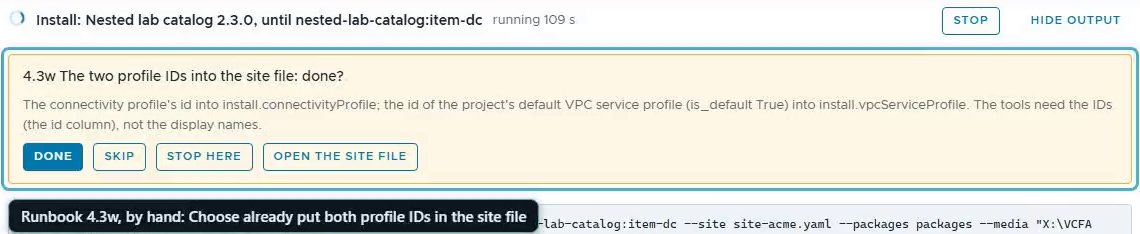 A runbook step only a person can confirm, asked on the page. The Install waits for the answer.
Second, the time. The 12 GB vCenter installer ISO took 23 minutes to upload, then VCF Automation spent another 16 minutes copying it into vCenter. The page reported that as a plain not-ready at the time; it now says what’s happening. The last minute is acme in VCF Automation, signed in as its administrator: nine catalog items, its content library, its projects and VPCs, and its binaries server.
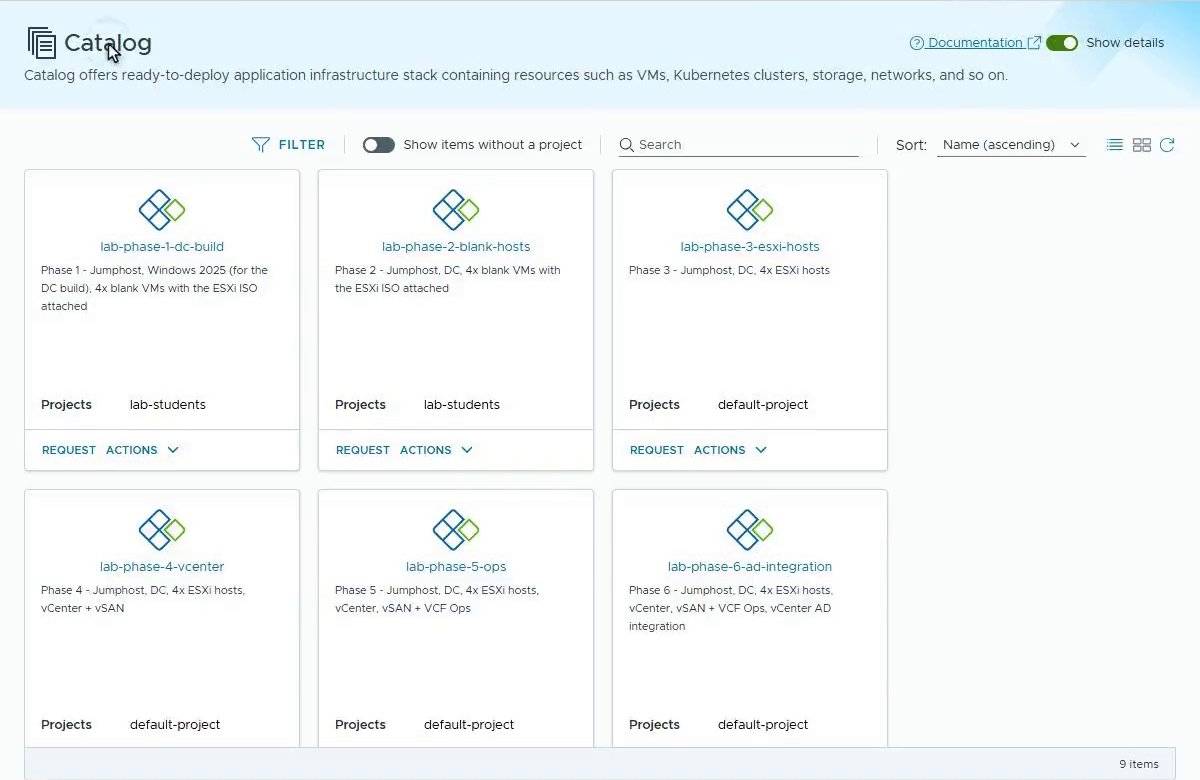 acme’s own catalog, as the Install left it on 5 October. Since 12 October, Phase 6 is Phase 5 with every option ticked.
Proving it in a throwaway organization
Unit tests against a fake VCF Automation run in seconds, but only the real platform proves a package. Two runs in a throwaway organization on f06 passed on 3 October. The first, from 05:57 to 09:25, took the trainer’s path: the organization’s administrator requested labs for a student, then came the upgrade and all three uninstalls. Six fixes went in along the way.
The second run, from 11:00 to 16:10, bound the organization to Active Directory and took the student’s path. The student signed in through the directory and saw exactly what a student should:
session: user=student01 org=pkg-test01 roles=['Organization User']
projects: 403 {"message":"forbidden","statusCode":403,"errorCode":0,"serverErrorId":"cef94085-85d3-4292-9acb-4b32fb3099c6","documentKind":"com:vmware:xenon:common:ServiceErrorResponse"}
catalog items: 200 ['lab-phase-1-dc-build', 'lab-phase-2-blank-hosts']
deployments visible: 200 []
Their Phase 1 lab was ready 7 minutes after the request, and their Phase 2 lab, domain-joined, after 19. A second student could neither see nor open the first one’s lab. Both snapshot diffs ended with the line at the top of this post, and so did the film’s run on 5 October.
About those 33 GiB. Both runs left vSAN 32 to 33 GiB lower, which the snapshot shows without judging. It sits in VM Service’s image cache: folders named after the images, which stay on the datastore after the content library has gone. They’re VM Service’s, not ours to delete, and certainly not from a host. Whether it reclaims them is still open, and a tidy mind finds that harder to leave alone than it should.
Why this matters outside the lab
A catalog that can’t be uninstalled is one nobody dares try. Packages turn a lab catalog, or any set of blueprints, property groups, images and deployments, into something you can install for a pilot, upgrade without a rebuild, and remove without leaving debris.
The made-or-found record is what makes that safe on a shared platform, and what lets packages adopt an organization built by hand without claiming it. The same shape fits anything delivered to more than one platform: a demo kit, a proof of concept, a partner’s environment.
What’s next
Part 5 takes the same catalog the other way. It reads the organization the catalog was built in, and one Import builds a brand-new organization from it, with that organization’s own values.
Rules learned
- Record every object as made or found, and let an uninstall remove only what was made.
- Write the record before an upload, a copy or a deployment request: a killed process writes nothing afterwards.
- A shared service can hand back an object you didn’t make. If it was there before you, it’s found.
- Guard the organization: stop and name its deployments, and keep force off the web page.
- Never change a built version. Every change that leaves the workstation gets a new number.
- Ship small signed zips, and send the media apart, named by SHA-256.
- Prove an uninstall in a throwaway organization, with a read-only snapshot before and after.
Broadcom documentation
- Reusing a Group of Properties in VCF Automation: property groups shared with the organization or kept to one project
- Versioning Blueprints in VCF Automation: versions, releasing one to the catalog, restoring an older one.
- Publish a Blueprint to the Catalog in VCF Automation: releasing a version, by default to the members of the blueprint’s project
- Creating and Managing Content Libraries for Stand-Alone VMs in vSphere Supervisor: the libraries that hold a release’s images
Lab environment; opinions my own. The output above comes from live runs on a VCF 9.1 platform, or from the same tools re-run over those runs’ saved files - output trimmed for length, never edited for outcome. Org Builder is our own tooling, not a Broadcom product. VMware, VCF and VCF Automation are trademarks of Broadcom Inc. or its subsidiaries.