
The host booted clean. Management IP configured, services up, DCUI happy. And every single packet it sent, ARP included, died silently. The host was having a lovely time; it just couldn’t tell anyone.
That’s how my first attempt at running nested ESXi inside an NSX VPC ended. The failure is nasty precisely because nothing looks wrong. If you’re building nested vSphere labs on VCF 9 with VPC networking, this post is the map of the minefield. It’s also the design that gets you across it, verified live.
The setup
VCF 9.1, with the vSphere Supervisor on NSX VPC networking. The goal was to deploy nested ESXi hosts as ordinary VM Service VMs inside a tenant’s VPC. No physical fabric changes, no provider tickets, no special treatment. It’s the kind of thing you want for training pods, cert-study labs, or reproducing customer issues.
Nested ESXi needs what physical ESXi needs: a management network, vMotion and vSAN. Traditionally, those are VLANs trunked to every host. But a VPC is an overlay world, and there are no VLANs to trunk. So what happens if you just attach the nested host’s vNIC to a normal VPC subnet?
Failure #1: the silent blackhole
Here’s the trap. A standard VPC subnet port gets address bindings. NSX pins the exact IP and MAC it allocated to that vNIC, and SpoofGuard drops everything else.
ESXi’s vmk0 doesn’t use the vNIC’s MAC. It makes up its own:
vmk0
   MAC Address: 00:50:ac:1e:00:8c     <- NOT the vNIC MAC (04:50:56:...)
So every frame the management interface sends carries a MAC the port doesn’t own. NSX drops all of it (ARP, ping, everything), while the host itself boots green and reports healthy. There’s no error anywhere, which is somehow worse than a bad one. You just can’t reach it, ever.

(There’s a second trap stacked on top. Our VPC subnets run with DHCP
deactivated, so the appliance also sits at “waiting for DHCP” unless you
inject static addressing through OVF guestinfo.* properties. NSX can give a
VPC subnet a DHCP server or relay (Add a Subnet to a VPC);
ours had neither. More on that below.)
The design that works: a trunk subnet + binding maps
The fix isn’t a hack. It’s a first-class NSX VPC construct that’s barely
documented in the wild: SubnetConnectionBindingMap.
The idea:
- Create one ordinary VPC subnet to act as a trunk (
sn-trunk). The nested host’s vNICs attach only here. - Create a normal VPC subnet for each traditional network:
sn-mgmt,sn-vmotionandsn-vsan. - Bind each of those to the trunk with a binding map carrying a VLAN tag. The nested host’s vSwitch tags frames exactly as it would on metal. The binding map strips the tag and delivers the frame into the right subnet.
It’s pure L2 demultiplexing. One vNIC carries N VLANs, and the VPC never routes on a tag. The physical fabric never sees any of it, because the 802.1Q header rides inside the Geneve overlay.
A tenant can create all of it through the supervisor, as Kubernetes objects:
# sn-trunk and sn-mgmt are ordinary Private Subnets; the interesting object:
apiVersion: crd.nsx.vmware.com/v1alpha1
kind: SubnetConnectionBindingMap
metadata: {name: bm-mgmt}
spec:
  subnetName: sn-mgmt          # the map is a child of the VLAN subnet...
  targetSubnetName: sn-trunk   # ...and points AT the trunk
  vlanTrafficTag: 1610
That direction is easy to get backwards, so it’s worth saying twice: the binding map belongs to the VLAN subnet and points at the trunk, not the other way round.
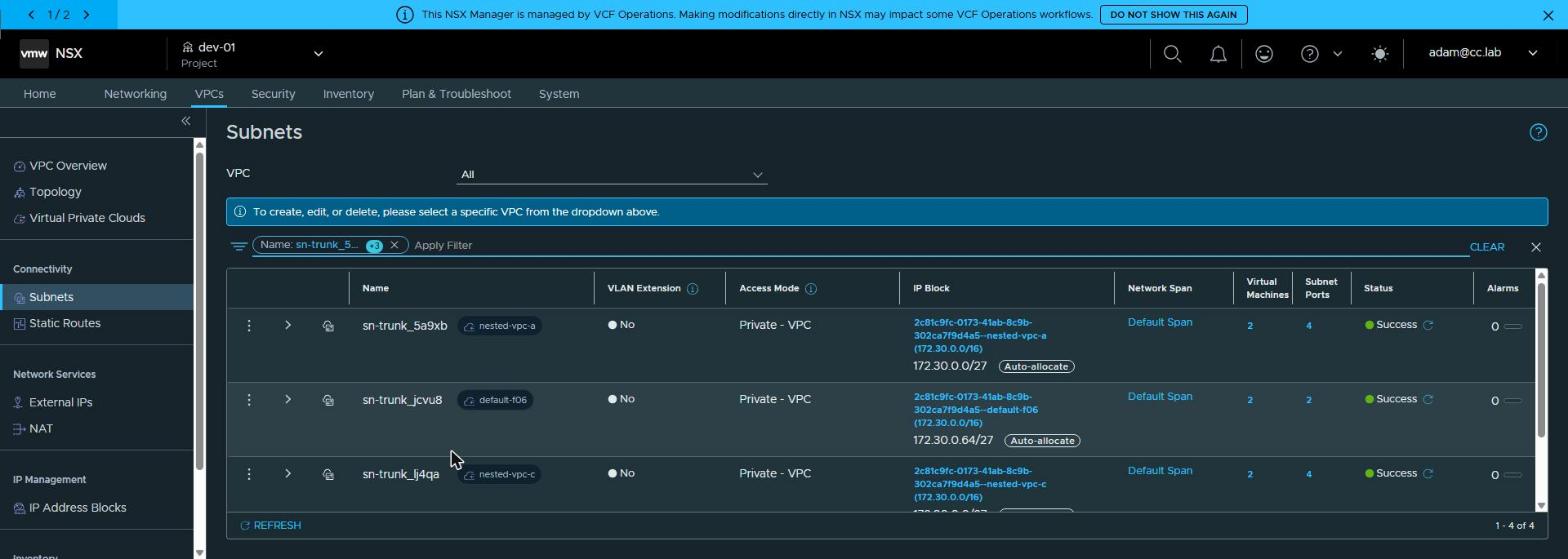
On the nested host, nothing exotic: plain virtual switch tagging (VST), just like physical. It never suspects a thing.
Name                Virtual Switch  Active Clients  VLAN ID
------------------  --------------  --------------  -------
Management Network  vSwitch0                     1     1610
vMotion             vSwitch0                     1     1611
vSAN                vSwitch0                     1     1612
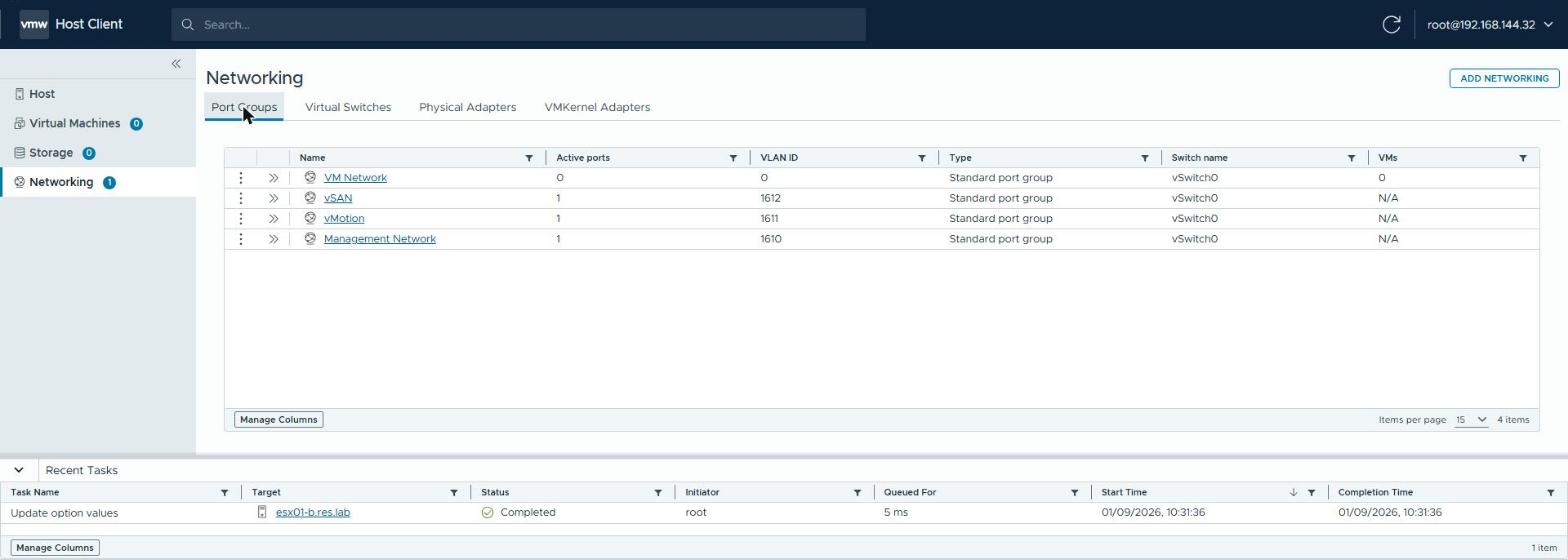 The same three VLANs as the nested host sees them.
And because there’s no DHCP in our VPC subnets, the nested-ESXi appliance gets its identity through OVF properties in the VM Service spec:
bootstrap:
  vAppConfig:
    properties:
      - {key: guestinfo.ipaddress, value: {value: "172.30.0.40"}}
      - {key: guestinfo.netmask,   value: {value: "255.255.255.224"}}
      - {key: guestinfo.gateway,   value: {value: "172.30.0.33"}}
      - {key: guestinfo.vlan,     value: {value: "1610"}}
Does it actually work? The receipts
Two nested hosts, vNICs on sn-trunk, three VLANs. From host one:
[root@esx01:~] vmkping -c2 172.30.0.41            # mgmt, VLAN 1610
3 packets transmitted, 3 packets received, 0% packet loss
[root@esx01:~] vmkping -I vmk1 -c3 172.30.0.71    # vMotion, VLAN 1611
3 packets transmitted, 3 packets received, 0% packet loss
[root@esx01:~] vmkping -I vmk2 -c3 172.30.0.101   # vSAN, VLAN 1612
3 packets transmitted, 3 packets received, 0% packet loss
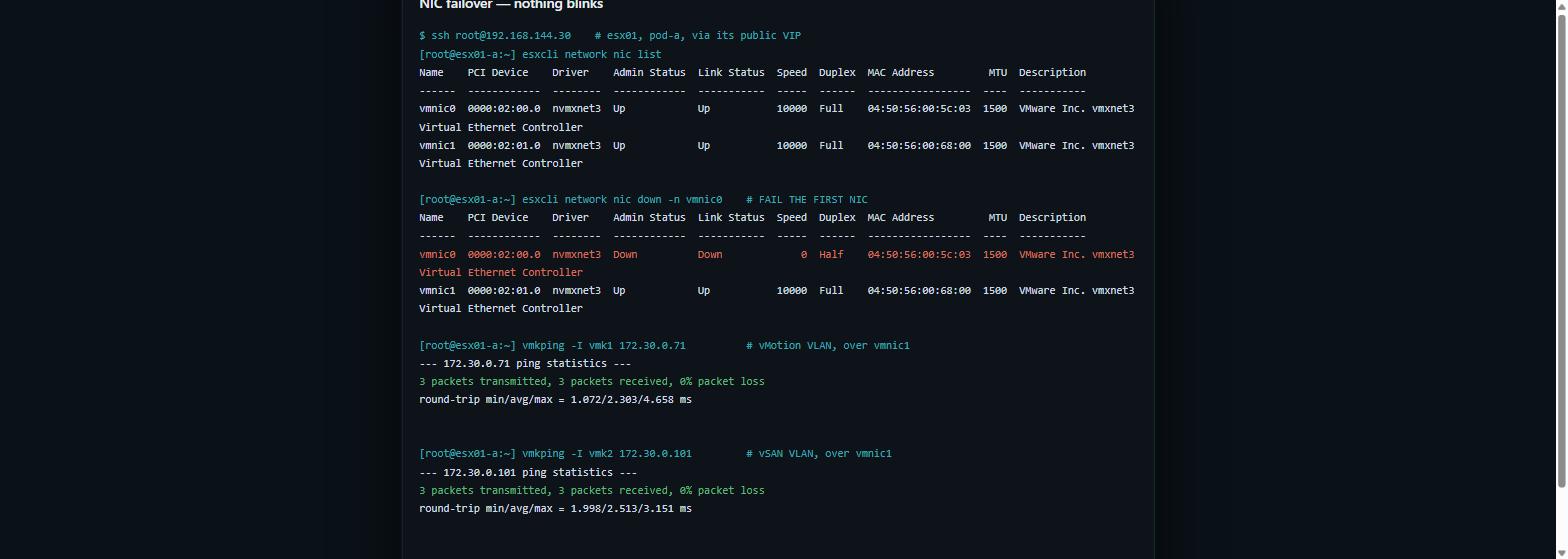 The transcript that matters: fail the first NIC, and every VLAN keeps flowing on the second — captured live.
Two more results are worth knowing before you design around this.
Untagged frames are dropped. I put a probe vmk on the untagged port group, using the address NSX itself had allocated to the trunk port. The result was 100% loss and an empty ARP table, while tagged traffic flowed happily beside it, as if to make a point. Every network your nested host uses needs a VLAN and a binding map. There is no untagged fallback.
Failover behaves like real hardware. With two vNICs on the trunk, teamed
active/active, esxcli network nic down -n vmnic0 moved every VLAN onto
vmnic1 with zero loss. The SSH session I was watching from never dropped.
A vmk MAC moving between trunk ports mid-flow is exactly what MAC-pinned
standard ports would blackhole. The trunk carries it fine.
Why this matters outside the lab
Running whole vSphere environments inside a VPC turns the platform into something most customers never had. It’s a way to stand up complete, isolated copies of infrastructure on demand, with no physical fabric change and no waiting for anyone. That’s what makes it commercially interesting:
- Training and certification labs where every learner gets a real vSphere environment, not a shared one.
- Reproducing a customer problem on a like-for-like copy, rather than on their own estate.
- Rehearsing upgrades and migrations end to end before the change window, then throwing the copy away.
- Vendor and feature evaluations with real behaviour, at zero risk to production.
This is the design Comms-care uses to give every consultant a dedicated environment. The same pattern scales to a classroom or a proof-of-concept factory.
Rules learned
- A nested ESXi vNIC on a standard VPC subnet is dead on arrival: vmk0’s made-up MAC loses to SpoofGuard, silently.
- Attach nested-host vNICs only to a trunk subnet, with one binding map per VLAN. The map lives under the VLAN subnet and points at the trunk.
- No DHCP in our VPC subnets, so bootstrap addressing goes through
guestinfo.*(appliances) or cloud-init (Linux). Static IP plans are a feature in a lab anyway. - ESXi’s default TCP/IP stack has one gateway. Set per-vmk override
gateways (
esxcli ... ipv4 set -g) so vMotion and vSAN use their own subnet’s gateway. - Recreating a VM reallocates its NSX addresses. Pin what you depend on.
- MTU: everything here ran at 1500. Raise the trunk and the nested vDS before you do vSAN at any real scale.
Broadcom documentation
- Create a SubnetConnectionBindingMap CR on the Supervisor: the binding map CR and its
vlanTrafficTag, shown for VKS egress subnets. - Creating a Child Segment: the NSX mechanism underneath: a binding map on the child segment, pointing at its parent with a VLAN ID.
- Understanding SpoofGuard Segment Profile: port address bindings, and traffic dropped when its MAC or IP does not match them.
- Add a VPC Service Profile: the DHCP settings and segment profiles, SpoofGuard included, that a VPC’s subnets inherit.
- Deploy VMs with Configurable OVF Properties in vSphere Supervisor: OVF properties set through the VM Service’s vAppConfig transport.
- Configure the VMkernel Adapter Gateway by Using esxcli Commands: a gateway per VMkernel adapter, set with esxcli.
Next in this series: what happens when you want ten of these labs, with byte-identical IP plans, firewalled from each other by construction. That’s where NSX VPCs go from “workaround” to genuinely better than physical.
Lab environment; opinions my own. Everything above was captured from a live VCF 9.1 environment — output trimmed for length, never edited for outcome.