
Everything in this series so far was built with kubectl and API calls.
That proves the platform. It doesn’t make a product.
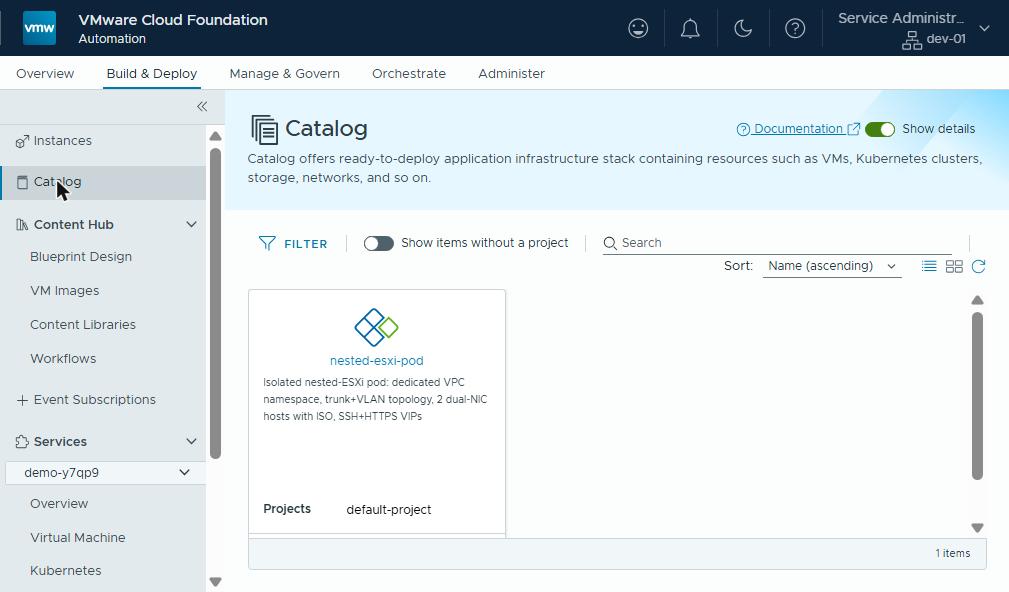
This post turns the pod into a catalog item. Fill in a name, pick a VPC, click Request, and a few minutes later there’s a datacenter in miniature with two SSH prompts waiting. Barely time to put the kettle on.
All Apps in one paragraph
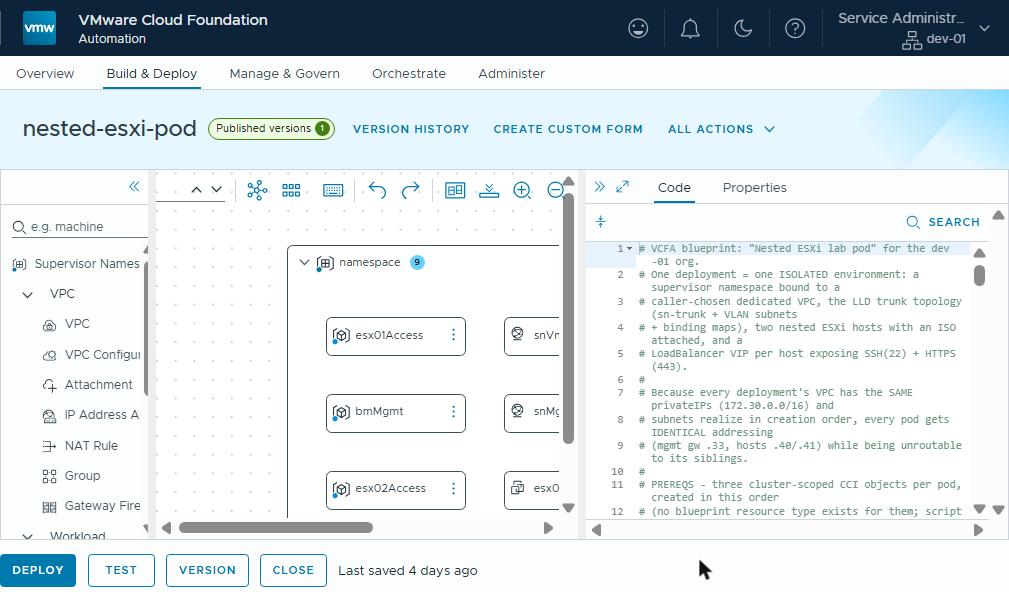
VCF Automation 9.1 has two provisioning models side by side. VM Apps is the classic Aria Automation path: cloud templates run through an IaaS (infrastructure as a service) engine that drives vCenter. All Apps is the supervisor-native path. Its blueprint composes Kubernetes objects (a Supervisor Namespace, VM Service VMs, NSX subnets, vSphere Kubernetes Service clusters), and the vSphere Supervisor’s controllers reconcile them.
A blueprint is formatVersion: 2, and its resources are
CCI.Supervisor.Namespace and CCI.Supervisor.Resource. The second is
literally “here’s a manifest, apply it in that namespace.” So the blueprint
is a composition of the manifests from the earlier posts, with two
additions: inputs, and dependsOn.
The blueprint, section by section
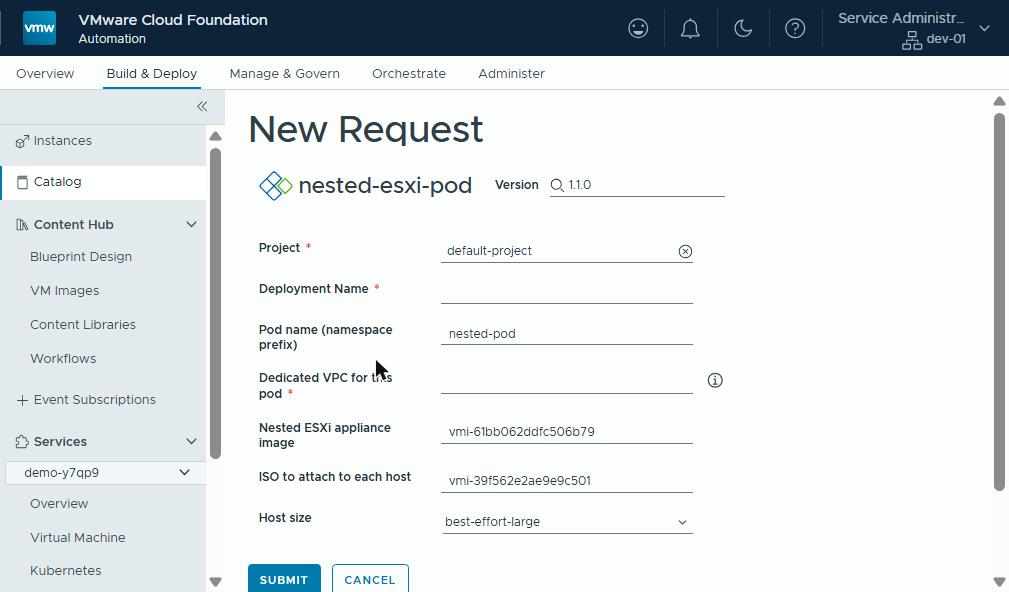
Inputs — the form
inputs:
  podName:  {type: string, default: nested-pod, pattern: '^[a-z0-9]([-a-z0-9]*[a-z0-9])?$'}
  vpcName:  {type: string, description: Must exist and be Realized before deploying.}
  esxOva:   {type: string, default: vmi-61bb062ddfc506b79}   # Nested ESXi 9.1 appliance
  isoImage: {type: string, default: vmi-39f562e2ae9e9c501}   # the ISO to attach
  vmClass:  {type: string, default: best-effort-large, enum: [best-effort-large, best-effort-xlarge, best-effort-2xlarge]}
The namespace — with libraries attached
namespace:
  type: CCI.Supervisor.Namespace
  properties:
    generateName: ${input.podName}-        # NOT name — new namespaces get a suffix
    className: large
    regionName: f06
    vpcName: ${input.vpcName}              # pins the namespace to the pod's VPC
    storageClasses: [{name: vSAN Default Storage Policy, limit: 400000Mi}]
    zones: [{name: domain-c9, cpuLimit: 40000M, memoryLimit: 64000Mi, ...}]
    contentSources:
      - {name: ISO, type: ContentLibrary}
      - {name: f06-vks-lib01, type: ContentLibrary}
contentSources is the line that closes the gap a lot of first attempts
hit. Our libraries were plain vCenter libraries, and a namespace created by
VCF Automation got none of them. No libraries meant no
VirtualMachineImages, so nothing could be deployed. An empty namespace is
very tidy, and of no use to anyone.
Declaring the libraries here attaches them at creation. (The 9.1 docs say a namespace class is assigned a content library automatically, and provider libraries are shared with every namespace.)
The topology — ordered on purpose
snTrunk:   {type: CCI.Supervisor.Resource, properties: {context: ${resource.namespace.id}, manifest: <Subnet sn-trunk>}}
snMgmt:    {dependsOn: [snTrunk], ...  manifest: <Subnet sn-mgmt>}
snVmotion: {dependsOn: [snMgmt],  ...  manifest: <Subnet sn-vmotion>}
bmMgmt:    {... manifest: <SubnetConnectionBindingMap sn-mgmt -> sn-trunk, vlan 1610>}
bmVmotion: {... manifest: <SubnetConnectionBindingMap sn-vmotion -> sn-trunk, vlan 1611>}
The dependsOn chain is the whole reason every pod has identical
CIDRs. A fresh VPC realizes its
subnets in the order they were created, and the blueprint fixes that order.
The hosts — dual-NIC, ISO attached, bootstrapped by OVF
esx01:
  type: CCI.Supervisor.Resource
  dependsOn: [bmMgmt]                    # no point booting before VLAN 1610 exists
  properties:
    manifest:
      kind: VirtualMachine                # vmoperator.vmware.com/v1alpha5
      spec:
        hardware:
          cdrom: [ ... the ISO, declared, connected ... ]
        network:
          interfaces: [ eth0 -> sn-trunk, eth1 -> sn-trunk ]
        bootstrap:
          vAppConfig: [ guestinfo.hostname / ipaddress / vlan / ... ]
  wait:
    fields: [{path: status.powerState, value: PoweredOn}]
(Abridged: the full resource carries the image references, VM class,
guest ID and the complete guestinfo set.)
Two vNICs, both on the trunk: the nested equivalent of a VCF host’s two pNICs. The ISO rides along as a declarative CD-ROM.
The wait block makes the deployment’s completion mean something: the
request doesn’t finish until the host is powered on. Finishing any earlier
would be optimism, not automation.
The doors — one VIP per host
Each host gets a VirtualMachineService of type LoadBalancer, which
selects it by label and publishes 22 and 443. A blueprint output then
reads the VIP back out of the service’s status:
outputs:
  esx01Ssh: {value: "ssh root@${resource.esx01Access.object.status.loadBalancer.ingress[0].ip}"}
The outputs show up in the deployment view, so the requester gets the SSH command rather than a scavenger hunt.
What the blueprint cannot express (yet)
Three cluster-scoped objects must exist before the request, in this order:
VPC:privateIPs: 172.30.0.0/16, the same in every pod.VPCAttachment: the connectivity profile with the service gateway. Without it, creating the load balancer fails loudly.LoadBalancer: silently, permanently required before the namespace.
VCF Automation 9.1 does have blueprint types for the first two: CCI.VPC,
and CCI.VPC.Configuration with kind: VPCAttachment. One of its
sample blueprints
uses both. There is none for the third.
A later test confirmed it. CCI.VPC.Configuration rejects a LoadBalancer
kind, and a VPC created that way comes up with load balancing off. Its
namespace’s VIPs would sit pending, waiting for a load balancer that isn’t
coming.
Today that’s a short script or a runbook step per pod. The honest framing: the blueprint is the pod, the VPC is the tenancy, and tenancy is still created one layer up. I’d expect the load balancer to become blueprintable too. Until then, keep the three calls next to the blueprint in version control.
Publishing: one version at a time
The order is blueprint, then BlueprintVersion, then release. Validation
happens at version time, not at create time. The result lives in
status.validationMessages rather than the HTTP code, so a 200 with
ContentValid: False is a thing: the HTTP equivalent of “yes, but no”.
And only one version can be published. Unrelease 1.0.0 before releasing 1.1.0, or you get a 409. (The full list of sharp edges is its own post.)
Why this matters outside the lab
This is where platform engineering turns into a service. The gap between “we can build you an environment” and “request one from the catalog” is the gap between days and minutes. It’s also the gap between a bespoke build and one that is consistent, quota-controlled and recorded every time. For an organisation that means:
- Time-to-environment measured in minutes, requested by the people who need it, without a queue.
- Consistency by construction. Every environment comes from the same definition, so support, training material and runbooks all match.
- Governance built in. Quotas, ownership, history and clean teardown are properties of the deployment record, not a spreadsheet.
The nested-ESXi pod is one catalog item. The same approach delivers any shape of environment: application stacks for developers, sandboxes for a proof of concept, demo kits for a sales team, isolated builds for a partner.
Rules learned
- All Apps blueprints are compositions of manifests:
CCI.Supervisor.NamespaceplusCCI.Supervisor.Resourceper object. If it works withkubectl, it works in a blueprint. - Use
generateName, notname, for the namespace, andcontentSourcesto attach libraries at creation. Keepzones/storageClassesflat, not wrapped. dependsOnis how you get deterministic CIDRs: order the subnets.wait.fieldsturns “request complete” into “host is powered on”.- VPC, VPCAttachment and LoadBalancer are prerequisites outside the blueprint, in that order, before every request.
- One published version per blueprint. Validation results live in
status, not in the HTTP response.
Broadcom documentation
- Sample Blueprints in VCF Automation:
CCI.Supervisor.NamespaceandCCI.Supervisor.Resourceexamples, withgenerateNameandcontext. - Creating bindings and dependencies between resources in blueprints in VCF Automation:
dependsOnand property bindings, which set the build order. - Specifying formatVersion in Blueprints in VCF Automation: what
formatVersion: 2adds, outputs included. - Versioning Blueprints in VCF Automation: blueprint versions, and releasing one to the catalog.
- Creating and Managing Content Libraries for Stand-Alone VMs in vSphere Supervisor: VM content libraries and the namespaces they are associated with.
- Deploy VMs with Configurable OVF Properties in vSphere Supervisor: OVF properties set through the VM Service’s vAppConfig transport.
Previously: shared services for isolated tenants. This closes the Pod Papers’ core arc. The companion posts on dual-NIC, no-DHCP bootstrap and blueprint gotchas fill in the details.
Lab environment; opinions my own. Blueprint nested-esxi-pod 1.1.0 is
live in the lab catalog; YAML above trimmed for length.