
The first post in this series said what Org Builder is. This one shows it doing the simplest useful job there is: moving a team’s blueprints from the organization where they were built to the one where people order them, with that organization’s own values.
Two organizations
Both live on the same VCF Automation, on the same platform:
- demo-dev is where a platform team builds and tests catalog items.
- demo-prod is where everyone else requests them.
In demo-dev the team has built two blueprints and released them to the catalog. Team namespace gives a team a Supervisor namespace. Linux VM gives one an Ubuntu VM in a namespace of its own.
Neither blueprint holds a single platform value. Both read them from two property groups:
- platformDefaults: region, zone, VPC, namespace class, storage, DNS domain, NTP server and the Linux image;
- vmSizes: the VM class behind small, medium and large.
  namespace:
    type: CCI.Supervisor.Namespace
    properties:
      generateName: ${'ns-' + input.team + '-'}
      className: ${propgroup.platformDefaults.namespaceClass}
      regionName: ${propgroup.platformDefaults.region}
      vpcName: ${propgroup.platformDefaults.vpc}
That’s the whole trick. A blueprint written this way never needs editing to move. Only the property groups change, and they’re exactly what Org Builder asks about.
What production does differently
Production isn’t development with a different name. Here’s what changes:
| Value | demo-dev | demo-prod |
|---|---|---|
| Namespace class | small | medium |
| DNS domain | dev.example.com | prod.example.com |
| NTP server | ntp.dev.example.com | ntp.example.com |
| VPC | default-f06 | default-f06 (its own) |
| Region, zone, storage | the platform’s | the platform’s |
Retyping a handful of values by hand is easy enough. It’s also how production quietly ends up using development’s NTP server.
Here’s the whole move on the page, start to finish. The sections below take it one step at a time.
Export from development
Org Builder reads demo-dev and lists what makes it up: the organization, its project, namespace classes, VPC and security profiles, then the property groups, blueprints and catalog items. Reading changes nothing. Everything starts ticked, and Only the catalog ticks just the catalog content.
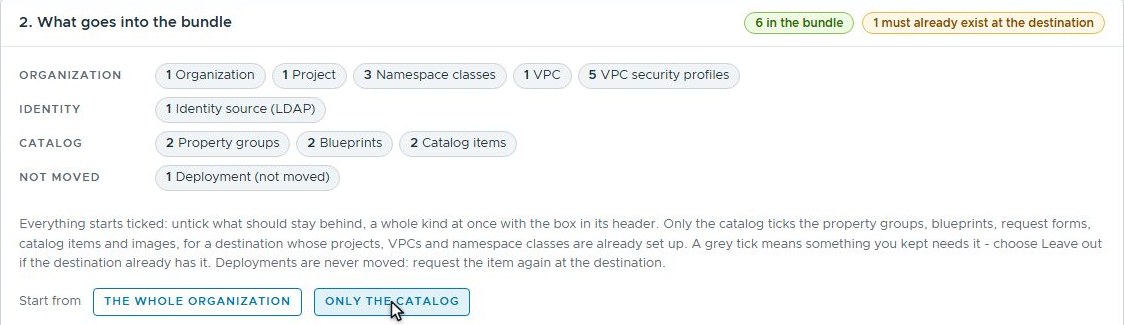 Only the catalog: the property groups, blueprints and catalog items, and nothing of the organization’s set-up.
The blueprints live in a project, and the project doesn’t move. Production has its own, so Org Builder marks it left out: something the destination must already have, which the import checks.
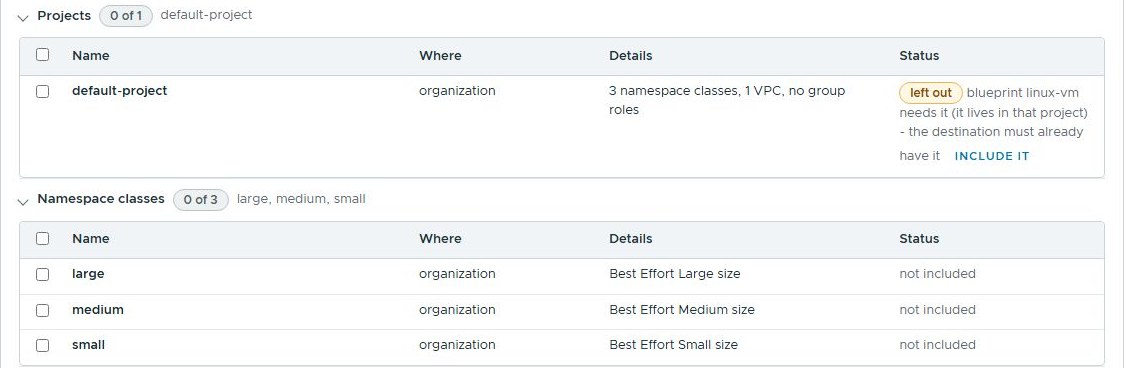 The project stays behind. Production has one of its own.
The bundle it writes holds a package, team-catalog 1.0.0, with the two
property groups, the two blueprints and their catalog items. It also holds a
site template: the questions the destination must answer. Development’s own
values stay behind unless you tick the box that keeps them, so nothing in
the bundle points at the wrong DNS domain by accident.
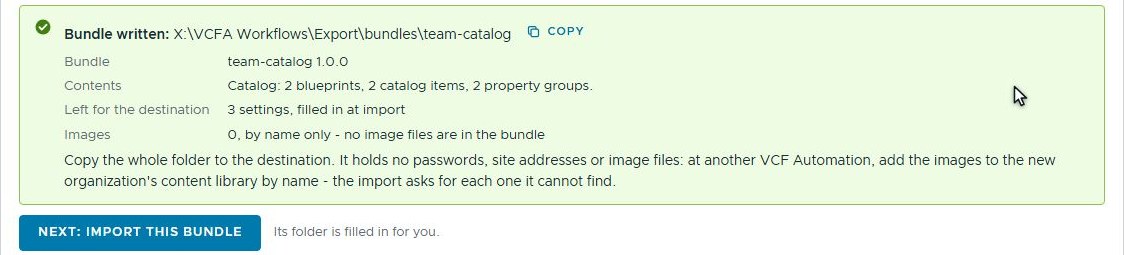 The bundle: a package, and three questions for whoever imports it.
Import into production
Production already has a site file of its own: where its VCF Automation is, and its platform’s names. The import adds only what this package reads, and leaves everything else in the file alone. Three values have no default, because they belonged to development: the VPC, the DNS domain and the NTP server. Production answers them.
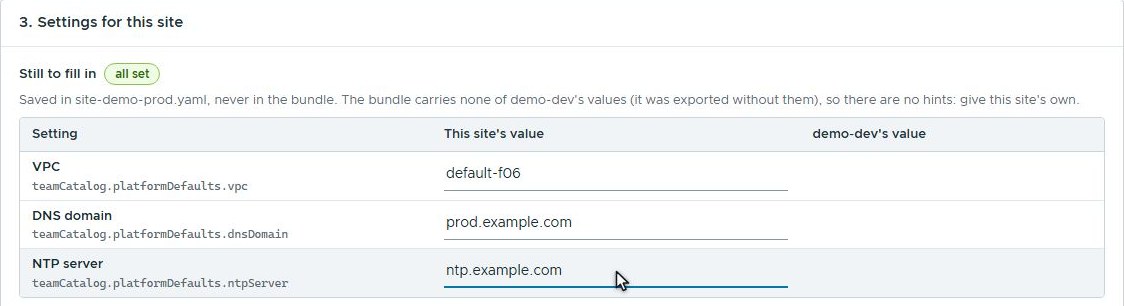 Three values belonged to development, so production gives its own. They’re saved in production’s site file, never in the bundle.
The namespace class did travel, as a default: small. That’s the one value
we change on the way in, to medium.
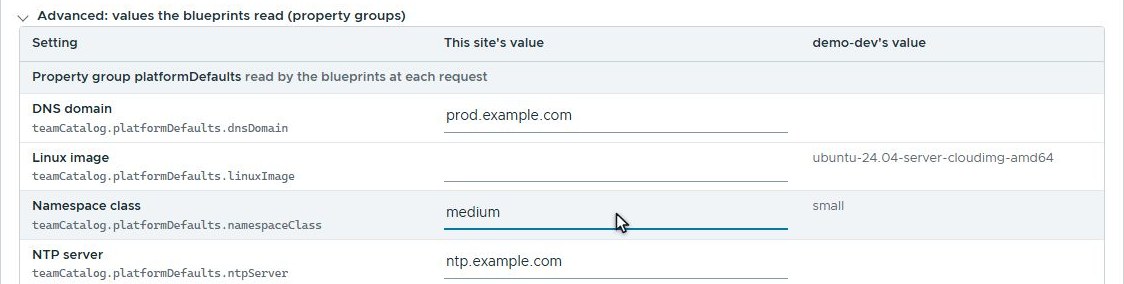 One default changed on the way in: the namespace class.
Then the preview reads demo-prod and says what it would do: make the two property groups, the two blueprints and the two catalog items, and find the project they need. Nothing has changed yet. Only after that does the import run.
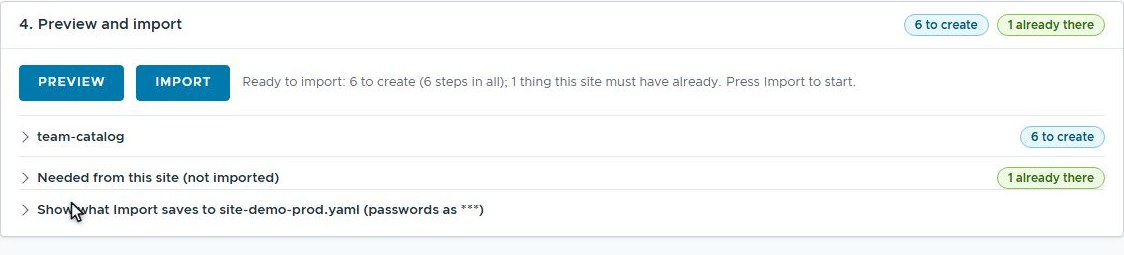 The preview reads production and changes nothing.
The result

demo-prod now has both property groups with its own values, and both catalog
items. A request for Team namespace in production makes a namespace with
the medium class. The same request in development still makes a small
one, because each organization’s property group says so.
The first take of the film had a cosmetic bug in it, so production got the catalog twice. In between, Org Builder’s uninstall took back exactly the six things the import had made, in reverse order. The project’s own VPC binding stayed where it was, because the import never made it.
Before the move: what both organizations need
Org Builder moved the catalog, not the organization’s setup. Both projects already had their region, namespace classes and VPC bound to them. A new organization’s default project starts with none of those, and VCF Automation is precise about it.
Building the dev content, my first request was turned down four times in a row, each time for a new reason. First no VPC was bound, then no namespace class, then no zone was given, and finally the memory limit was bigger than the namespace class allows. It was right every time, which didn’t help.
Why this matters outside the lab
Promoting catalog content from development to production is everyday work for platform teams. Done by hand, it’s slow and easy to get subtly wrong. Done with scripts, it means keeping the scripts in step with the catalog.
Org Builder turns it into an export and an import. The blueprints move untouched, the destination answers only for what’s genuinely its own, and the preview says what will happen before it happens. The same bundle can go to a test organization, a second production region or a customer, each with its own answers.
What’s next
Linux VM is in production’s catalog now, but its Ubuntu image isn’t. The next example adds a content library: images that have to arrive before the blueprints that boot from them, plus a package’s own instructions, shown to whoever installs it at the step where they matter.
Rules learned
- Put every platform value in a property group, and a blueprint moves between organizations untouched.
- Bind a project’s region, namespace classes and VPC before anyone requests a namespace in it; a new organization’s default project has none.
- A namespace’s zone limits must fit inside its namespace class: the small class here allows 10000 MiB of memory.
- Let the destination decide: carry no source values by default, and preview before installing.
Broadcom documentation
- Reusing a Group of Properties in VCF Automation: property groups shared with the organization or kept to one project
- Publish a Blueprint to the Catalog in VCF Automation: releasing a version, by default to the members of the blueprint’s project
- Blueprint versioning in VCF Automation: versions, releases and rolling back
Lab environment; opinions my own. Org Builder is our own tooling, not a Broadcom product. VMware, VCF and VCF Automation are trademarks of Broadcom Inc. or its subsidiaries.