
Part 2 ended with a small confession: the Linux VM item was in production’s catalog, but the image it boots from wasn’t. This example puts that right. It’s the bring-your-own-image case, and it needs two things Org Builder hadn’t been asked for yet: an image, and a step only a person can do.
The image
demo-dev gets a content library, team-images, with the Ubuntu 24.04 server
cloud image in it. The blueprint doesn’t change at all, because it already
reads the image’s name from the platformDefaults property group:
        spec:
          imageName: ${propgroup.platformDefaults.linuxImage}
          className: ${propgroup.vmSizes[input.size]}
          storageClass: ${propgroup.platformDefaults.storageClass}
A test request in development finished in 80 seconds, and the VM came up with an address. VM Service turned the image’s name into the library item’s own ID, so the blueprint never needs to know it. That matters in a moment, because the ID is different in every organization.
Bring your own image
The image takes 1.1 GB in the library. This example is the bring-your-own-image case, on purpose: the package names the image, and each site brings its own copy.
VCF Automation does offer the other road. Its Export dialog for a blueprint has two formats: YAML, which is just the blueprint, and OVA, which packs the blueprint together with the VM disk images it uses. So I asked it what an OVA of Linux VM would carry.
No images at all. The export packs only the images a blueprint names itself, and this one reads its image’s name from a property group. I tried the blueprint as it is, and three throwaway copies that name the same image in other ways:
| How the blueprint names the image | What the OVA export found |
|---|---|
From the property group: ${propgroup.platformDefaults.linuxImage} | no image: a 55 KB OVA |
From an input with a default: ${input.image} | no image |
The name, written in: ubuntu-24.04-server-cloudimg-amd64 | the image: a 566 MB OVA with its disk |
The image’s ID, written in: vmi-e24ba6f524c05ac13 | the image |
Naming the image in the export request itself changed nothing. The property-group blueprint still came out at 55 KB: a blueprint, a manifest, and no Ubuntu whatsoever. And what an OVA does carry is one blueprint (with its custom form, when it has one), not the property groups it reads or its catalog item.
So VCF Automation’s OVA road means writing the image into the blueprint, and with it one site’s image into every site’s copy. An image’s ID also differs in every organization; the end of this post shows two. Org Builder keeps the image out of the blueprint, and out of the bundle: it exports the image by name and size, never the file.
 Only the catalog brings the image with it, by name. The library it lives in stays behind: production has its own.
The bundle says so in as many words: no image files, and the destination adds each image to its own library by name.
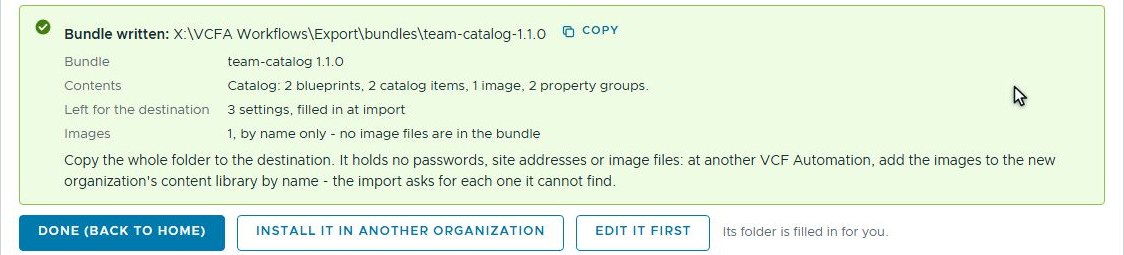 team-catalog 1.1.0: the image by name, no file.
A step only a person can do
Someone has to bring that image to the destination. The obvious place to say so is a runbook. The trouble with runbooks is that the person installing the package has to find them, read them, and remember them at the right moment.
So the package says it itself. Edit a package opens the bundle, and a step done by hand goes in at its place in the install: just before the image.
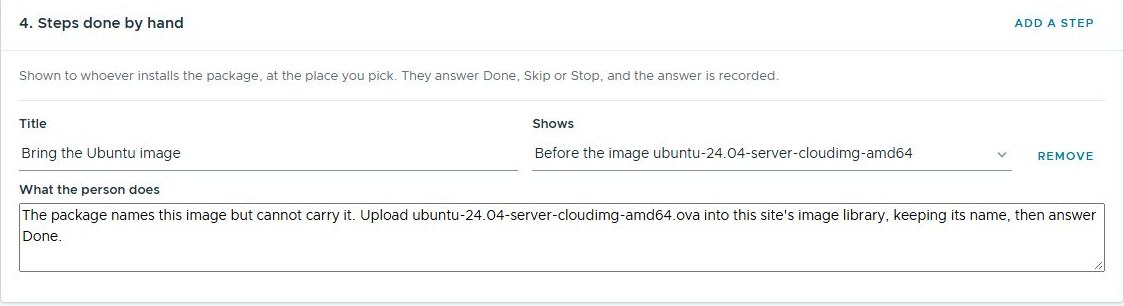 The step, in the package’s own words, placed before the image it’s about.
It saves as a new version, 1.2.0, in a new folder. Version 1.1.0 stays exactly as it was. That’s not fussiness: Org Builder records which version each site has, and a package that changed under the same number would confuse every upgrade after it.
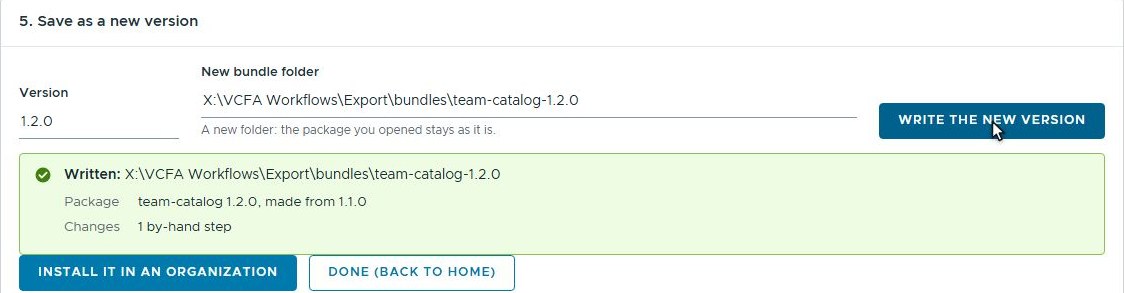 1.2.0, made from 1.1.0. The one it was made from is never changed.
Install in production
demo-prod already runs 1.0.0 from part 2, so this is an upgrade. Production
keeps its images in a library of its own, called prod-images, so it gives
that name instead of development’s.
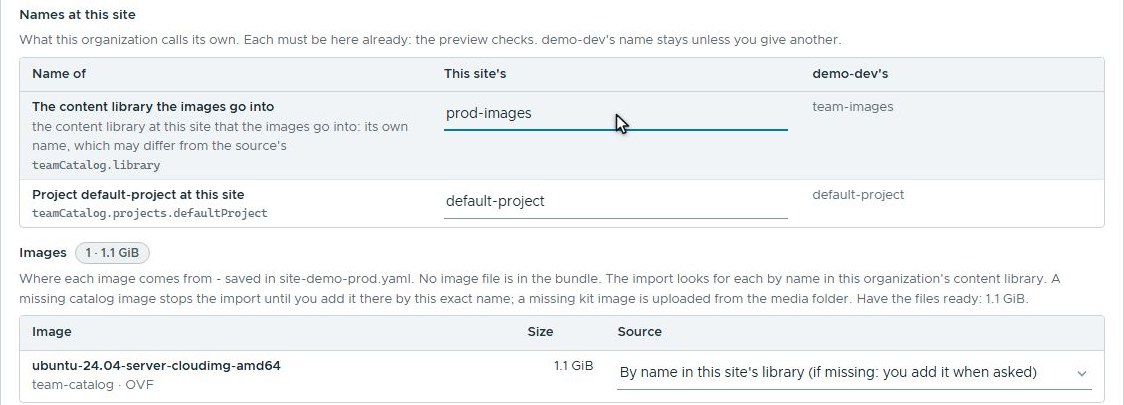 Production names its own library. The project has the same name in both.
The preview reads production and changes nothing. One thing to create (the image), one step done by hand, and eight already there: the six from 1.0.0, the project and the library. It also says, before anything starts, that the image isn’t in the library yet.
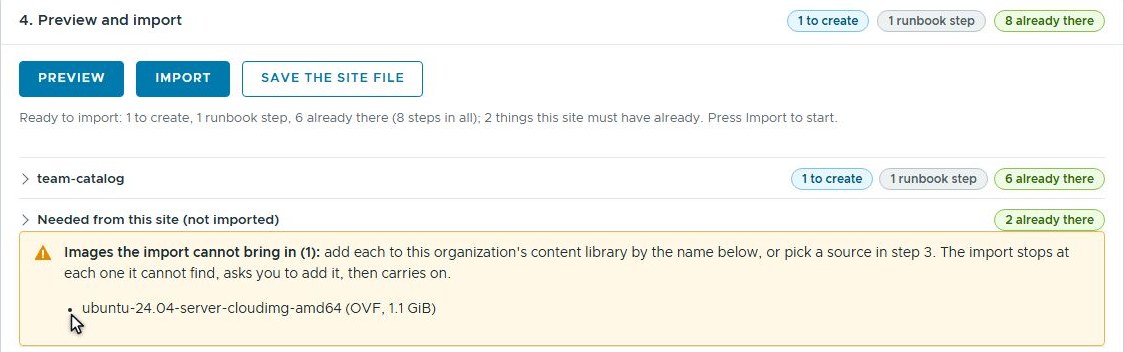 The preview knows the image is missing, and says so before anything starts.
Then the import runs, and stops at the step. The question box shows the step’s own title and words, with three answers: Done, Skip or Stop here.
 The package’s own words, at the moment they matter.
The image then went into prod-images under its own name. In our lab a
script did the upload while the import waited, in a little over two minutes,
and the film skips it. Then Done. The import found the image by name,
recorded its ID, and carried on.
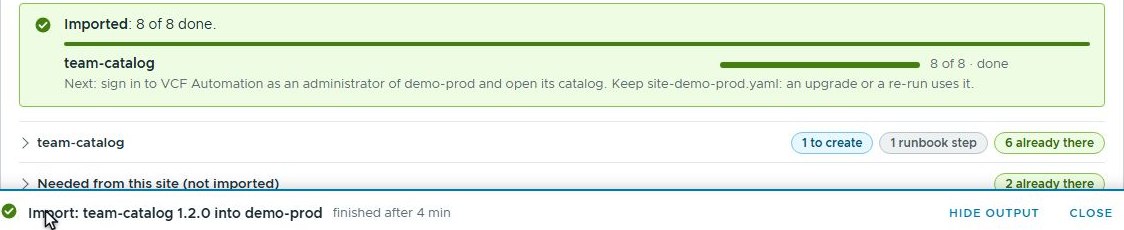 8 of 8 done. The step is recorded as done by hand, with the answer.
Here’s the whole thing on the page: create the package, edit it, install it.
The result, in VCF Automation itself
Production’s library has the image, as VCF Automation reports it:
 prod-images, made in production before the import.
 The image, with production’s own ID.
And a request for Linux VM in production makes a VM that boots from it:
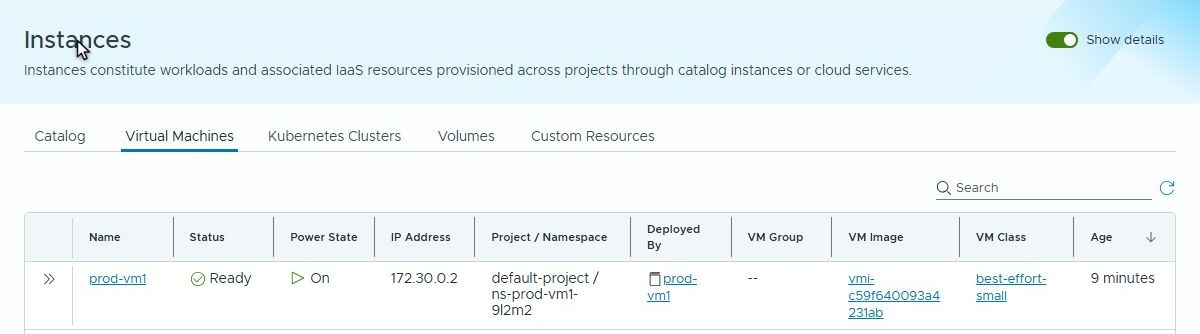 prod-vm1: on, with an address, booted from production’s copy of the image.
Same image name in both organizations, two different IDs, and a blueprint that never had to know either of them.
What the example found
Worked examples are useful for finding things, and this one obliged three times.
- Production’s library in the wrong place. The first script made development’s library, then cheerfully made production’s library in development too. Python loads a module once, so the second organization’s sign-in quietly became the first one’s. One organization per process fixed it; the stray library was deleted.
- A library by the wrong name. The first preview looked for development’s library name in production. It now looks for the name this site gives, which is what Names at this site is for.
- A Done that went nowhere. In the first take, the page’s answer to the step was refused, because an import’s job had no build site file behind it. The four-minute wait also lasted no time at all, which is quicker than any upload I’ve seen. Both are fixed; the film above is the second take.
Why this matters outside the lab
Images are where catalog moves tend to come unstuck. They’re big, and each site usually has its own, built, patched and approved by its own team. A package that carried them would be slow to copy, and often wrong for the place it lands.
Naming the image instead keeps the bundle small and leaves the choice of copy with the site. The step done by hand puts the instruction where the person installing will meet it, not in a document they may never open. And because the preview checks the library first, a missing image turns up while everyone is still planning, not when the first person requests a VM.
Rules learned
- Bring your own image: name it in the package, and let each site bring its own copy.
- VCF Automation’s OVA export carries only the images a blueprint names itself. An image read from a property group or an input stays behind, even when the export request names it.
- When a package needs a person, put the step in the package, at the place it matters, not in a runbook somebody has to remember to open.
- Every change is a new version; the version you opened stays as it was.
- Let each site name its own library and projects, and check them in the preview before anything is made.
What’s next
The next posts leave this small catalog behind for a bigger one: the nested lab catalog, built and moved with the same packages.
Broadcom documentation
- Importing or Exporting Blueprints in VCF Automation: a blueprint and its VM images as one bundle, and what an import accepts
- Export a Blueprint from VCF Automation: the Export dialog, versions, images and the Exports tab
- Managing Content Libraries in VCF Automation: provider, organization and project libraries, and which namespaces see them
- Create an Organization Content Library in VCF Automation: a library for every namespace in the organization
- Add a VM Image to a Content Library in VCF Automation: uploading an OVA or OVF
Lab environment; opinions my own. Org Builder is our own tooling, not a Broadcom product. VMware, VCF and VCF Automation are trademarks of Broadcom Inc. or its subsidiaries.