Every lab has one: the script that builds the nested hosts. Ours was
esxihostdeploy.ps1, ovftool plus PowerCLI. An interactive menu asked for
environment, ESX version, role, size and host count. Then came a loop of
ovftool --prop:guestinfo.*, Set-VM, New-NetworkAdapter and
Set-HardDisk.
It worked for years. It also prompted for credentials, lived on one machine, and knew nothing about the bringup that came after. Loyal, if a little needy.
Porting it to a VCF Automation catalog item (VM Apps: a cloud template plus vRO) is not a rewrite. It’s a sorting exercise. Every behaviour in the script has a natural home in the declarative model, and the skill is finding it. Here’s the whole table, then the four rows that took some thought.
The mapping
| Script behaviour | Where it lives now |
|---|---|
| Environment menu (f01–f10) | environment input (enum) |
| Version menu → OVA path on a share | esxVersion input → image mapping → content library item |
| Role menu (management / workload / both) | role input; “both” = two requests |
| Size menu / auto-detect from an existing host | size input (auto-detect dropped — see below) |
| vCenter + ESXi credential prompts | vCenter creds gone (cloud account); esxiRootPassword an encrypted input |
Next-free esxNN index scan (gap-filling) | vRO action getNextEsxHostIndexes, bound to the request form |
| VLAN / IP / gateway arithmetic | template expressions (same formulas) |
ovftool --prop:guestinfo.* | ovfProperties on Cloud.vSphere.Machine |
Folder lookup / New-Folder | allocation-phase subscription creates the folder if missing |
Set-VM cpu / mem | cpuCount / totalMemoryMB in the template |
2× New-NetworkAdapter (Vmxnet3) | networks array, deviceIndex 0/1/2 |
3× Set-HardDisk grow | post-provision subscription |
NestedHVEnabled = $true | post-provision subscription |
| “Power on after?” prompt | powerOn input, honoured post-provision |
| Summary table printed at the end | the deployment view in the UI |
That’s five homes, in decreasing order of preference:
- input
- template expression
- platform abstraction (image mapping, network profile, cloud account)
- form action (read-only lookup at request time)
- subscription (imperative work at a lifecycle stage)
Push each behaviour as far up that list as it will go.
The four decisions that weren’t obvious
1. Drop auto-detect; the platform already remembers
The script inspected an existing host to work out its size. That was a workaround for having no record. The catalog is the record: deployment history shows what size every existing host was requested at. So the input simply asks. Fewer moving parts, and the requester sees the choice.
2. The index scan is a form action, not a workflow step
“Next free esx07” has to be known at request time, so the requester
sees the names they’ll get. That makes it a vRO action bound to the
custom form, not a step inside provisioning:
getNextEsxHostIndexes(environment, role, count) returns an array of
strings. Forms can call actions, so use one for anything that’s a lookup.
3. Rename and folder go in Compute Allocation, hardware goes in Post Provision
Two blocking subscriptions, filtered by a custom property on the template:
| Subscription 1 | Subscription 2 | |
|---|---|---|
| Topic | Compute allocation | Compute post provision |
| Runnable | “Set VM Name & Folder” | “Finalize Hardware” |
| Does | sets resourceNames, creates folder | grows 3 disks, NestedHVEnabled, power on |
| Timeout | 10 min | 30 min |
The rename must happen at allocation. It’s the only stage where a
workflow output named resourceNames is applied to the machine. Growing
the disks and enabling nested hardware virtualisation both need a VM that
exists, so they wait for post-provision. Both subscriptions are blocking:
the deployment doesn’t proceed until they return.
4. nestedEsx: 'yes' — not true
The subscription condition is
event.data.customProperties.nestedEsx == "yes". Why not "true"?
Because boolean-looking strings can arrive in the event payload as typed
booleans, and true == "true" is false in the condition evaluator and
in the vRO code.
It fails silently: the subscription just never fires. yes can’t be
coerced. Small thing; two hours. The ratio still stings.
What stayed exactly the same
The formulas. 10.(20+X).<sub>.0/24, VLAN 2X0n, gateway .254: they
were string concatenation in PowerShell, and they’re template expressions
now, character for character. The guestinfo.* property names are
identical too, because the OVA didn’t change.
Porting a script well means most of it survives. Only the plumbing moves.
The bits that still bite
- Network profile without IP ranges. Addressing comes in through
guestinfo, not the platform’s IP address management (IPAM). Tag the trunk port group and add no ranges, or IPAM and guestinfo will disagree, each utterly sure of itself. - Two template revisions in the repo. v1 is what the guide documents; v2 grew later. Both are kept deliberately, and both are labelled. Check which one the org has imported before editing either.
- Content-source lag. A new or changed vRO action needs about 15–20 minutes of data collection before the form sees it. Publish, wait, then test.
- Small disks and OSDATA. Nested hosts with 64 GB disks ship ESX-OSDATA at essentially the whole disk. Templates now provision 128 GB, and a relocate-scratch script limits the damage on existing hosts.
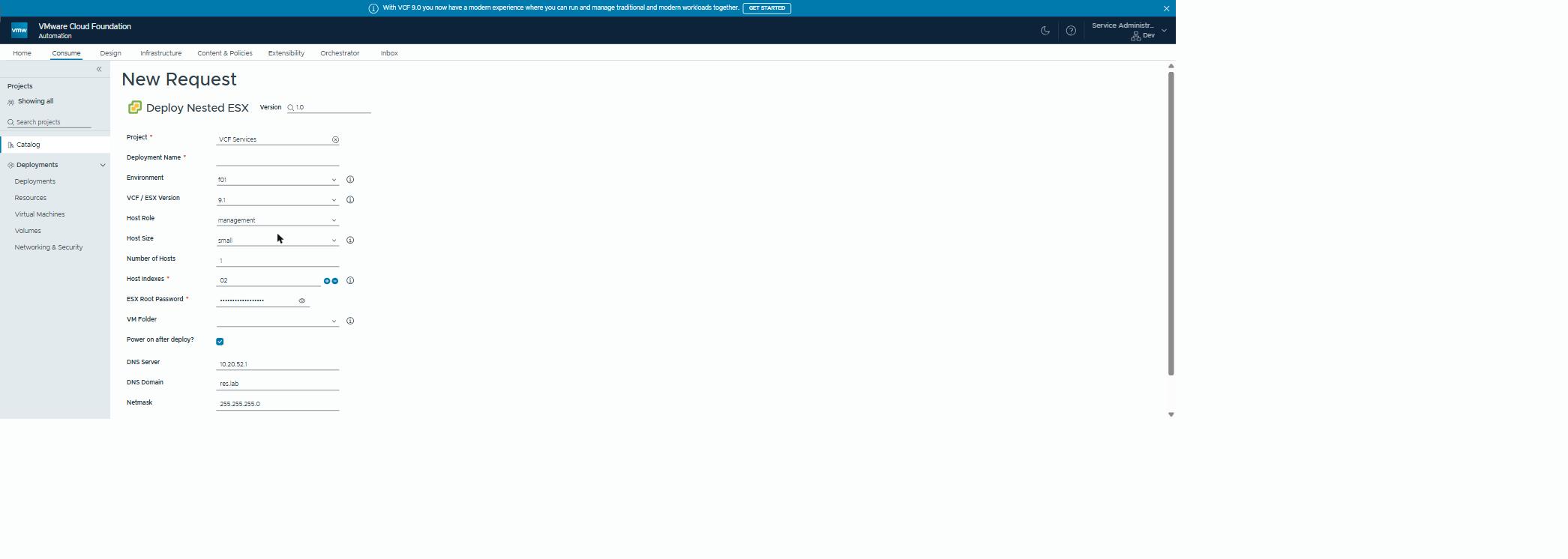 Every menu prompt from the script is now a field;
 Host Indexes is the form action’s answer to “next free esxNN”.
Why this matters outside the lab
Almost every organisation has these scripts: valuable, trusted, and stuck on one person’s machine. The message of this post for them is that modernising doesn’t mean rewriting.
The logic survives. What changes is where it lives: behind a request form, with access control, an audit trail, consistent inputs and a deployment record. That’s how a team turns tribal knowledge into a service, without losing the years of edge cases the script already handles.
Rules learned
- Porting is sorting: input, then expression, then platform abstraction, then form action, then subscription. Push each behaviour as far up as it goes.
- Lookups the requester needs to see are form actions.
- Rename at allocation (
resourceNamesoutput); hardware at post-provision. Both blocking. - Filter subscriptions on a custom property, and make its value a word that can’t be coerced to a boolean.
- Drop workarounds for missing state; the catalog is the state.
- Keep the formulas. Move the plumbing.
Broadcom documentation
- vSphere resource examples in VCF Automation for VM Apps:
Cloud.vSphere.Machinewith CPU and memory, several NICs, a vCenter folder andovfProperties - How to add image mapping in VCF Automation for VM Apps to access common operating systems: image mappings, named images per cloud account and region
- Using VCF Operations orchestrator actions in the custom form designer in VCF Automation for VM Apps: form fields filled by a vRO action that takes other fields as inputs
- Event topics provided with VCF Automation for VM Apps in: the Compute allocation topic, where resource names can still change, and Compute post provision
- Create an extensibility subscription: conditions on
event.data, blocking, and the workflow a subscription runs
Part of The Lab Factory. Next: driving the VCF Installer API from vRO.
Lab environment; opinions my own.