
Two facts, both true, and a little awkward in the same room:
- The VCF Operations application-monitoring agent (Telegraf, packaged by Broadcom) does not list Windows Server 2025 as a supported OS.
- It installs from the VCF Operations UI, runs, and reports on Windows Server 2025, once one missing Windows component is put back.
This post is about the gap between those two. “Unsupported” is a statement about who fixes it when it breaks, not about whether it works. And there is a right way to run unsupported software in production. It starts with knowing exactly what you’re relying on.
What “unsupported” means here
The matrix is a promise. Broadcom has tested this combination and will take a support case on it. Server 2025 wasn’t in the test set at release.
Nothing in the agent is gated on the OS version. It’s Telegraf with
Windows inputs (win_perf_counters, win_services, win_eventlog) and
an output to Ops. The Windows APIs those inputs use haven’t changed in a
decade.
So it works. You just own it.
The one prerequisite: put WMIC back
Windows Server 2025 no longer ships the WMI command-line tool, wmic.
It’s been deprecated for years, and it’s now a Feature on Demand rather
than part of the base install. The agent’s install bootstrap still calls
it. So on a stock Server 2025 build, the install from Ops does not
complete.
Add the capability first, then install:
DISM /Online /Add-Capability /CapabilityName:WMIC~~~~
wmic os get caption   # should now answer
(Settings > System > Optional features > Add > “WMIC” does the same thing through the UI.) That’s the whole workaround. Not much of a plot twist, I know.
Note it wherever you keep build standards for Server 2025. It’s a one-line prerequisite for the agent, and it will stay one until the bootstrap stops needing it.
The normal install, from the UI
With WMIC present, the install path is exactly the supported-OS one. No
scripts, no manual telegraf.conf, no heroics:
Operate > Workloads > Applications > Manage Telegraf Agents, tick the
VM, Agent Actions > Install, supply guest credentials, wait. On the
pipeline-built W2025 server it
registered as a Product Managed Agent, version 9.1.0.0.3033, with
Last Operation Status reading Install Success.
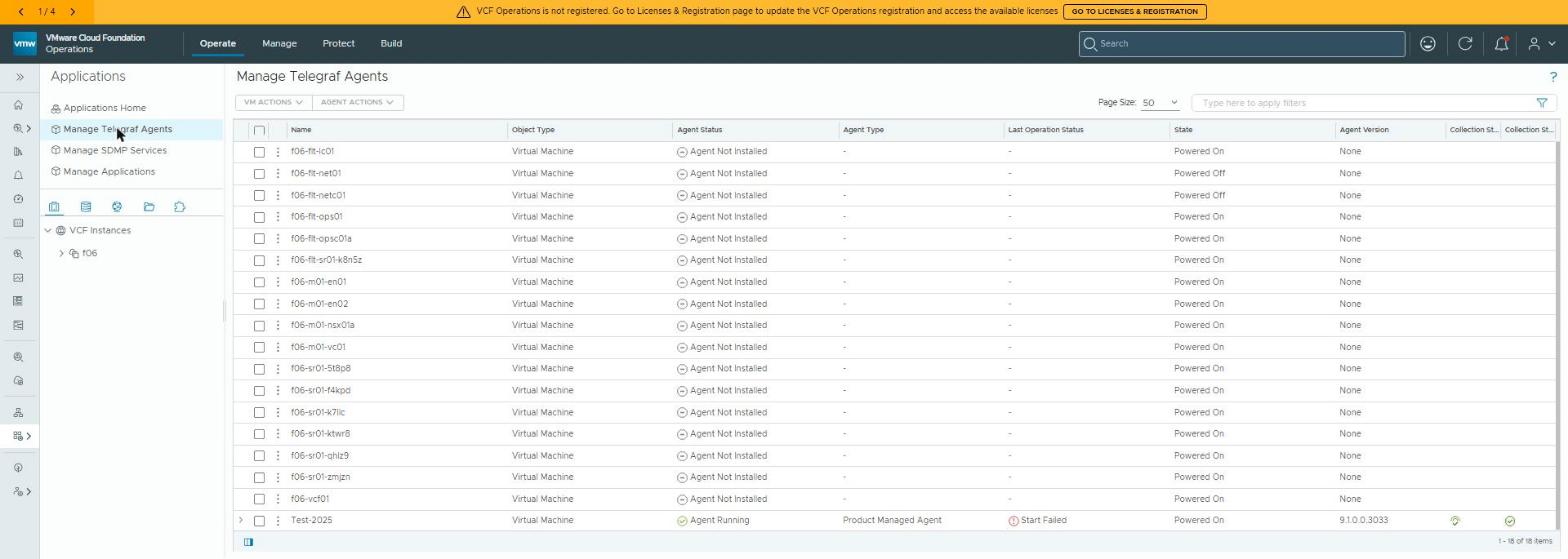 The agent list with the Windows Server 2025 row expanded. Agent Running, product-managed, Install Success, both collection ticks green. Under Custom Monitoring sits a Ping Check, configured from the same screen and already receiving data, with no config file touched.
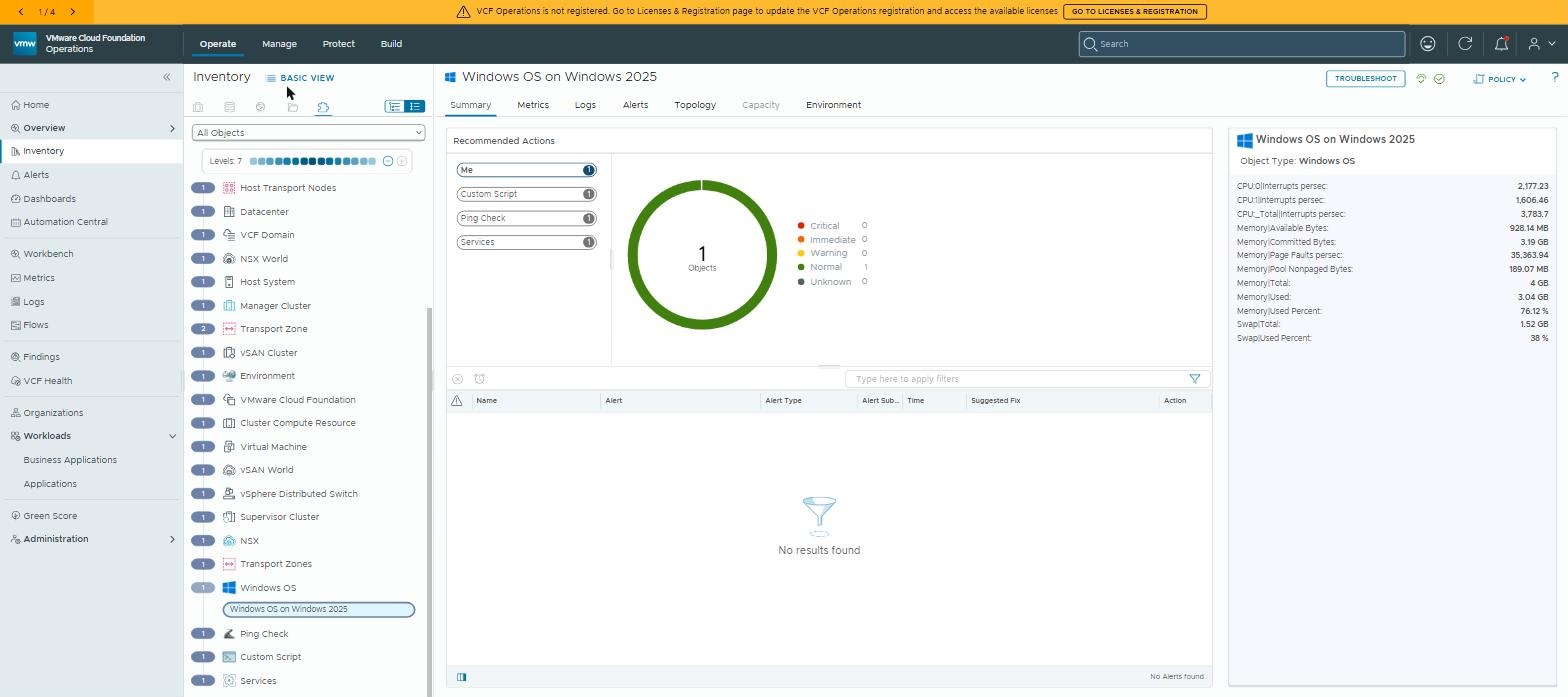 The object the agent created, as Ops sees it: green, no alerts, CPU and memory properties populated. This is the picture that matters, not the install dialog.
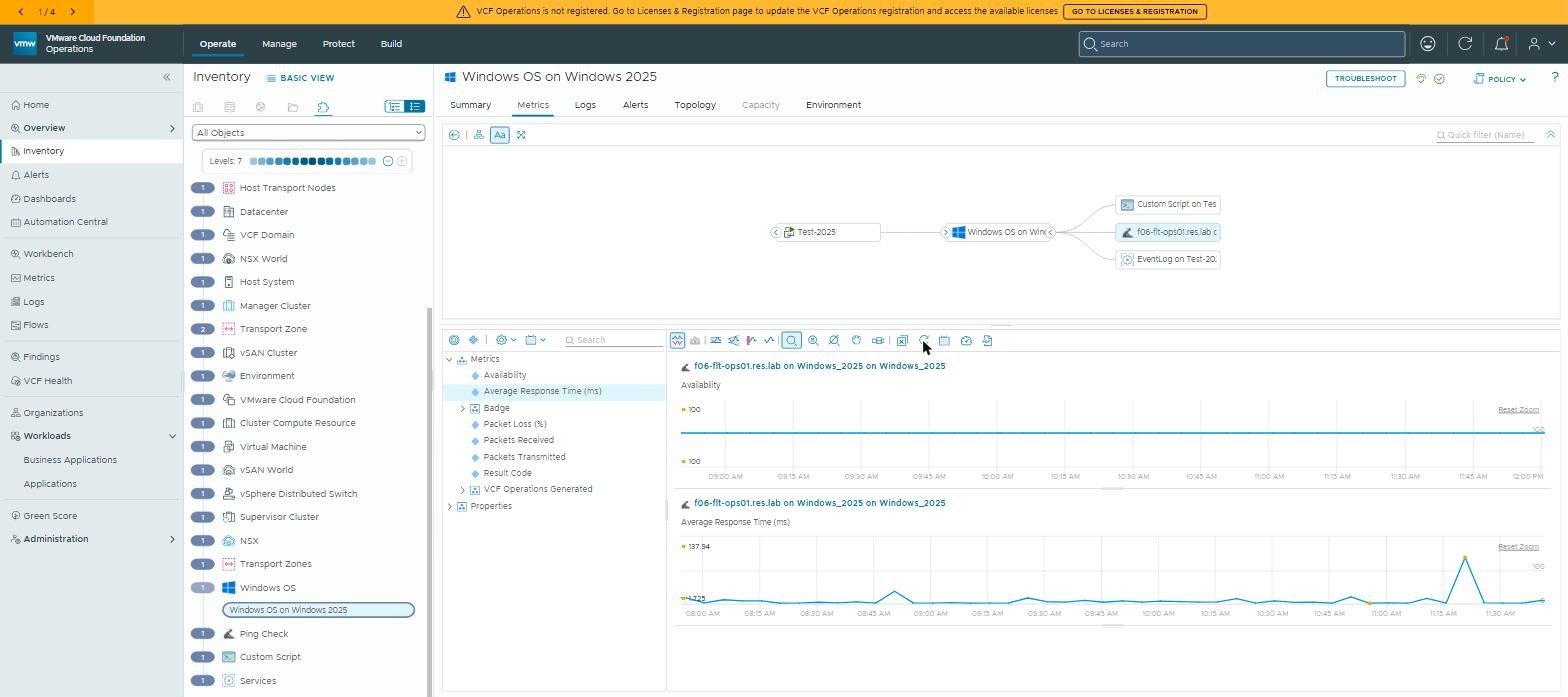 And the proof it’s doing work rather than just existing: a Ping Check run from the Server 2025 guest, availability flat at 100 across the morning, response time steady at a couple of milliseconds.
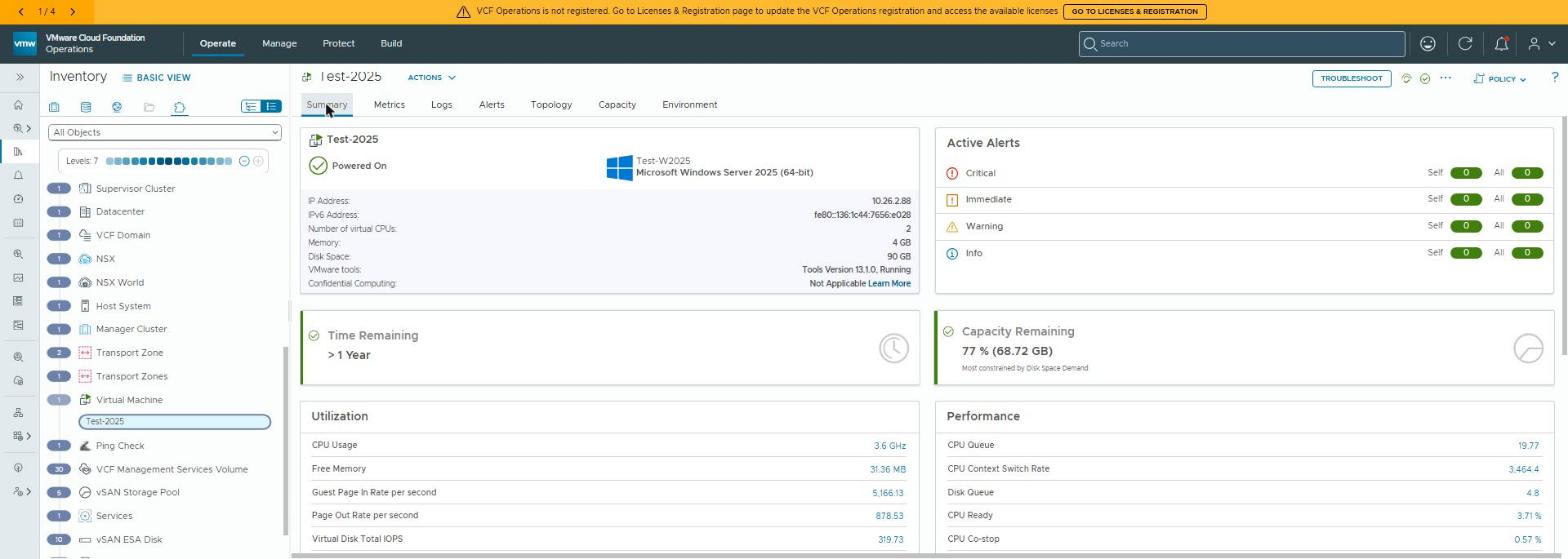
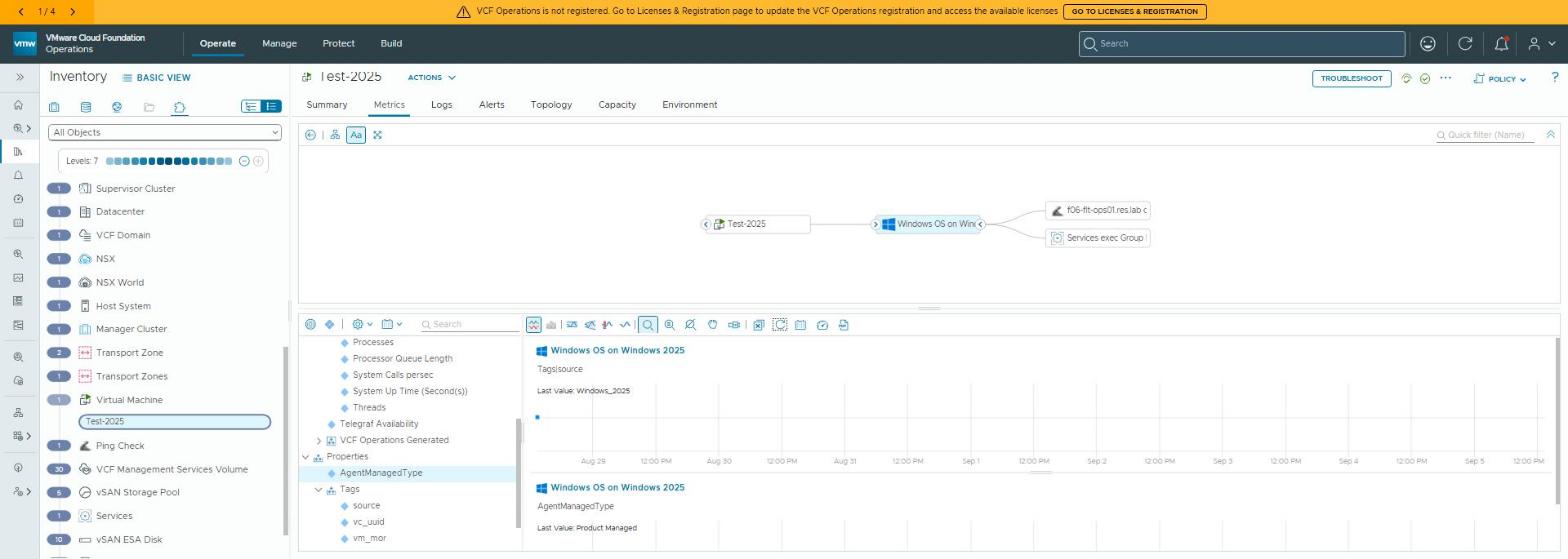 The “Windows OS on Windows 2025” child object, with
 Telegraf Availability in the metric tree and AgentManagedType reading Product Managed.
Then make it yours
Two small things turn “it happens to work” into something you can run:
Record exactly what you’re running. Agent build, Telegraf version, OS build and the WMIC prerequisite, in whatever you use for a CMDB. When the support matrix catches up, you’ll want to know whether you’re on the version they tested.
Give it a check that will go flat first. The Ping Check above is configured from the agent row in Ops (Custom Monitoring). HTTP, TCP and UDP checks live there too, and a Custom Script entry on the same screen can run anything on the box. Point one at something trivially OS-dependent, and alert on its absence. If a Windows update changes an API under the agent, that line stops before anything else does.
What to watch, because it’s unsupported
- Agent upgrades from Ops. The upgrade path is tested on supported OSes. Take a snapshot before pushing an agent upgrade to the W2025 fleet, and upgrade one first. Optimism is not a rollback plan.
- Windows cumulative updates. Performance counter names are stable. Provider GUIDs occasionally aren’t. Watch your canary check after Patch Tuesday.
- WMIC on new builds. Any image or pipeline that produces Server 2025 needs the capability added. Without it, the next install will fail the way the first one did.
- Service account and UAC. WMIC was the only install blocker we hit. The documented Windows catch is UAC. With UAC on and a non-administrator account in Administrators, the agent stays at “Not Started” and the last operation reads “Download Success”. The bootstrap then has to be run by hand.
- Don’t file cases on it. Reproduce on a supported OS first. That’s the deal you made.
Why this matters outside the lab
The practical lesson for customers is about how to adopt something the vendor hasn’t blessed yet. New operating systems arrive before support matrices catch up, and “wait” is often not an option. The approach here is how an operations team gets Windows Server 2025 monitored on day one, without taking on hidden risk:
- Find the real blocker (one missing Windows component, not the agent).
- Use the standard install path.
- Record exactly what you’re running.
- Add a check that detects breakage early.
- Upgrade one node first.
The same discipline applies to any unsupported-but-working combination.
Rules learned
- “Unsupported” means you own the fix path. Decide that consciously, then record versions, add a canary check and upgrade one node first.
- Server 2025 ships without WMIC, and the agent bootstrap needs it. Add the capability first, and the ordinary UI install works.
- The Windows inputs aren’t gated on the OS version, and W2025 runs the agent fine. Alert on metric absence, not just thresholds.
- Configure checks from the agent row in Ops. Leave
telegraf.confalone, so upgrades from Ops stay clean.
Broadcom documentation
- Supported Platforms: the operating systems the product-managed agent supports; Windows stops at Server 2022
- Windows Server 2025 support for Telegraf Agent in VCF and Aria Operations: Server 2025 not yet supported, and the install that stays “in progress”
- Install an Agent from the UI: the Manage Telegraf Agents install, and what UAC changes about it
- Communication with Cloud Proxy and vCenter: the vCenter guest-operation privileges the UI install needs
- Activate Remote Checks: ICMP, UDP, TCP and HTTP checks under Custom Monitoring
- Custom Script: scripts the agent runs on the box, each returning a single integer
Previously: fluent-bit two ways. Next in the Observability on VCF series: the same Telegraf on VKS, and the dependency that isn’t in its README.
Lab environment; opinions my own. Support status as observed at time of writing — check the current matrix.