An assessment that stays on the assessor’s laptop helps nobody. It has to reach the people who will act on it, and they want different things.
The sponsor wants to know whether the upgrade can go ahead. The engineers want the hosts by name. The security team wants to know what a read-only account will read. And now and then, someone off site wants to look at the assessment without learning whose estate it is.
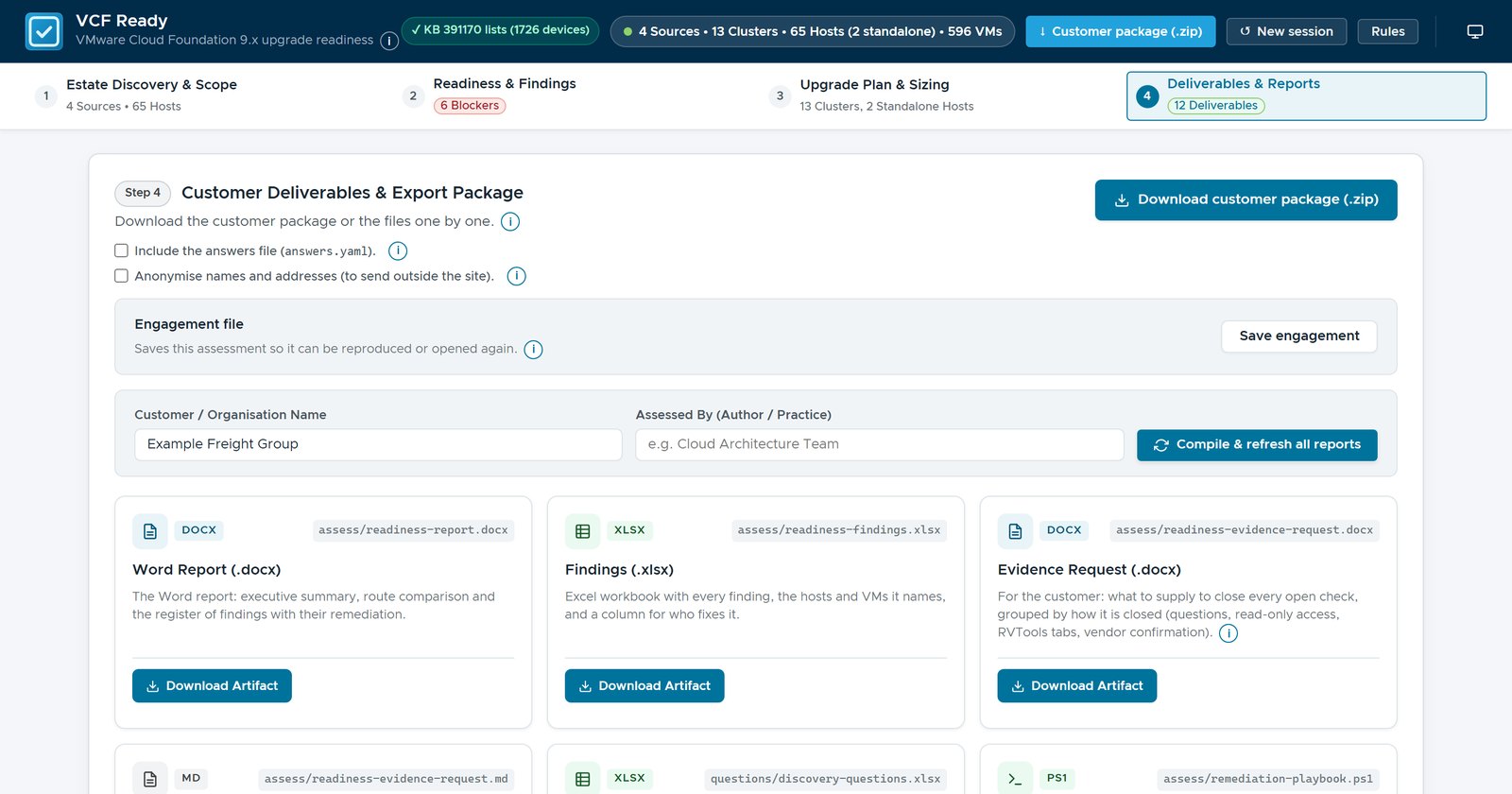
Step 4 of VCF Ready writes all of that, from one assessment. The pictures are of the made-up Example Freight Group from part 1: four vCenters, 13 clusters and 65 hosts.
What Step 4 hands over
Question: what does the customer actually receive? Step 4 has a button for the customer package, and a card for each file.
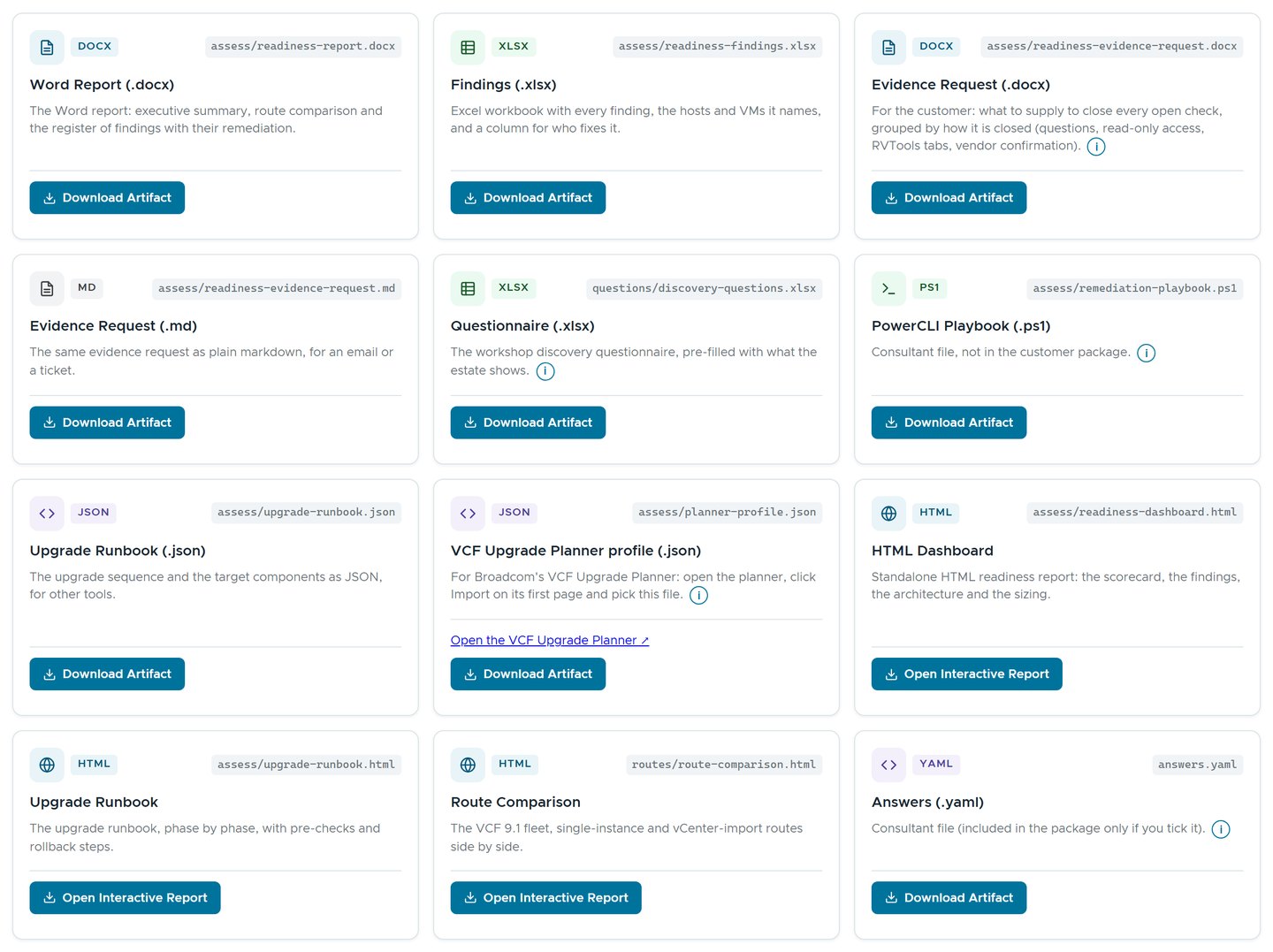 Twelve cards. The PowerCLI playbook, the planner profile and the answers file are the consultant’s.
The package holds the rest:
| Deliverable | For | What it does |
|---|---|---|
| Word report | The sponsor, and the record | What stands in the way, what is still unknown, and every finding with its evidence and source |
| Findings workbook | The engineers, and whoever tracks the work | One row for each finding, with its hosts and VMs, and Status, Owner and Notes columns |
| Evidence request, in Word and Markdown | The customer’s teams | What to supply to close each open check, and how |
| HTML dashboard | Anyone with a browser | The scorecard and every finding in one offline page |
| Upgrade runbook, in HTML and JSON | The upgrade team | Each product’s path to the target, then the phases |
| Route comparison, in HTML, Markdown and Excel | Whoever chooses the route | The same evidence assessed for every route |
| Discovery questionnaire | The workshop | Only the questions the estate leaves open |
| Inventory workbook | Anyone who wants the inventory | The vCenter collection in the RVTools layout, when there is one |
The example was read from RVTools exports alone, so it has no inventory workbook. The package never holds the uploaded workbooks, the collections or the session’s own files.
The Word report and the findings workbook
Question: what does the sponsor read? Mostly the Word report’s executive summary. It gives the findings by severity, then Before the upgrade: every blocker, prerequisite and design decision, grouped by check. Then come the evidence still needed, readiness by area and the management domain, sized as Broadcom’s Planning and Preparation Workbook sizes it.
Scope and method follow, with the “Broadcom data as of” dates, then the findings, each one a small table:
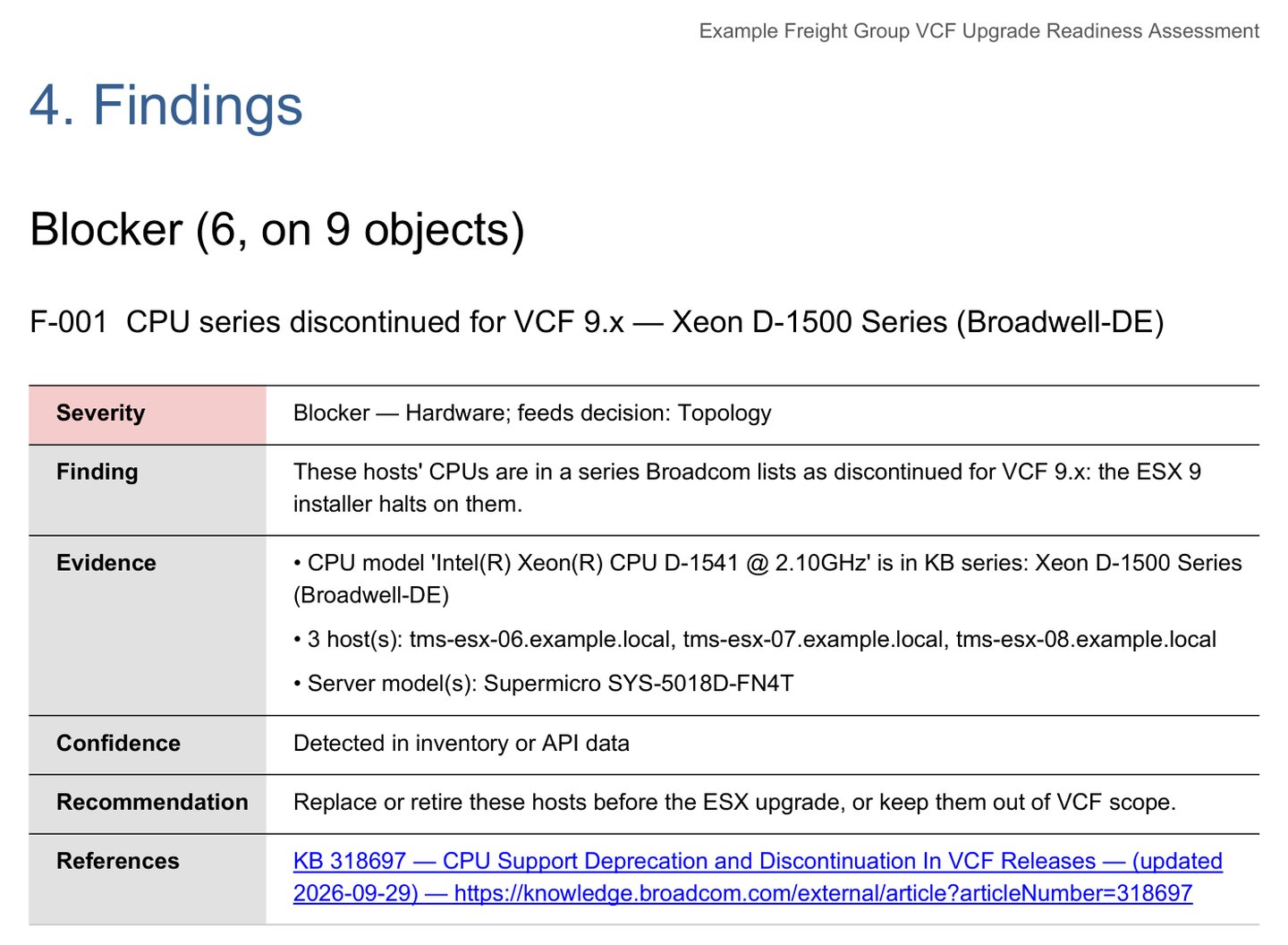 What was found, the evidence, how sure it is, what to do, and the Broadcom source with its update date.
Then come the plan outline and the appendices: every check and its outcome, the references, the facts and their evidence, and the waivers. For the example it runs past a hundred pages, and the first few say what matters. This jump host has no Word, so LibreOffice drew the page above, and took the request in good part.
The findings workbook holds the same 143 findings as rows, each naming its hosts and VMs, with Status, Owner and Notes columns for tracking the work. Its Checks sheet lists every rule and its outcome, the clear and the unchecked included, so “nothing assumed to pass” can be audited row by row.
The evidence request
Question: what should the customer go and find? The evidence request says, in Word, and in Markdown for an email or a ticket. It is written only while a check is open.
Its first table lists the open checks, each with what is missing and how to close it: a questionnaire question by its ID, read-only access to vCenter, an RVTools tab or a vendor’s confirmation.
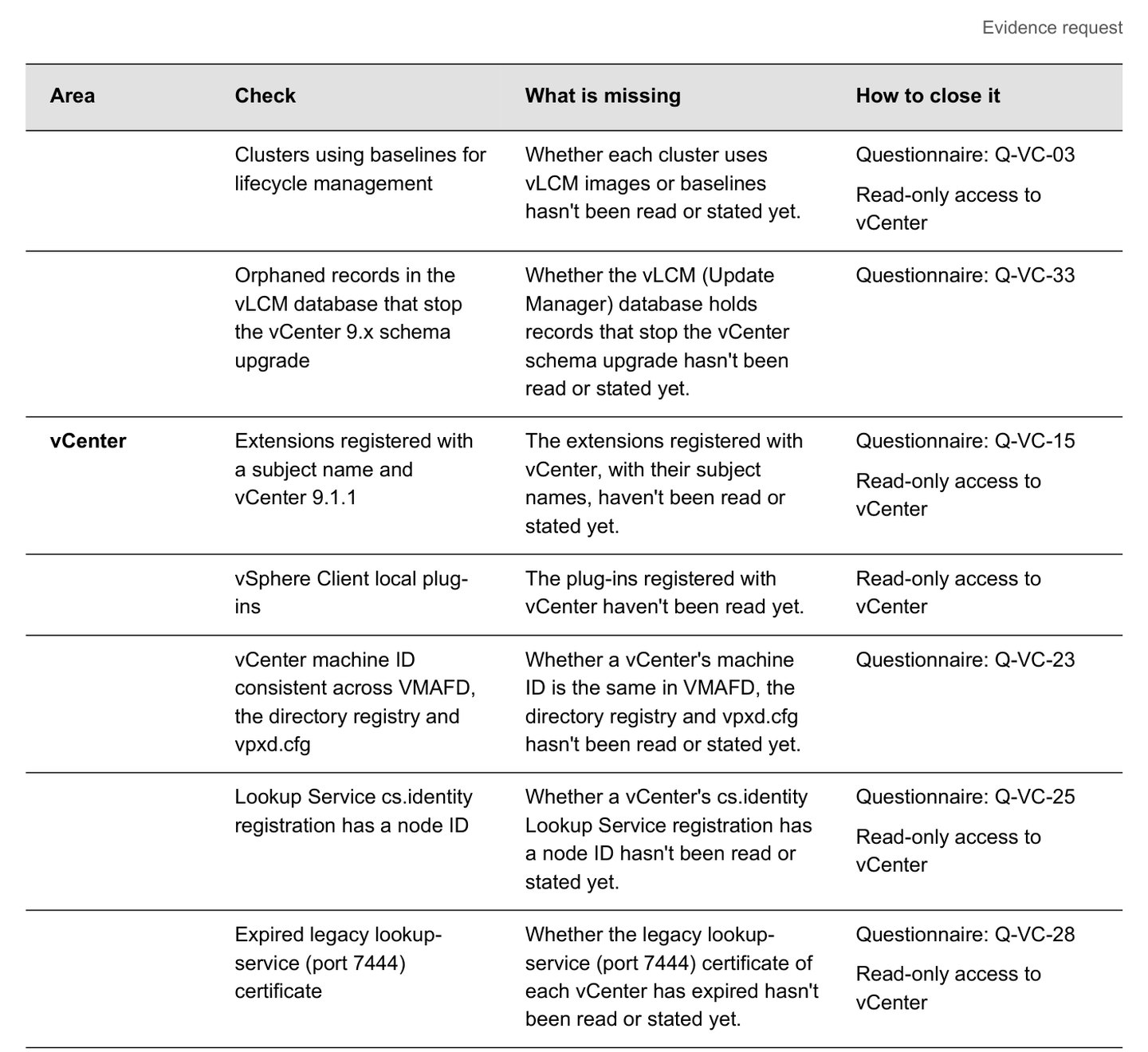 Most open checks close with a questionnaire answer, read-only access to vCenter, or either.
Then it groups the asks by kind, so that each is made once. For the example, 31 open checks and 2 open choices for the installer come down to 21 questions, read-only access to the four vCenters and one check to agree with the consultant. The access section is written for a security team: the built-in Read-only role, what the account reads, and what is never kept, such as passwords, licence keys and serial numbers.
Nothing in it says a check passed. A check still short of evidence stays open.
The dashboard’s Evidence needed tile says 49, not 31. It also counts checks that did find something a person has to confirm, such as a driver whose devices still need checking. Nearly all of those are on the questionnaire’s Evidence needed sheet instead, one finding to a row.
The dashboard
Question: what about the people who won’t open a hundred-page document? They get the dashboard: one HTML file that makes no network calls, so it opens offline on a customer laptop. It follows the viewer’s light or dark theme, and it prints.
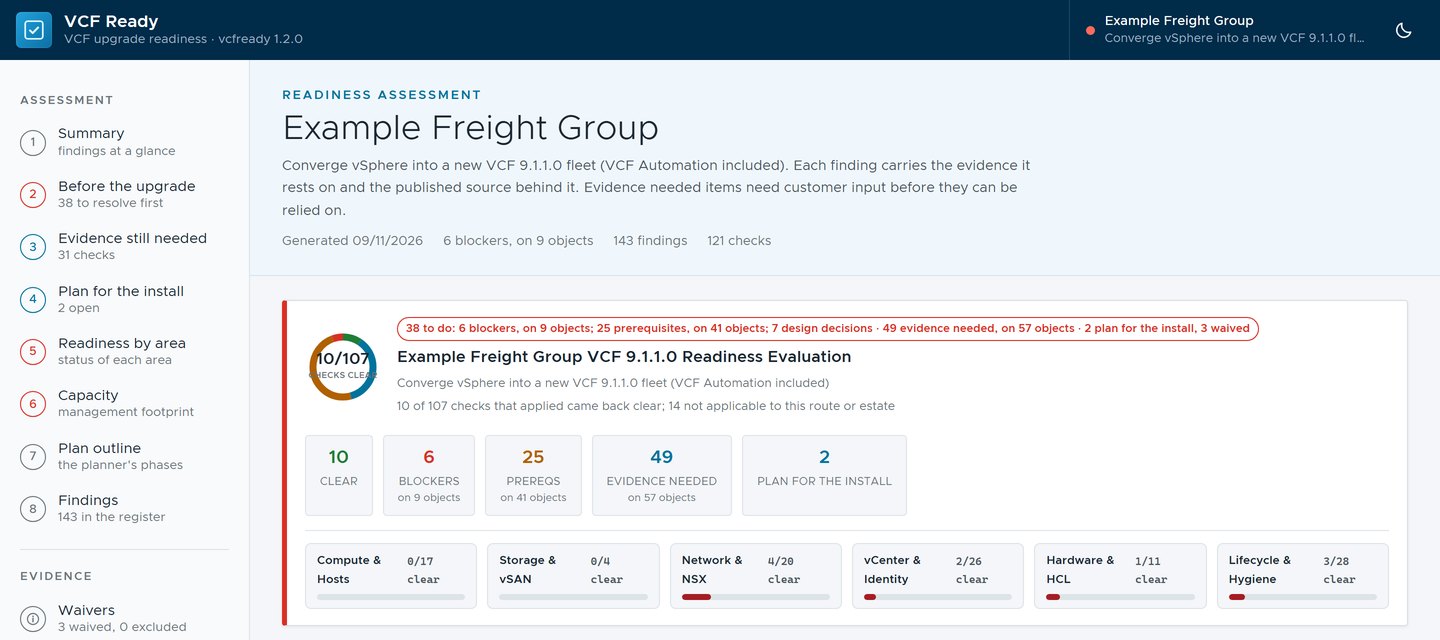 The same counts as the web page in part 1: 6 blockers on 9 objects, 25 prerequisites on 41, 49 evidence needed on 57.
Before the upgrade and Evidence still needed sit at the top, as in the report. Below them is the whole findings register, with filters for severity and area and a search box for findings, hosts and KB numbers.
The rest of the package
The runbook and the route comparison are the ones from part 2, as files. The questionnaire asks only what the inventory doesn’t answer, with drop-down lists for the yes, no and choice answers. Filled in, it goes back in through Step 1 or Step 2.
When vCenter was read through its API, there is also an inventory workbook: the collection in the RVTools layout, with an About sheet saying it is not RVTools output. It leaves out IP and MAC addresses and the guests’ host names, because the file gets passed around.
Three files stay with the consultant. The PowerCLI playbook holds read-only
audit commands, with any change commented out and set to -WhatIf. The
planner profile opens the VCF Upgrade Planner with the estate’s choices made.
The answers file joins the package only if you tick it.
One set of evidence, so they agree
Writing everything in one place means it all says the same thing. Every file comes from the same assessment run: Compile and refresh writes the lot, or the first download does. The Word report’s sources table says so.
So the numbers match. The dashboard, the Word report’s summary, the findings workbook and Step 2 of the web page all say 6 blockers on 9 objects and 25 prerequisites on 41. The report, the dashboard, the workbook and the evidence request carry the same “Broadcom data as of” line, so every reader can see how fresh it is.
It wasn’t always that tidy. In one 1.2 release candidate, Step 3’s sizing table counted the two standalone hosts as a fourteenth cluster, while the rest of the page said 13. A reader spots that in seconds, then wonders what else is off. It was fixed before 1.2.0.
Sharing an assessment without sharing the customer
Sooner or later an assessor wants a second opinion: a question about a finding, a report to review, a result to reproduce. The customer’s answer is short and entirely reasonable. The names and addresses stay on our site.
The usual fix is find and replace, followed by hope. It works until the one name you forgot is in cell Q412 of the second sheet. VCF Ready makes an anonymised copy instead, built to be checked by the people with most to lose from a mistake.
One tick on Step 4
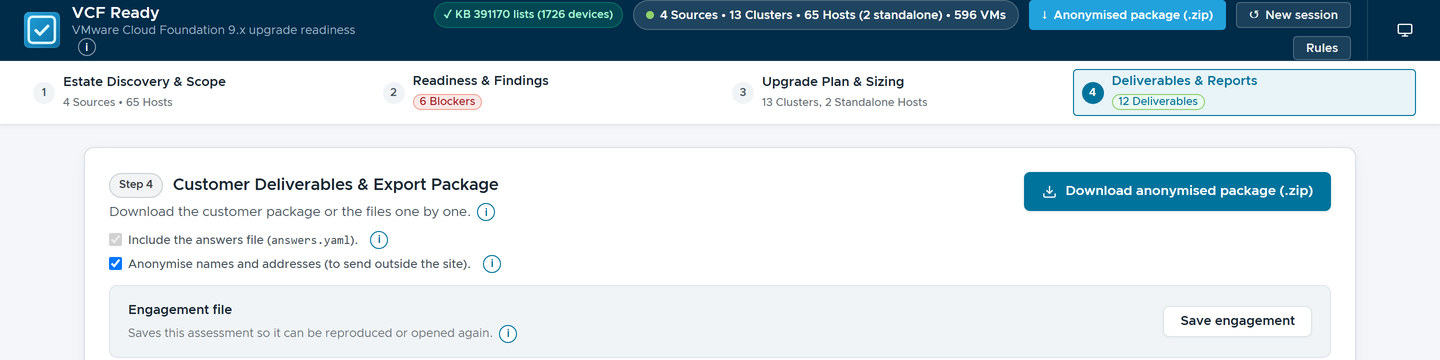 The tick changes the download button. The answers tick locks on, because the copy needs the answers to be assessed again.
From the command line, it is vcfready anonymise <folder> --out copy.zip.
The zip holds a README, the anonymised data and four reports rebuilt from it:
the Word report, the findings workbook, the dashboard and the evidence
request. It never holds the RVTools workbooks, the collections, the device
lists, the inventory workbook or the key.
Pseudonyms that keep what the checks test
Every name and address is replaced, in the data and in free text, from host names to serial numbers. Versions, models, drivers, PCI IDs, capacities and KB numbers stay, because the findings are about them.
Replacing a name is easy. Replacing it so that every check still gives the same answer is the work:
| A check tests | The pseudonym keeps |
|---|---|
A .local suffix | .local, the one top-level domain a check reads |
| Capital letters in a vCenter’s name | A capital, if the original had one |
Product words in VM names, such as vrops, nsx-mgr or srm | The keyword |
| The same name in two places | The same pseudonym in every field and file |
| A valid DNS name | A valid DNS name |
The .local rule is a recent lesson. The first version kept every
top-level domain, and a lab vCenter came back as vc-01.dom-02.lab. I
spotted it on the first export, which is more than can be said for the tests.
A private top-level domain can name a customer as surely as a host name can,
so now only .local stays.
Addresses go through a keyed, prefix-preserving permutation, the idea behind a published scheme called Crypto-PAn. Two addresses that share a prefix still do, so a /24 stays a /24, and every address stays in the range it was in.
The key stays on site
The key, anonymisation-key.json, maps every pseudonym back to its original.
It stays in the session folder, never goes in the zip and can’t be downloaded
from the page. The next copy reads it again, so the pseudonyms stay the same
from one export to the next. When a reviewer needs a real name, the customer
looks it up.
The self-check
The zip is written only when two checks pass. The assessment is run again from the anonymised data, and its rules, severities and findings per rule must match the original. Then every original name, address and identifier is searched for in every file, inside the Word and Excel files too. The example’s README reports both:
Self-check (the copy is not written unless both parts pass)
  Same assessment: the assessment was run again from this copy's data and compared with the original. 143 findings,
  the same as the original: every rule, its severities and the number of findings per rule are the same.
  No leak: 1355 original names, addresses and identifiers were looked for in every file of this zip, the
  text inside the Word and Excel files included. None was found.
If either fails, nothing is written, the output says what differs or what leaked and where, and the web page downloads nothing. It never falls back to the plain package.
An early version refused to copy an assessment because of the assessor’s own firm name. The name was replaced in the data, as it should be, but it also appeared in the tool’s own README. The tool suspected itself of leaking. As far as a text search can tell, it had a point.
Before and after
Here is one finding as the site sees it:
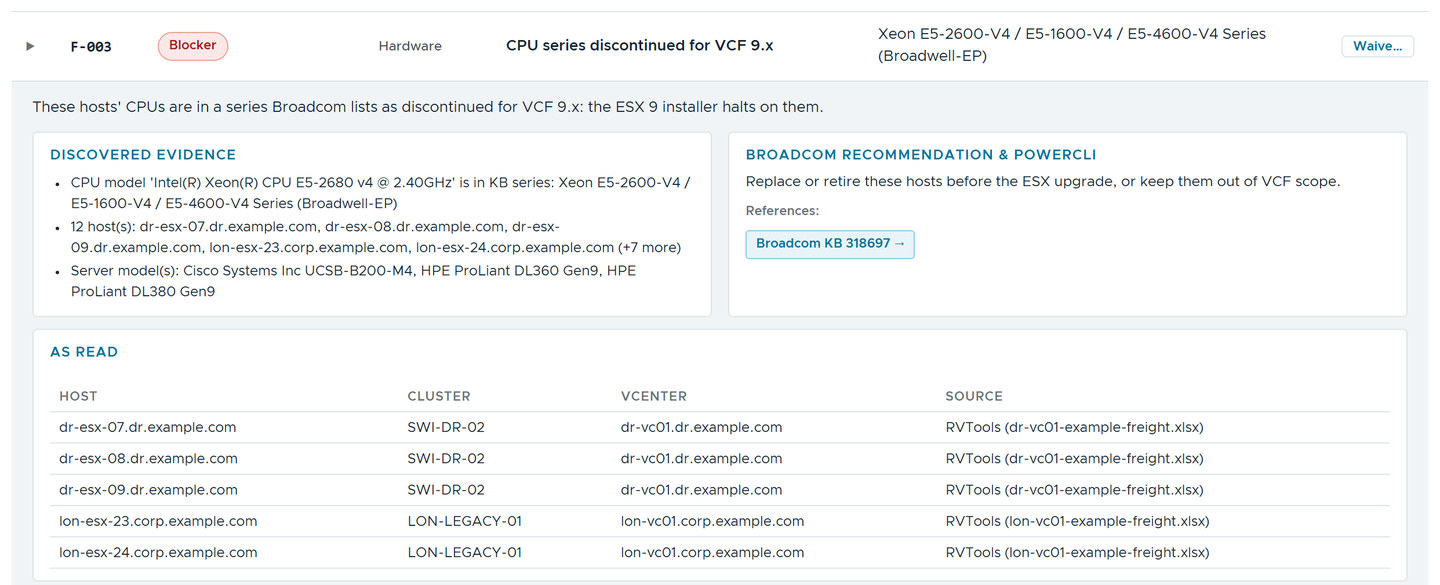 The original: real-looking host, cluster and vCenter names, and the source files.
And as the copy shows it:
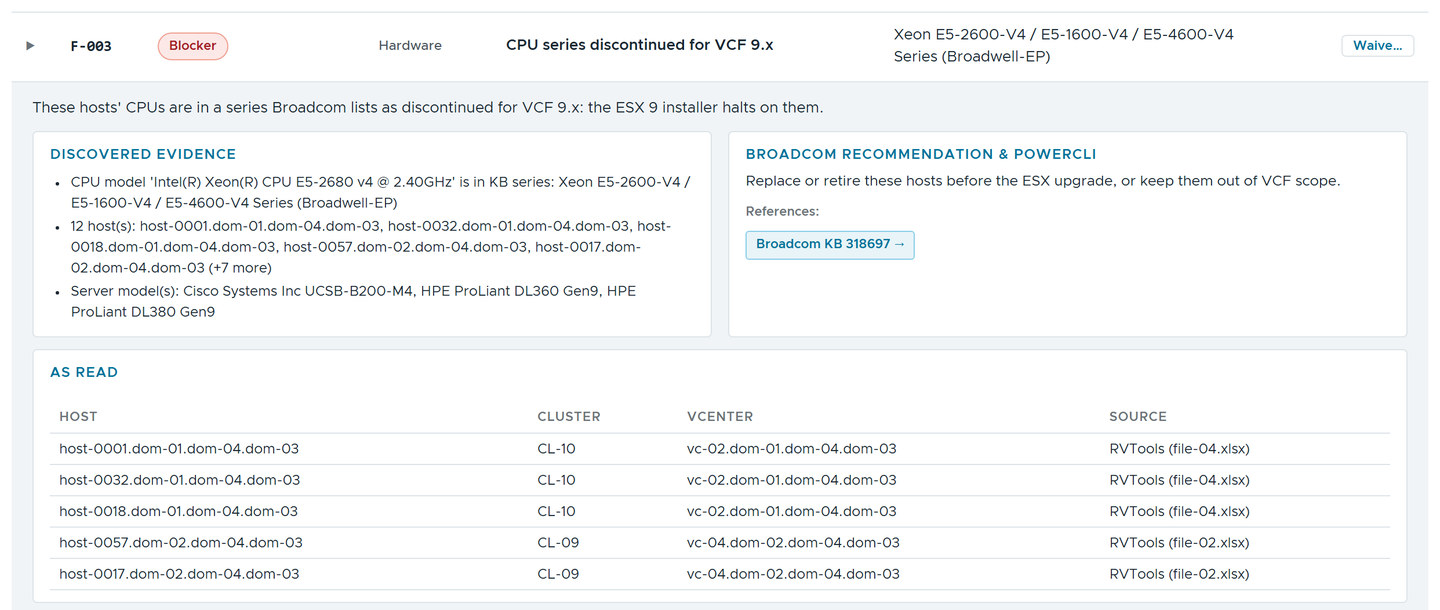 Pseudonyms for every name. The CPU model, the server models and the KB stay, because they are what the finding is about.
The finding is the same, the evidence is the same, and the customer is gone.
Opening the copy at the other end
The reviewer starts the web UI and drops the zip on Step 1, where RVTools exports go. Only its data files are read, in memory. A banner stays while the copy is loaded, and Step 4 builds fresh reports from it.
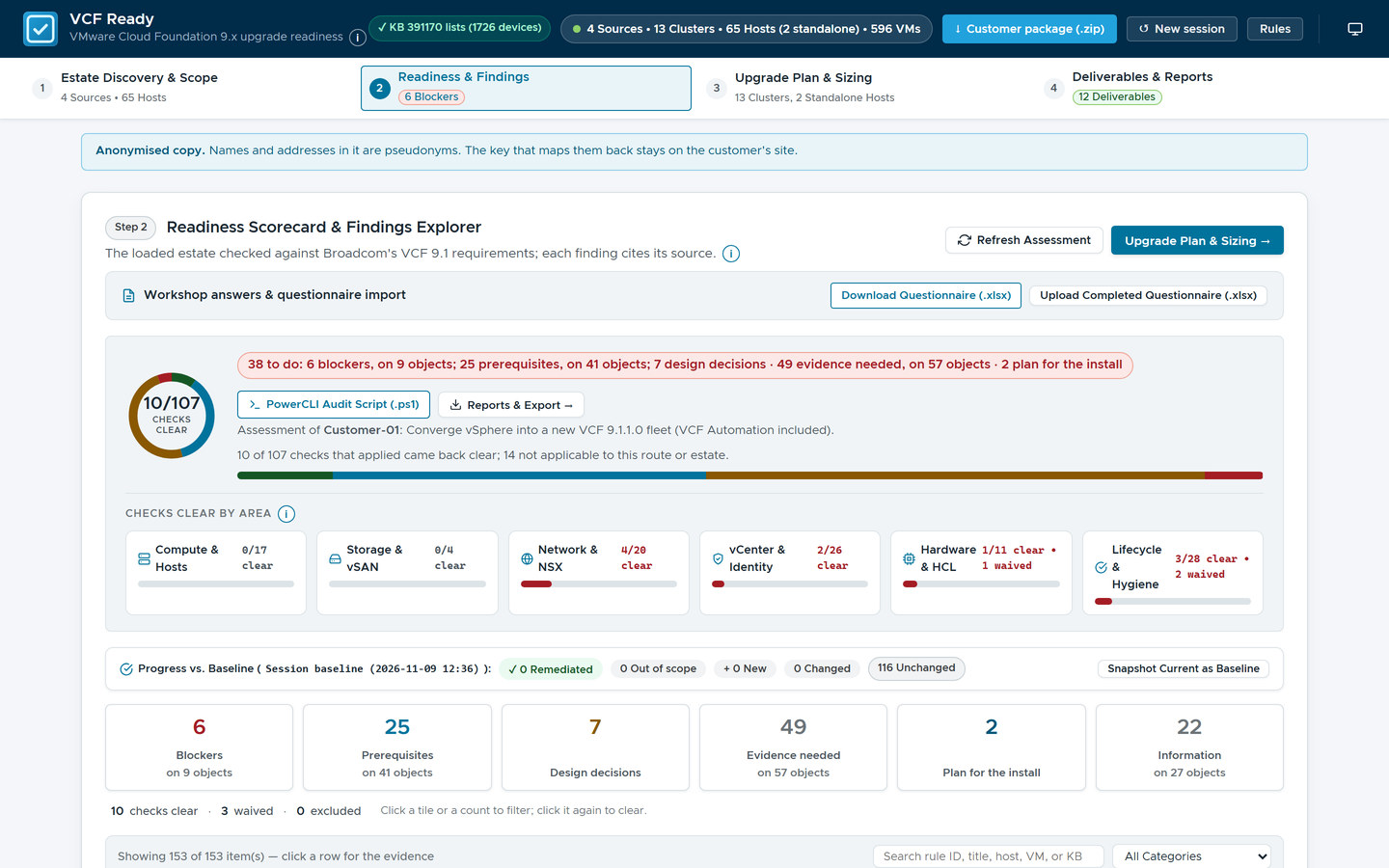 The same tiles as the original, and the customer is now Customer-01.
Two things it can’t do. It can’t replace a name it doesn’t know, such as one typed only into a free-text note, so read the README, the evidence and the notes before the zip leaves. And the shape of the estate stays: counts, versions and models are what the checks need, and someone who knows the estate might still recognise it.
Why this matters outside the lab
An assessment is judged by what the customer receives. The sponsor reads two pages, the engineers filter a workbook, and the security team reads one paragraph about access. Each gets a document written for them, and they all agree, because they come from the same evidence.
The anonymised copy changes what you can ask for. A customer who would never send an inventory may send something they can open, read and check themselves. A reviewer who has never seen the estate can still reproduce a finding. All they lack is the names.
Rules learned
- Write every deliverable from the same assessment run, so the counts agree wherever the reader looks.
- Write for each reader: a summary for the sponsor, rows for the engineers, a request for whoever holds the evidence.
- Group the asks so that one piece of work closes several checks, and never say a check passed in a request for evidence.
- Keep the consultant’s working files out of the customer’s package.
- Keep what the checks test, replace everything else, and keep the key on site.
- Write an anonymised copy only when it gives the same findings and a search of every file, inside the Word and Excel files too, finds no original name.
What’s next
Part 4 is about writing your own checks, and keeping them honest.
VCF Ready isn’t public, so there is no download link. If you would like to see what it hands over for an estate, get in touch.
Broadcom documentation
- CPU Support Deprecation and Discontinuation In VCF Releases (KB 318697): lists the Xeon D-1500 Series (Broadwell-DE) as discontinued for VCF 9.x, the finding on the Word report page above
- Planning and Preparation: the Planning and Preparation Workbook for VCF 9.1.0 and 9.1.1, whose management domain sizing the Word report follows
- VCF Upgrade Planner: the planner whose first step imports the profile the consultant keeps
- Guidelines for Using .Local DNS Domains in VCF and VVF Deployments (KB 460245): the guidance behind the
.localcheck, which is why.localis the one ending the anonymised copy keeps
Lab environment; opinions my own. VCF Ready is our own tooling, not a Broadcom product. The estate in the pictures is fictional, with example domains. VMware, VCF and ESX are trademarks of Broadcom Inc. or its subsidiaries.