Part 1 ended with a list of what stands in the way. The customer’s next question is always the same: fine, but what do we end up with, and what do we need to buy?
Broadcom answers that too, in three places. The VCF Upgrade Planner gives the route and its phases. The Planning and Preparation Workbook sizes the management domain. The design blueprints describe the target. One is a web app, one is an Excel workbook and one is 19 web pages.
VCF Ready puts the three on one page, Step 3, filled in from the estate it has already read. The pictures are of the made-up Example Freight Group from part 1: four vCenters, 13 clusters and 65 hosts.
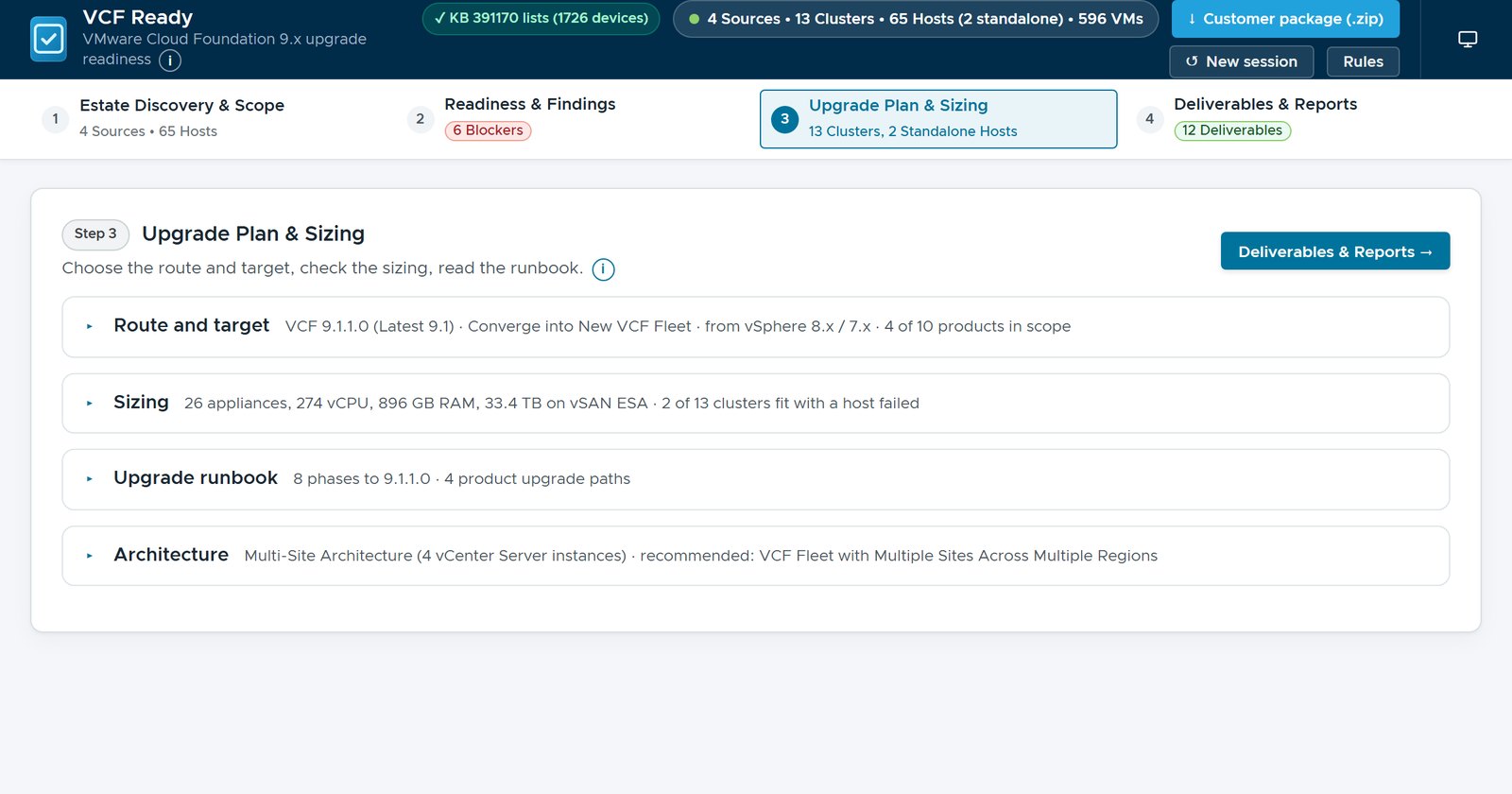
Step 3 in four lines
Step 3 has four sections: Route and target, Sizing, Upgrade runbook and Architecture. Closed, each one still says what is inside, so the whole plan fits on one screen. That screen is the cover of this post.
Route and target
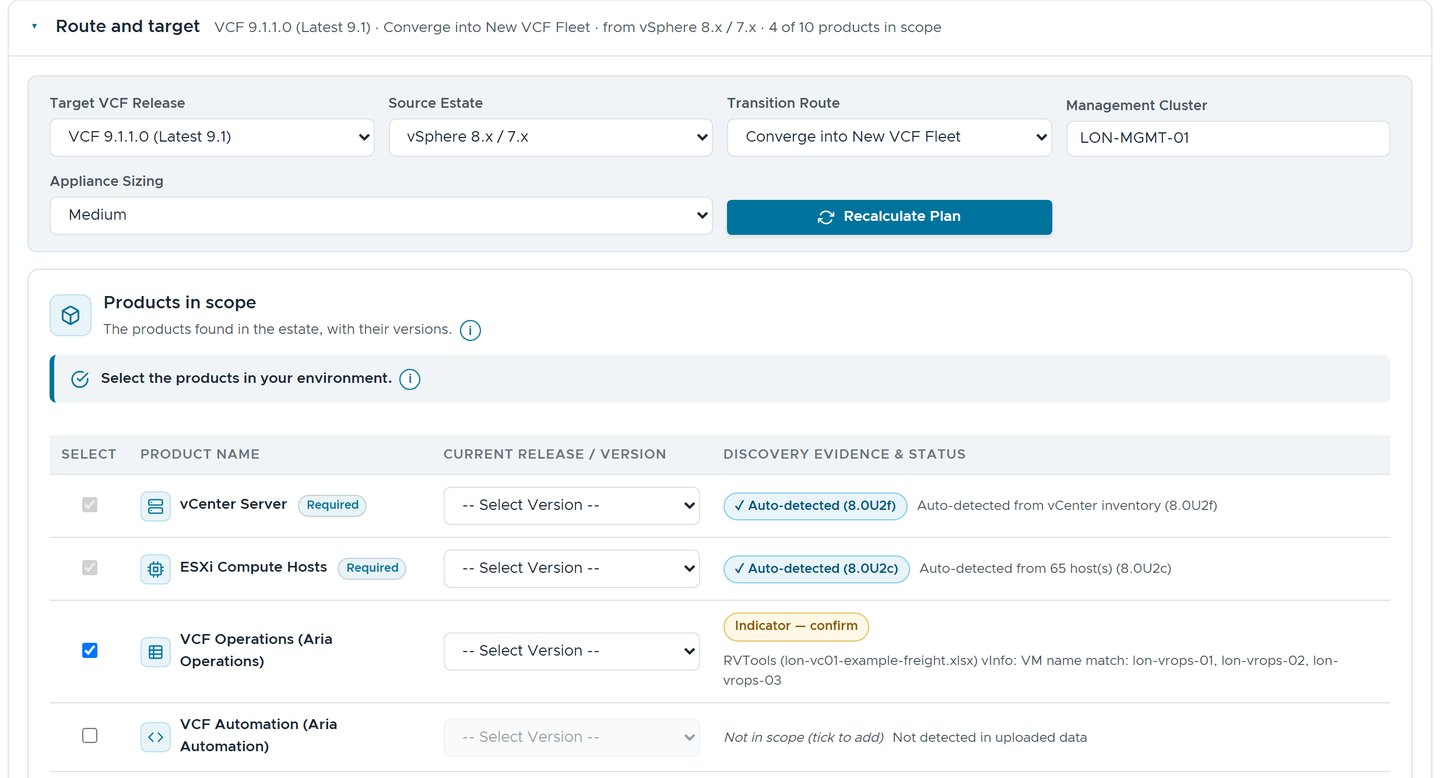 The target, the route and the management cluster, and the products the estate shows.
The target release, the source and the route come from the answers file, or are picked here. The products in scope come from the estate. vCenter and ESX versions are read from the inventory. VCF Operations shows only as an indicator, because three VMs are named like its nodes. An indicator is a reason to ask, not an answer, so it says “confirm”.
Which route? Ask the same evidence five times
From vSphere, the planner has five routes: converge into a new fleet, converge into a new instance, import as a workload domain, and two routes to vSphere Foundation 9.1, with or without the VCF management services (the lifecycle, depot and telemetry services that VCF requires and vSphere Foundation makes optional). VCF Ready assesses the same evidence once for each route. The route comparison then separates what the choice changes from what follows the estate wherever it goes.
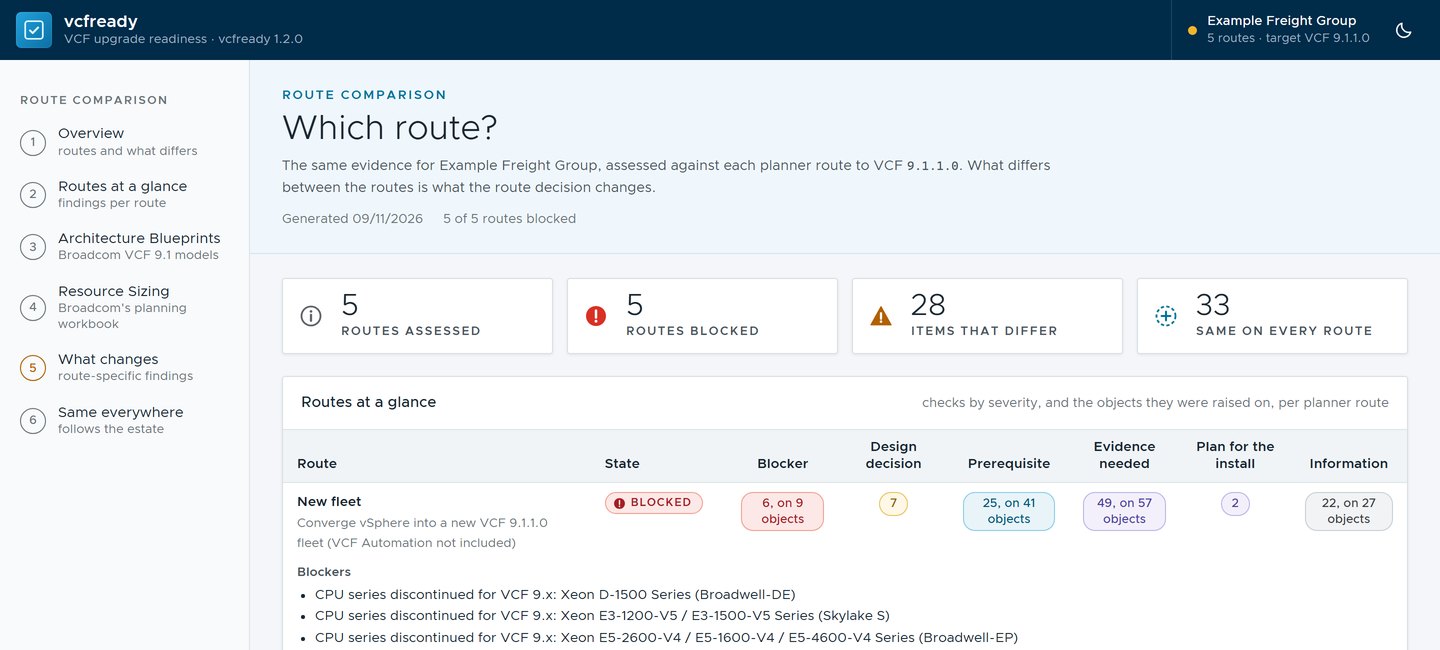 Five routes, the same evidence: 28 items differ between them and 33 do not.
In the example, all five routes are blocked. Discontinued CPUs are refreshingly impartial about routes. The 28 items that differ are the useful part: they are what the route decision actually decides.
The runbook, from the planner’s own data
The VCF Upgrade Planner is Broadcom’s guide to the order of an upgrade. It asks about the environment and the goal, then lays out the phases with their notices and Knowledge Base (KB) articles. VCF Ready carries a pinned copy of the planner’s data. From the estate and the answers, it works out which planner scenario applies, and which of its optional parts do.
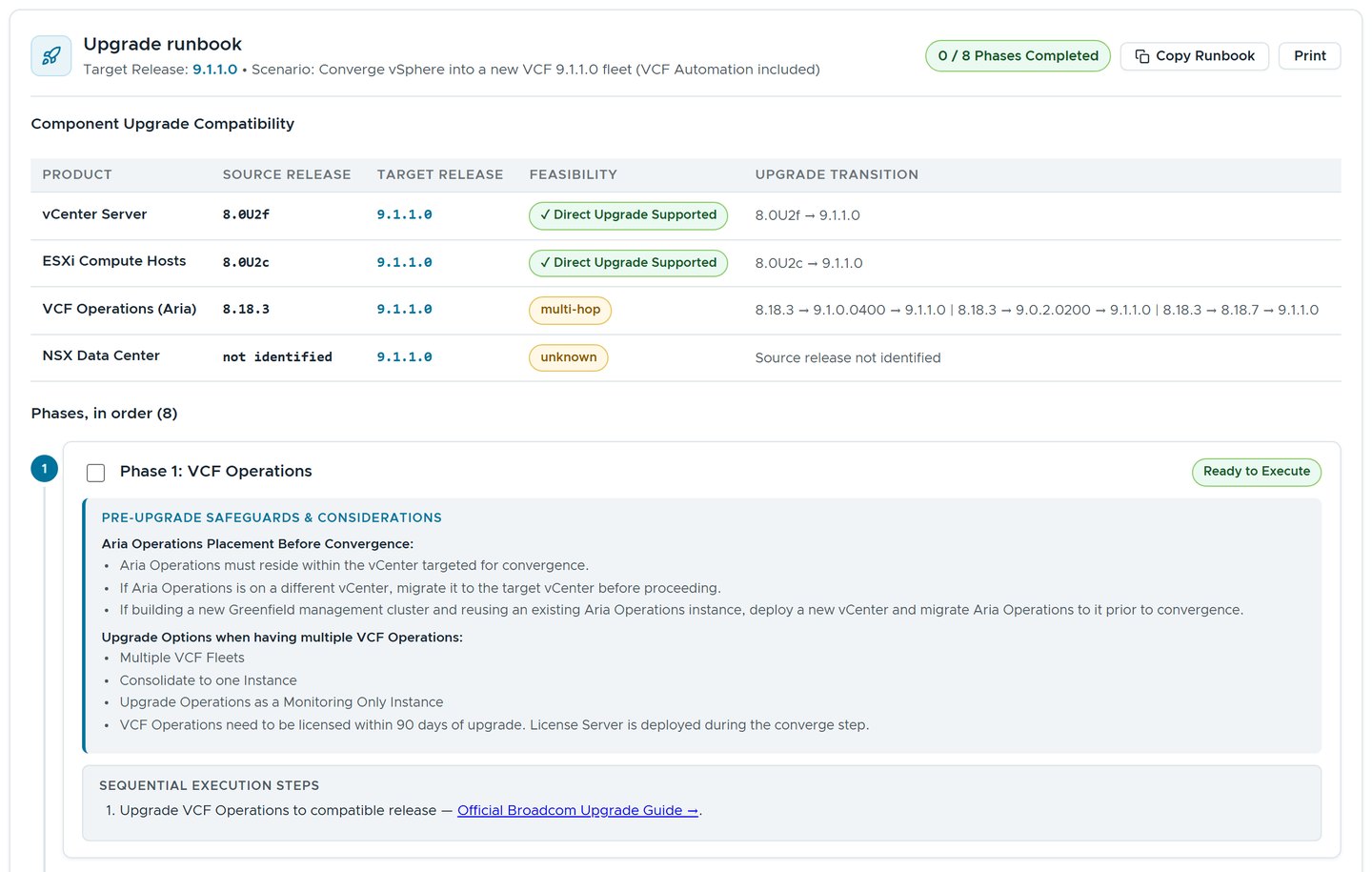 Each product’s path to the target against the interop data, then the phases in order.
The runbook opens with each product’s path to the target. vCenter and ESX go straight to 9.1.1.0. VCF Operations 8.18.3 takes more than one hop, and the table lists the paths. NSX was found only by its VM names, so it has no version, and its row says “unknown” rather than guessing. Eight phases follow, starting with VCF Operations, breaking Enhanced Linked Mode and the converge itself. Each has the planner’s safeguards and links to Broadcom’s guides.
What VCF Ready doesn’t do is rebuild the planner’s step-by-step plan. The plan pages hold a lot of version-specific logic that changes weekly, and a copy would be out of date by Friday. VCF Ready writes a planner profile instead. Import it into the VCF Upgrade Planner, and the plan that counts opens with the estate’s choices already made.
Sizing, cell by cell
Broadcom’s Planning and Preparation Workbook is an Excel file on TechDocs, one for 9.1.0 and one for 9.1.1. Its Management Domain Sizing sheet adds up every appliance the management domain runs and turns the total into hosts. VCF Ready does the same arithmetic. It was checked cell by cell against both workbooks, which is exactly as thrilling as it sounds.
The workbook itself isn’t in the tool, only its figures and its arithmetic. Every result names the edition and version it follows: here, the VCF 9.1.1 workbook, v1.9.1.103.
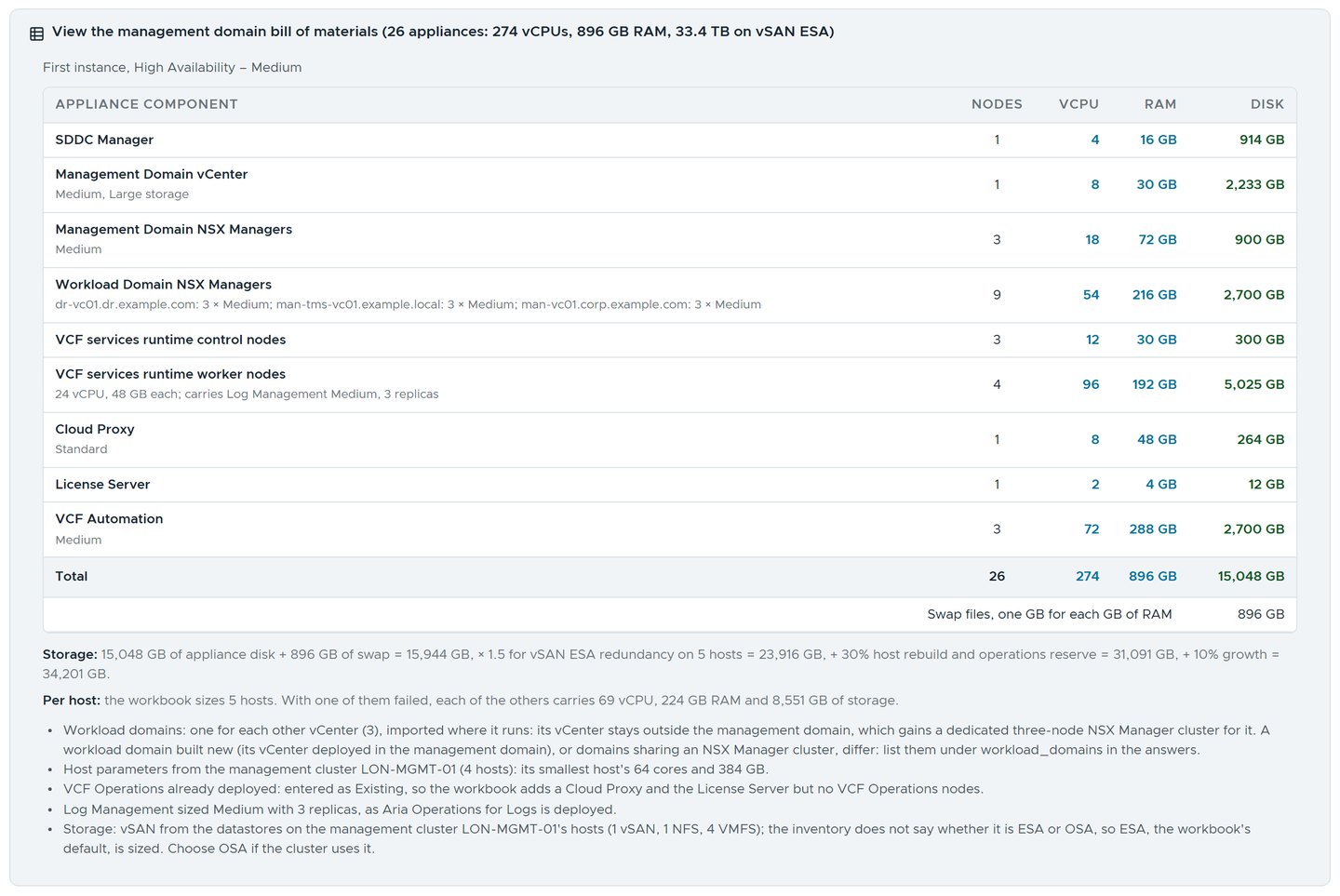 The workbook’s bill of materials for the example, and how the storage figure is reached.
For the example, a first instance at High Availability, Medium, comes to 26 appliances. That is 274 vCPUs, 896 GB of RAM and 34,201 GB of storage, once the workbook adds swap, vSAN Express Storage Architecture (ESA) redundancy, a rebuild reserve and growth. The workbook makes it five hosts of the management cluster’s size.
Some inputs the workbook needs, the estate can’t give. They are sizing decisions, each shown with where it came from. Workload domains start as one for each other vCenter, imported where it runs. Principal storage starts as what the management cluster’s datastores hold. Change either and the sizing follows, and the answers file keeps the change.
Products already deployed count the way the workbook counts them. VCF Operations is entered as existing, so the sheet adds a Cloud Proxy and the License Server but no new VCF Operations nodes. What the sheet doesn’t model is listed too: NSX Global Managers, the Security Services Platform, the vDefend and Avi licensing hub, Live Recovery for workload domains and customer workloads.
Every cluster, with a host down
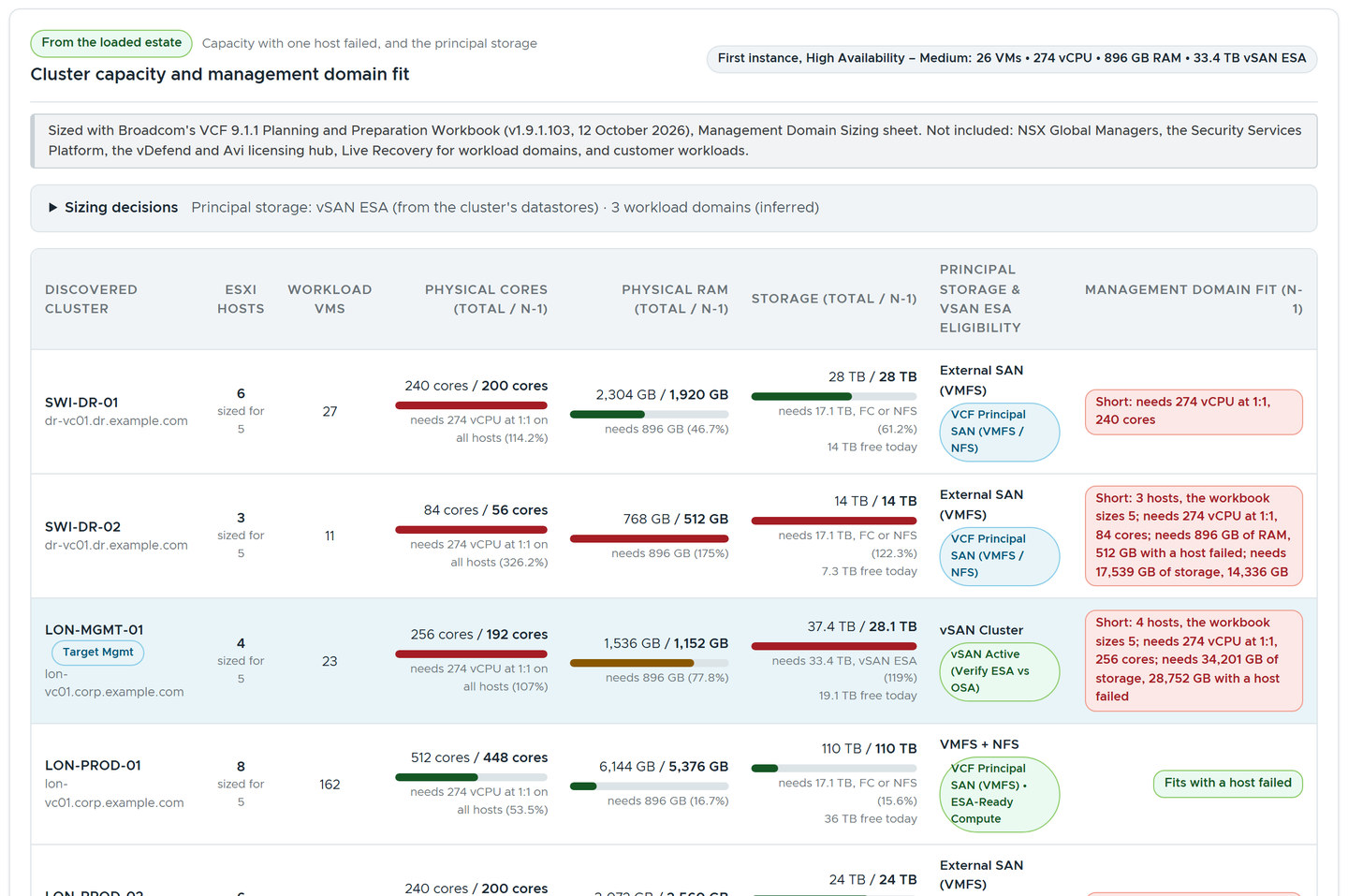 Each cluster against the sized management domain, with one host down.
Then each cluster is set beside the sized management domain, with one host failed. In the example, 2 of the 13 clusters fit. LON-MGMT-01, the cluster with management in its name, has 4 hosts where the workbook sizes 5. It happens to the best of us.
Blueprints: what it becomes
Broadcom’s design blueprints are reference designs for VCF 9.1: 19 of them, under Infrastructure, Application and Security Modernization. Each has its own page, and the fleet designs have a Minimum Requirements page with their host counts. VCF Ready has an entry for every one, under Broadcom’s own headings, saying what its page says.
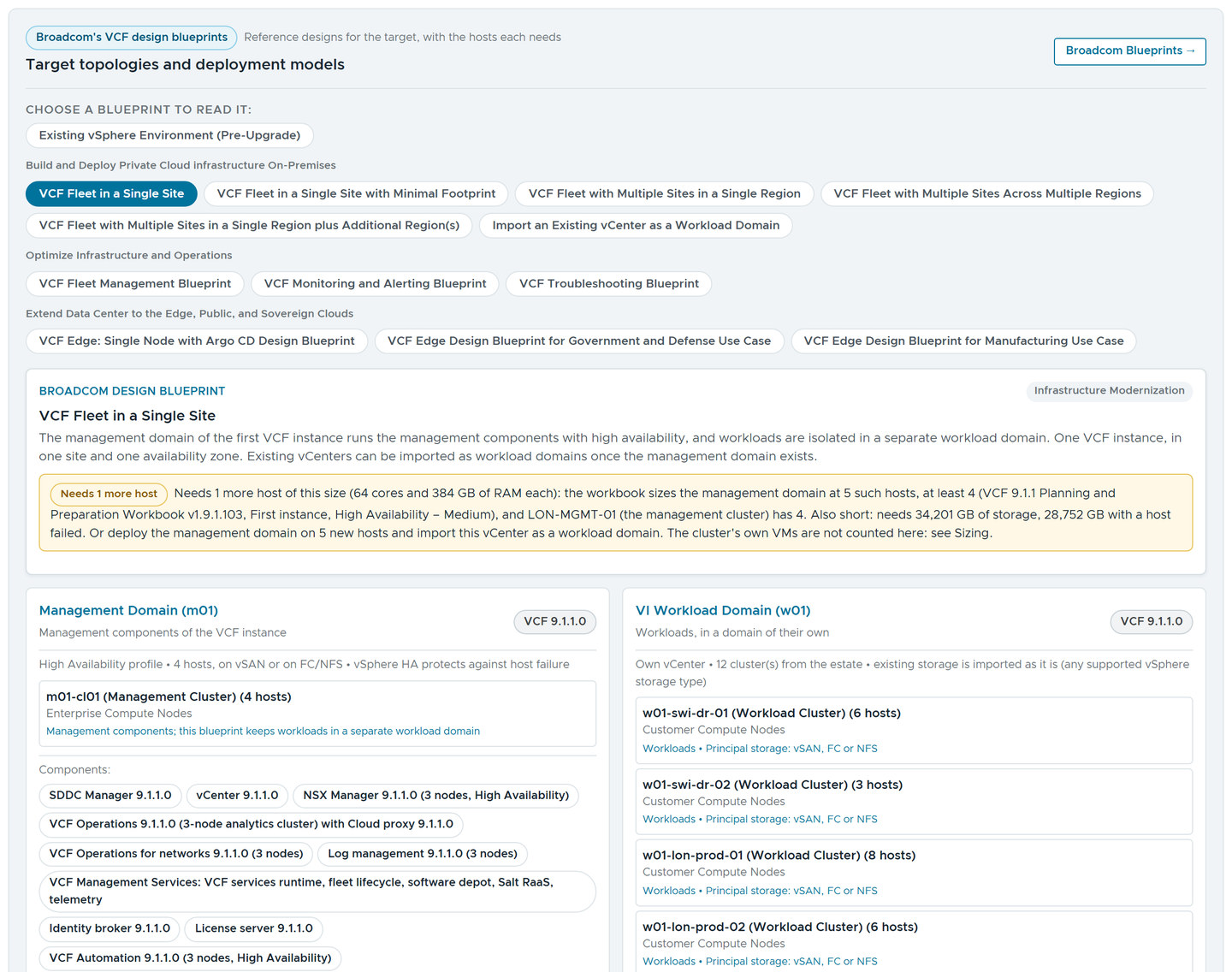 The blueprints under Broadcom’s headings. This one needs one more host.
Each card sets the blueprint’s host count against the estate. VCF Fleet in a Single Site, picked above, needs one more host the size of the management cluster’s: the workbook sizes five, and LON-MGMT-01 has four. The card gives the other way too: deploy the management domain on five new hosts, and import the vCenter as a workload domain.
The recommended target comes with its reasons. The example’s four vCenters stand on three sites, so VCF Ready recommends VCF Fleet with Multiple Sites Across Multiple Regions: a VCF instance for each site, in one fleet, reached by a converge. The reasons name all three of Broadcom’s multi-site blueprints and say why this one fits.
The estate records no sites, so they come from the vCenter names, and the card says so. Each region is then set against its site’s largest cluster. Here the management domains need 12 hosts in all, 4 in each region, and no site is short.
Sites and regions, drawn as you type
A site taken from a vCenter’s name is a fair guess, but it is still a guess. So Step 3 has a Site layout panel. It lists each vCenter with the site its name gives, and any of its clusters can stand on a site of its own. Beside it, the recommended blueprint is drawn top-down: its regions, the sites in each, and the vCenters and clusters on each site. The drawing follows your typing, and says “Preview: not applied yet” until you apply it.
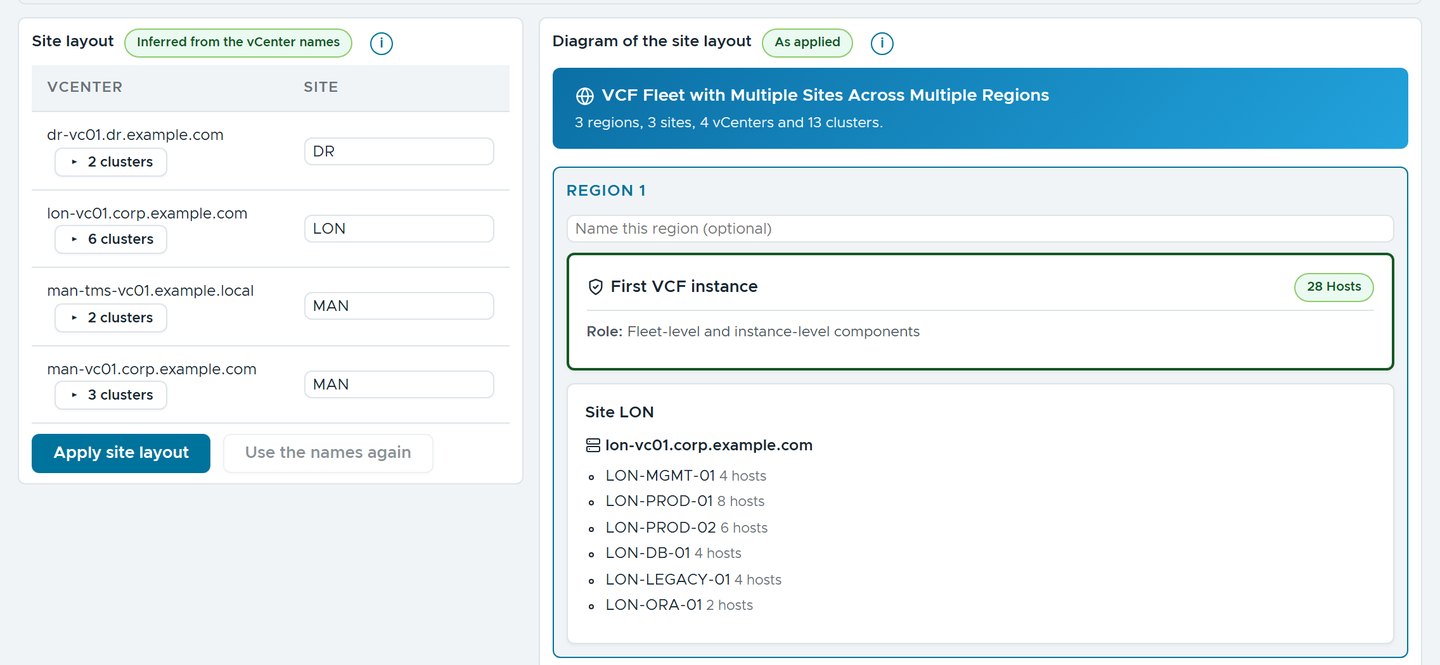 Three sites, so three regions, each with a VCF instance of its own. Region 1 holds the management cluster.
Broadcom’s multi-site blueprints don’t define a region by distance. They tell regions apart by shape, and so does VCF Ready. Two sites that share one VCF instance, stretched over two availability zones, are one region. Every other site is a region of its own. Region 1 is where the first VCF instance goes: the site of the management cluster, or the stretched pair when there is one. There is no region setting to get wrong.
A stretched cluster needs two more facts: the site it is stretched to, and the site of its witness. Once the estate or the workshop says a vSAN cluster is stretched, each cluster row gains a Stretched to box and a Witness at box. For the picture below, I answered the stretched question Yes for the example. Then I stated LON-MGMT-01 as stretched to MAN, with its witness at DR.
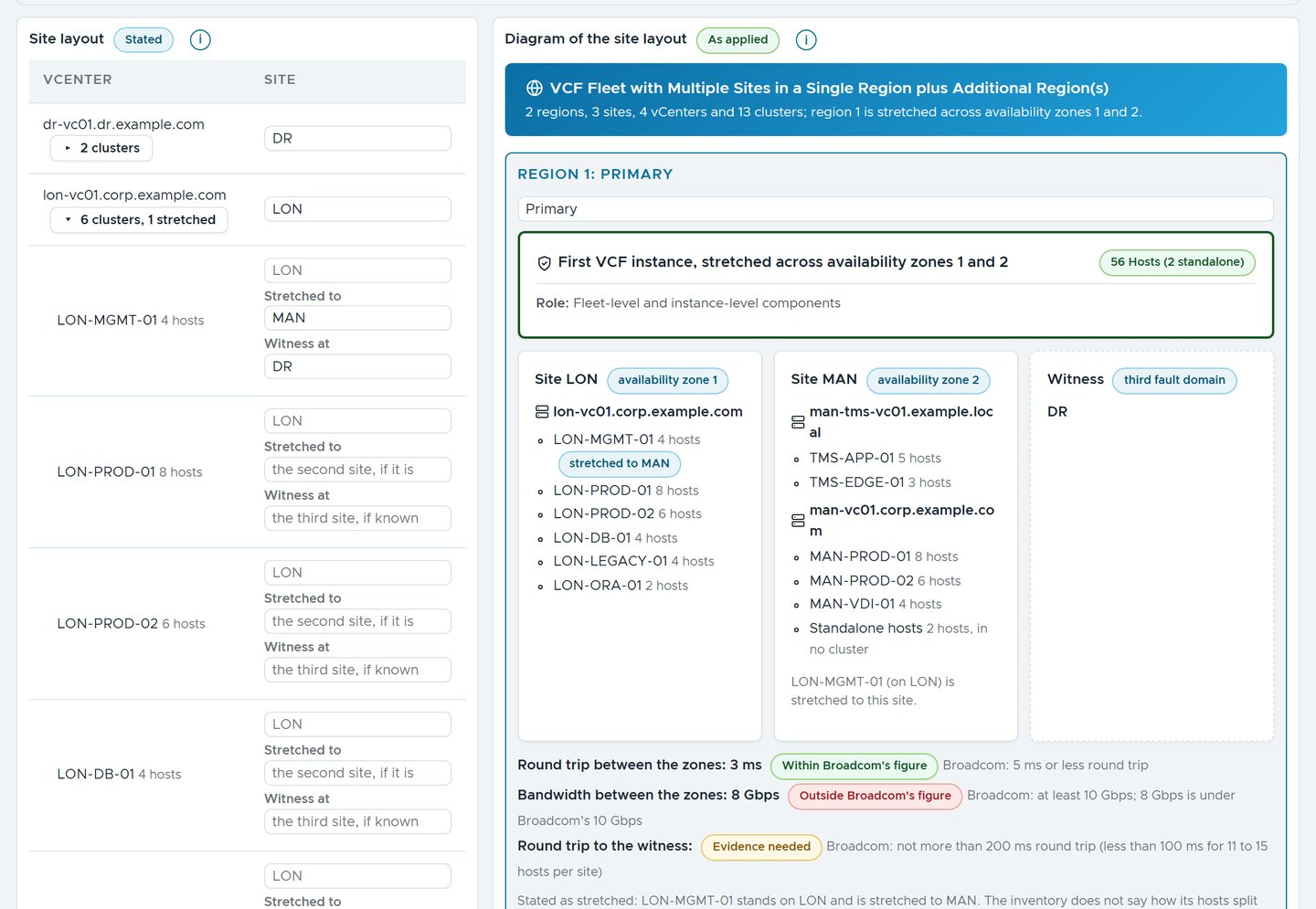 One region over two availability zones, the witness in a third fault domain, and the link set against Broadcom’s figures.
The link is checked as well. A new check, VCF-STO-005, asks for three measured figures and sets each against Broadcom’s. Between the zones, that is a round trip of 5 ms or less and at least 10 Gbps. To the witness, it is a round trip of not more than 200 ms, or under 100 ms with 11 to 15 hosts per site.
I typed in 3 ms and 8 Gbps, and left the witness blank. The 3 ms passes, the 8 Gbps comes back as a Prerequisite and the witness stays Evidence needed. A witness on either data site would be a finding too. Better to meet the 8 Gbps in a workshop than in a change window.
A region can also have a name, as region 1 has above. The name is a label only: it changes no region, number, fit or blueprint.
Not every workshop happens in the web page. While a vSAN cluster is stretched, the questionnaire workbook gains a fourth sheet, Stretched clusters. It has a row for each cluster and two yellow columns, Stretched to and Witness at. Fill them in, import the workbook, and the answers land where the panel would have put them.
Why this matters outside the lab
The plan is where a readiness assessment turns into a budget. That conversation goes better when nobody has to ask where a number came from. Here every figure names its source: the workbook’s edition and version, the planner’s data, the blueprint’s page. The customer can check each one against Broadcom.
Filled in by hand from the same inventory, the planner, the workbook and the blueprints can drift apart. Filled in from one assessment, they read the same estate and tell the same story.
Rules learned
- Reproduce the vendor’s arithmetic exactly, and name the edition and version on every figure it produces.
- Outline the plan and hand it to the planner, which stays the authority, rather than copying logic that changes weekly.
- Size against a failed host, not a full cluster.
- Ask the same evidence about every route before choosing one.
- Work out regions from the shapes of Broadcom’s blueprints, and ask for a stretched link’s measured figures rather than assume them.
- When the estate can’t say something, such as a site or an NSX version, say so and count what you can.
What’s next
Part 3 is the deliverables, and how to share an assessment without sharing the customer. Part 4 is about writing your own checks.
VCF Ready isn’t public, so there is no download link. If you would like to see it plan an estate, get in touch.
Broadcom documentation
- Planning and Preparation: the Planning and Preparation Workbook for VCF 9.1.0 and 9.1.1, whose Management Domain Sizing sheet the sizing reproduces
- VCF Upgrade Planner: the routes, the phases and the profile import
- Product Interoperability Matrix: the interop data the runbook’s upgrade paths are checked against
- Design Blueprints for VMware Cloud Foundation: the 19 blueprints, each with its own page and host minimums
- Stretched vSphere Cluster Model: “up to two availability zones” for a stretched cluster; for vSAN, at least 10 Gbps and a round trip of less than 5 ms between the zones, and “a third, independent fault domain” for the witness
- Stretched vSAN Storage Model: “no less than 10GbE” and a round trip of not more than 5 ms between the data sites; a witness “not co-located to the ESX hosts in any of the availability zones”, within 200 ms round trip
- Bandwidth and Latency Requirements: the vSAN stretched cluster figures, a “minimum of 10 GbE” and “5 ms or less latency RTT” between the sites, and the witness round trip by hosts per site
- Upgrading to VMware Cloud Foundation 9.1.x: the upgrade routes the comparison assesses
Lab environment; opinions my own. VCF Ready is our own tooling, not a Broadcom product. The estate in the pictures is fictional, with example domains. VMware, VCF and ESX are trademarks of Broadcom Inc. or its subsidiaries.