
The second trap from part 1 deserves its own
short post, because it catches everything, not just ESXi: our VPC subnets
have DHCP deactivated. NSX VPC subnets can run a DHCP server or relay
(Add a Subnet to a VPC).
But the subnets the Supervisor made for us, and every Subnet we created
with the defaults, came up DHCP_DEACTIVATED with static IP allocation.
Drop a stock appliance onto one and it will boot, sit at “waiting for DHCP”, and wait politely until the heat death of the universe.
This isn’t a gap. It’s the model. NSX allocates the address at the port and pins it there with address bindings, and the guest has to be told what it was given. The VM Service does that telling through bootstrap providers. Once you know the three of them, static addressing stops being a chore and starts being a feature.
Three providers, three guest types
| Guest | Provider | Carries |
|---|---|---|
| Linux | cloudInit | user-data (users, write_files, runcmd) + network config |
| Windows | sysprep | unattend XML / sysprep spec, identity, network |
| Appliances (OVF) | vAppConfig | OVF properties (guestinfo.*) the appliance reads on boot |
All three are typed fields on the VirtualMachine object, not bolt-on
customisation specs. The platform already knows the network side: the VM
Service knows which subnet each interface landed on, and what NSX allocated.
So for cloud-init and sysprep, the addressing is injected for you.
Appliances are the exception, because each one has its own idea of which
properties it wants.
Appliances: vAppConfig
The nested-ESXi appliance reads guestinfo.* OVF properties. In the VM
Service spec, that’s:
bootstrap:
  vAppConfig:
    properties:
      - {key: guestinfo.hostname,  value: {value: "esx01.pod-a.res.lab"}}
      - {key: guestinfo.ipaddress, value: {value: "172.30.0.40"}}
      - {key: guestinfo.netmask,   value: {value: "255.255.255.224"}}
      - {key: guestinfo.gateway,   value: {value: "172.30.0.33"}}
      - {key: guestinfo.vlan,      value: {value: "1610"}}
      - {key: guestinfo.dns,       value: {value: "10.20.52.1"}}
      - {key: guestinfo.ssh,       value: {value: "True"}}
The one that trips people up: the address you give must be the one NSX allocated to the port. In a standard subnet, SpoofGuard enforces that, and it doesn’t negotiate. On a trunk subnet, the VLAN subnets have their own allocations, and you’re choosing addresses within them.
Either way, pick from the realized range. And remember that recreating a VM
reallocates its addresses. So the fixed
.40/.41 in a deterministic pod
is a design choice, not luck.
Linux: cloud-init
A Secret holding user-data, referenced from the VM:
bootstrap:
  cloudInit:
    cloudConfig:
      users: [ ... a local user with a key ... ]
      write_files:
        - path: /var/www/html/index.html
          content: "shared-svc repo01\n"
      runcmd:
        - [systemctl, enable, --now, nginx]
Networking arrives through the platform’s own network-config, so you don’t write it. Every line of YAML I don’t write is a line I can’t get wrong.
The svc-repo01 VM from the shared-services
post was exactly this:
write_files plus runcmd, with its web page verified from three pods.
Windows: sysprep
bootstrap:
  sysprep:
    sysprep:
      guiUnattended: {autoLogon: true, autoLogonCount: 1, timeZone: 85}
      identification: {joinWorkgroup: WORKGROUP}
      userData: {fullName: Lab, orgName: Lab, computerName: {name: win01}}
Or use rawSysprep with an unattend XML in a Secret, if you already have
one. The ISO from the blueprint post
can ride along as a declarative hardware.cdrom. That’s handy for tools and
agents on first boot.
The ESXi footnote: one gateway, many vmks
Once the appliance is up and you add vMotion and vSAN vmks on their own subnets, you hit a detail that makes the Host Client look wrong:
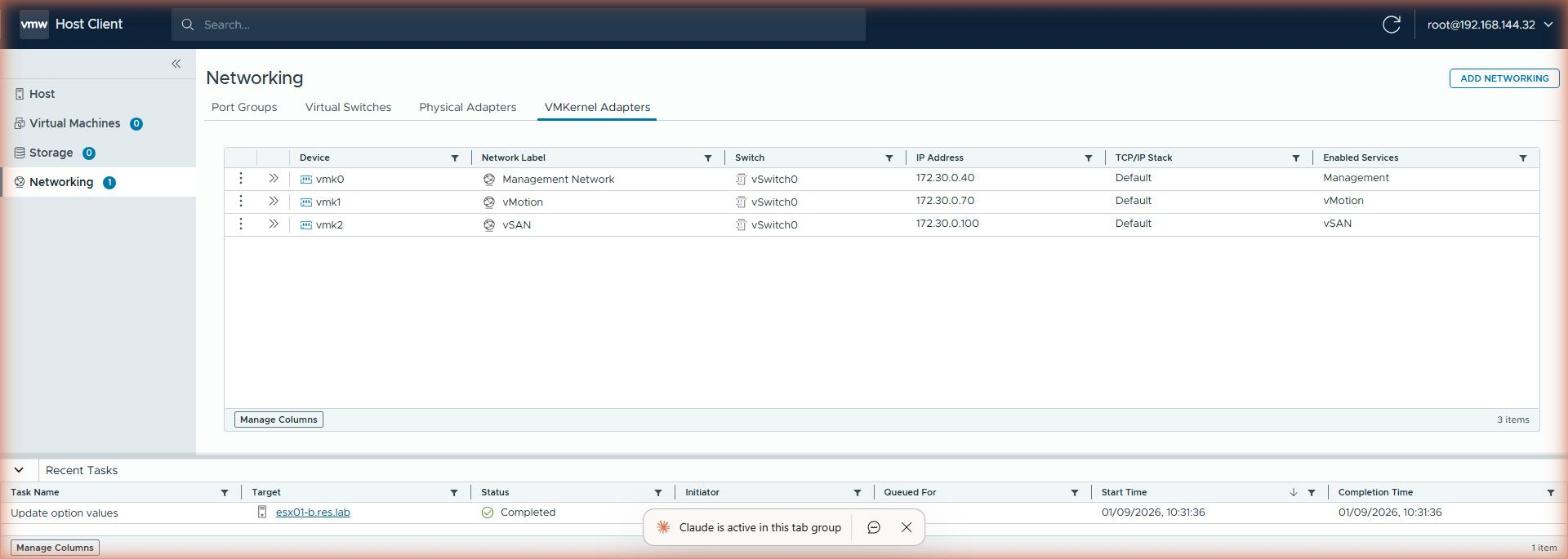
ESXi’s default TCP/IP stack has one default gateway (vmk0’s .33), and
the UI repeats it on every vmk row with total confidence. Same-subnet vMotion
never uses a gateway, so nothing breaks. But each NSX subnet does have its
own gateway, and cross-subnet traffic from vmk1 and vmk2 would take the wrong
exit. Set per-vmk override gateways:
esxcli network ip interface ipv4 set -i vmk1 -t static -I 172.30.0.70  -N 255.255.255.224 -g 172.30.0.65
esxcli network ip interface ipv4 set -i vmk2 -t static -I 172.30.0.100 -N 255.255.255.224 -g 172.30.0.97
Now the display is truthful and the routing is correct. (The full-realism
alternative is a dedicated vmotion netstack for vmk1. I kept the default
stack so the service tags stay visible in the Host Client.)
Why this matters outside the lab
For the business, “no DHCP” translates into something security and operations teams both want: predictable addressing. Every environment has a known address plan, firewall rules can be written once, and nothing turns up on the network with an address nobody expected.
Bootstrap providers deliver the second benefit. Images stay generic and configuration is injected at deploy time, so there are fewer golden images to maintain and far less drift between environments.
Rules learned
- No DHCP in our VPC subnets: that’s the Supervisor’s default, not a VPC limit. NSX allocates at the port, and the guest is told through a bootstrap provider.
cloudInit(Linux),sysprep(Windows) andvAppConfig(appliances) are typed fields on the VM, not customisation specs.- Appliance addresses must match the realized subnet. Fix the order of subnet creation if you want fixed addresses across pods.
- ESXi has one default gateway per stack. Set
-gper vmk, or the Host Client lies to you and cross-subnet traffic exits wrong. - A static IP plan is a feature in a lab: it’s what makes screenshots, runbooks and pods identical.
Broadcom documentation
- Add a Subnet to a VPC: a subnet’s DHCP setting: none for static addresses, a DHCP server, or DHCP relay.
- Understanding SpoofGuard Segment Profile: the port address bindings SpoofGuard enforces.
- Provision a VM Using Self-Service: the four bootstrap methods, cloud-init, Sysprep, Linuxprep and vAppConfig, and static IP allocation.
- Deploy VMs with Configurable OVF Properties in vSphere Supervisor: OVF properties set through the VM Service’s vAppConfig transport.
- Configure the VMkernel Adapter Gateway by Using esxcli Commands: a gateway per VMkernel adapter, set with esxcli.
Companion to nested ESXi inside an NSX VPC.
Lab environment; opinions my own.