
Part 1 ended with a startup scheduled
task registered and 05-build-master.ps1 staged locally. From here, the
machine reboots at least twice more. Windows Updates insists, as it tends
to, and the build ends with a clean reboot.
Every one of those boots runs the same script. So the script has to converge on a finished build, however many times it runs.
That’s a state machine, and it’s built from three very boring mechanisms.
The three mechanisms
1. Master kill switch. If 100_build_complete.flag exists, exit
straight away. A stray task run after completion does nothing.
2. Per-step flags. Every install step writes
NN_<Step>_installed.flag when it succeeds, and is skipped on later runs.
3. Persisted state. data-state.json holds the provisioning start
time and the timing of each step, and it’s reloaded on every boot. So the
final report shows the true duration of every step across the whole
build, not just the last boot. A step seen again as SKIPPED after a reboot
never overwrites its real recorded duration.
every boot:
  if 100_build_complete.flag → exit
  load data-state.json
  for step in $softwarePayload:
      if NN_step_installed.flag → SKIP (keep recorded timing)
      run installer from local Staging (timeout ceiling)
      exit 0 or 3010 → write flag, record timing
      if step.RebootAfter → Restart-Computer; exit      ← next boot resumes here
  cleanup → validate → publish → self-destruct → final reboot
 The loop above, boot by boot.
Phase 1: software, declaratively
The stack is a single array, and that array is the designed extension point:
$softwarePayload = @(
  @{ Name='MonitoringAgent'; Folder=$p.monPath;  File=$p.monInstallFile;  Timeout=20; Reboot=$false;
     Service='HealthService';       Path='...\Monitoring Agent\HealthService.exe' },
  @{ Name='InventoryAgent';  Folder=$p.invPath;  File=$p.invInstallFile;  Timeout=15; Reboot=$false;
     Service='InventoryAgent';      Path='...\Inventory\agent.exe' },
  @{ Name='EndpointSecurity';Folder=$p.epsPath;  File=$p.epsInstallFile;  Timeout=30; Reboot=$false;
     Service='masvc';               Path='...\Agent\masvc.exe' },
  @{ Name='LogAgent';        Folder=$p.logPath;  File=$p.logInstallFile;  Timeout=15; Reboot=$false;
     Service='LogAgentService';     Path='...\Log Agent\liwinsvc.exe' },
  @{ Name='WindowsUpdates';  Folder=$p.updPath;  File=$p.updInstallFile;  Timeout=45; Reboot=$true }
)
Adding a product means adding an element. Each installer runs from the local staging copy, with a timeout in case it hangs. Exit codes 0 and 3010 (success, reboot required) both count as success.
When a Reboot=$true step succeeds, the script restarts the machine and
exits. On the next boot the task runs it again. The completed steps skip
via their flags, and the run carries on at the next step.
Post-install health isn’t “the installer said OK”. Installers say OK with great confidence and variable accuracy. Health is flag present AND service running AND install path exists, with a 120-second wait for delayed-start services. Windows Updates is flag-only, as there’s no service to check.
Phase 2: cleanup — leave nothing behind
- Eject the config-drive ISO. Session 0 has no Explorer, so the usual
shell ejection doesn’t work. A P/Invoke to
winmm’smciSendString("set cdaudio door open")does. - Restore UAC.
EnableLUAandFilterAdministratorTokenwere relaxed in the base image so the build could run unattended. Turn both back on. - Uninstall cloudbase-init. Stop and delete the service, kill its
processes, run the uninstaller silently and remove the directory.
Guarded by
99_cleanup_complete.flag.
The startup task is deleted before validation. That way the health check can truthfully report “no automation task remains”.
Phase 3: collect the evidence
The script assembles data-validation.json, the single input to the
report in part 3:
| Collector | Captures |
|---|---|
| Network | per active adapter: alias, IPv4, prefix, gateway, MAC, DNS |
| Infrastructure | guestinfo.vra.infrastructure via vmtoolsd, 15 attempts × 10 s (the vRO subscription can land late) |
| OS / hardware | domain, CPUs, RAM, caption, uptime, time zone, pending reboot, latest hotfix |
| AD / security | local Administrators, secure-channel test, machine OU |
| Disks | per volume: letter, label, size, free |
| Post-build health | WinRM, RDP, UAC enabled, startup task gone, domain DNS resolves, NTP source |
| Software | per app: flag + service + path |
| Installed apps | both uninstall hives (64-bit and WOW6432) |
The verdict is strict: GuestStatus = Success only if every software
item is healthy and the machine is domain-joined. Anything else turns
the report banner red. The report doesn’t do “mostly fine”.
Phases 4 and 5: publish, then self-destruct
Remap the share with the write account, with 5 × 10 s retries. It’s a different account from the read-only one used for pulls, so a compromised build guest can’t tamper with the engine.
Render the HTML report locally. Write 100_build_complete.flag: kill
switch armed. Copy the report plus Data\, Flags\ and Logs\ to
\\share\Builds\<image>\<HOSTNAME>\. Stop the transcript before copying
the logs, so the final log is complete and unlocked.
Then:
- delete the startup task;
- overwrite both share passwords in the on-disk payload with
*** SCRUBBED ***; - delete
Data\andStaging\(andFlags\andLogs\, if the share copy succeeded); - delete the sibling scripts and itself;
- remove
Scripts\; - reboot one final time.
The delivered server boots clean and domain-joined, with its agents running. It carries no credentials, payloads or tooling.
The reboot sequence of a nominal build
- After static networking (
00, exit 1003) - After the engine pull (
03, exit 1003), which ends the cloudbase-init phase - After Windows Updates (
05,Reboot=$true) - Final, after publish and self-destruct
Four reboots, and only one of them is Windows Updates’ doing. We asked for the other three.
The report’s timeline chart finds the update reboot by itself. Any gap over 30 seconds between steps is shaded and labelled REBOOT.
When it’s done, the Flags\ folder is the whole history of the build, in
file names:
Flags  00_config-network.flag
  01_config-disks.flag
  02_join-domain.flag
  03_init-puller.flag
  04_stage-payloads.flag
  01_MonitoringAgent_installed.flag
  02_InventoryAgent_installed.flag
  03_EndpointSecurity_installed.flag
  04_LogAgent_installed.flag
  05_WindowsUpdates_installed.flag
  99_cleanup_complete.flag
  100_build_complete.flag        <- kill switch
And the persisted timings turn into this, in the report from part 3:
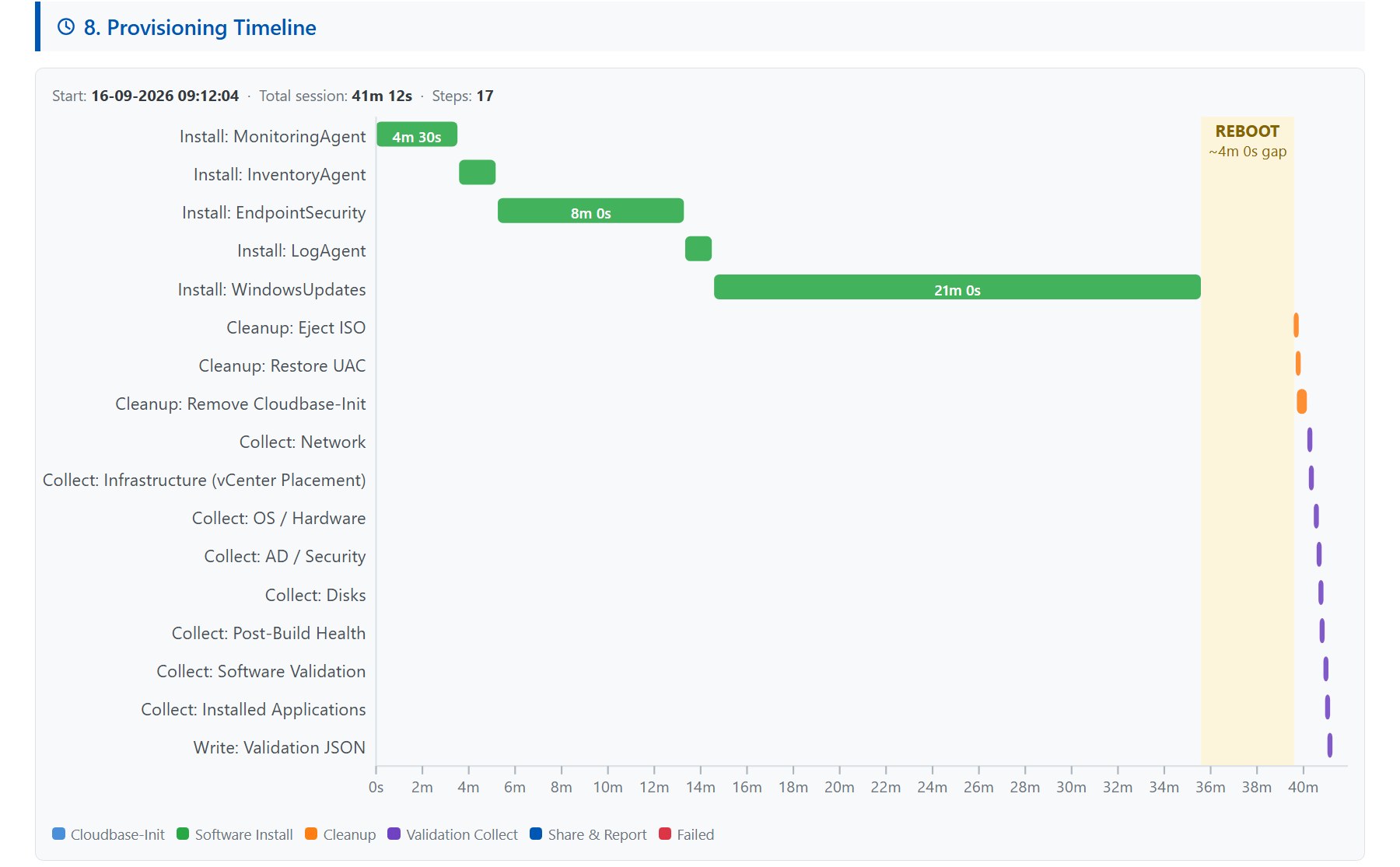 Every bar sits at its true wall-clock position across the reboots because the state file carried the timings. The amber band is the reboot after Windows Updates, found automatically from the gap.
Why this matters outside the lab
What customers get from a reboot-safe build is predictability. Every server takes the same steps in the same order, survives the reboots Windows insists on, and finishes clean. The delivered machine has no tooling, no credentials and no leftover tasks.
That last part matters to security reviewers as much as the first part matters to operations. And because every step’s timing is recorded, “why did this build take twice as long?” has an answer instead of a guess.
Rules learned
- A reboot-safe build is kill switch + per-step flags + persisted timings. Nothing cleverer is needed.
- Treat exit 3010 as success. Let the step declare whether to reboot; the loop handles it.
- Health = flag and service and path. Installer exit codes lie.
- Read platform-injected metadata with retries. The workflow that injects it may land after the guest starts looking.
- Two share accounts: read-only for pulls, write-only for publishing.
- Delete the task before validating, so “no task remains” is checkable.
- Stop the transcript before you copy the logs.
- Scrub, delete yourself, reboot. The customer gets a server, not a build environment.
Broadcom documentation
- Windows Automation Assembler image for vSphere: how Cloudbase-Init gets onto the template, the install the cleanup removes
- Event topics provided with Automation Assembler: Compute post provision, issued once per machine after it is provisioned
- How do I track workflow runs: Extensibility > Activity > Workflow Runs, to see when the metadata workflow ran
- Query Information using GuestInfo Variable:
info-geton aguestinfovariable from inside the guest
Part 3: validation as a product, and the details that hurt.
Lab write-up of a production pattern; customer specifics removed. Opinions my own.