
Most provisioning pipelines end with “Deployment completed”. This one ends with a document a human can read. It changed how the platform team and the server team talk to each other.
Instead of “it’s built, go check it”, the requester gets a page that says what was built, where it landed, what passed, and how long each step took.
Part 1 was the architecture and part 2 the state machine. This is the payoff. After it come the details that were nowhere in any documentation.
The report
06-validate-build.ps1 is a pure transformation: data-validation.json
in, one self-contained HTML file out. There’s no server and there are no
external assets. CSS, SVG icons and the timeline chart are all inline, so
it opens as-is from the file share or as an email attachment.
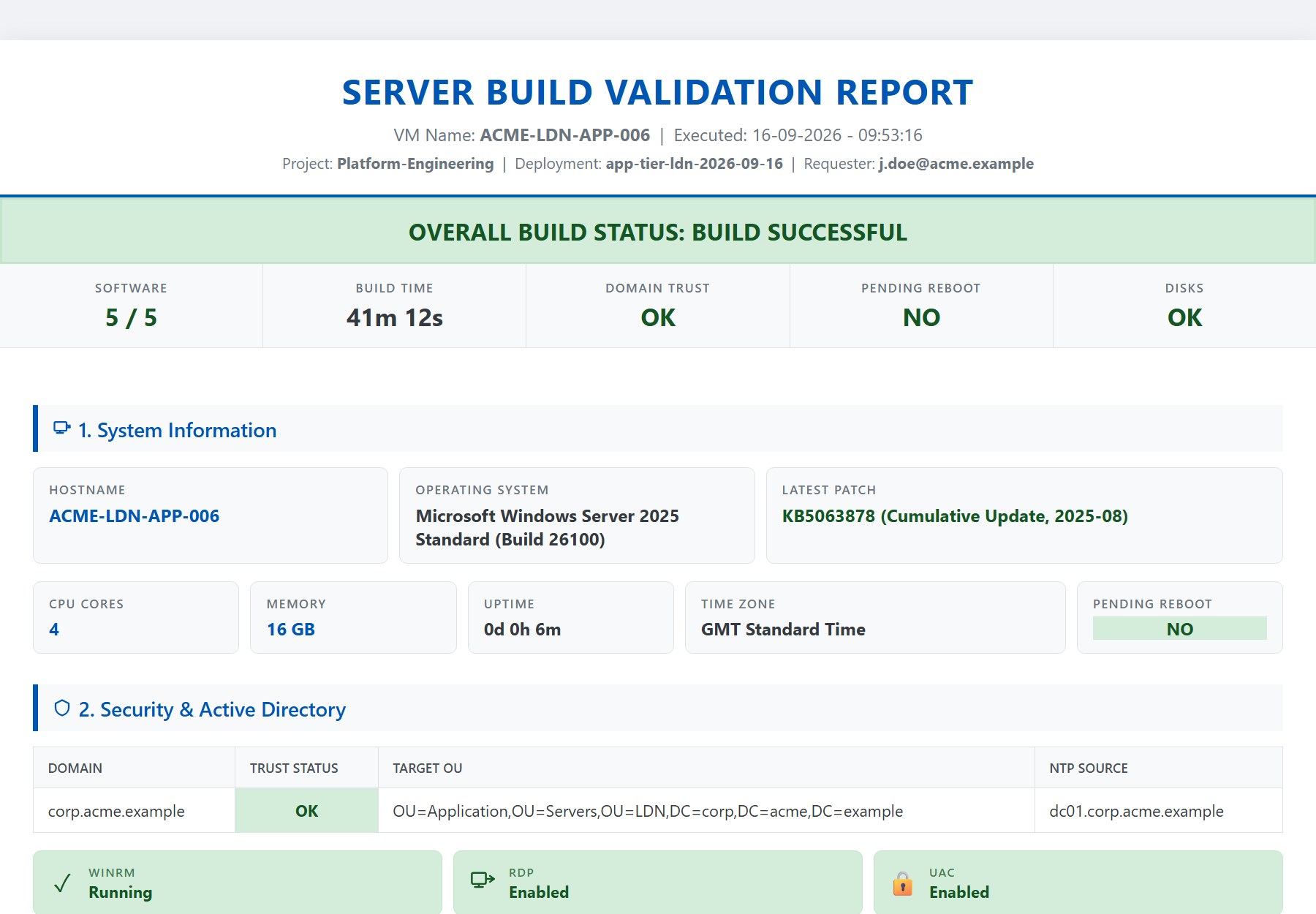 The top of the report. Rendered by the real renderer from an anonymised payload: the hostnames, domain and vendor names are fictional, the code that drew it is not. Open the full report (it’s one self-contained HTML file) or the JSON it was built from.
The header shows the VM, execution time, project, deployment and requester. The banner says BUILD SUCCESSFUL / BUILD FAILED, by the strict rule from part 2. A sticky status bar keeps the hostname and verdict in view while you scroll. Then:
| Section | Contents |
|---|---|
| System | hostname, OS, latest patch, CPU, RAM, uptime, time zone, pending reboot |
| Security & AD | domain, trust status, OU, NTP source; WinRM/RDP/UAC status cards; local admins |
| Software | one card per agent: pass/fail badge + the individual checks (flag, service, path) |
| Network | per adapter: alias, MAC, IP, mask (converted from prefix), gateway — joined to the vSphere portgroup via the guestinfo NIC/MAC map |
| Storage | per volume: capacity bars (warn < 20 % free, critical < 10 %) + backing datastore chips |
| Tags | every deployment tag as a colour chip (palette chosen deterministically by key hash, so the same tag is always the same colour) |
| Placement | vCenter → datacenter → cluster → host chain, VM folder; “metadata pending” if guestinfo was never readable |
| Timeline | SVG Gantt of every step at true wall-clock position; phase colours; automatic REBOOT detection (gaps > 30 s shaded and labelled) |
| Installed apps | collapsible full inventory |
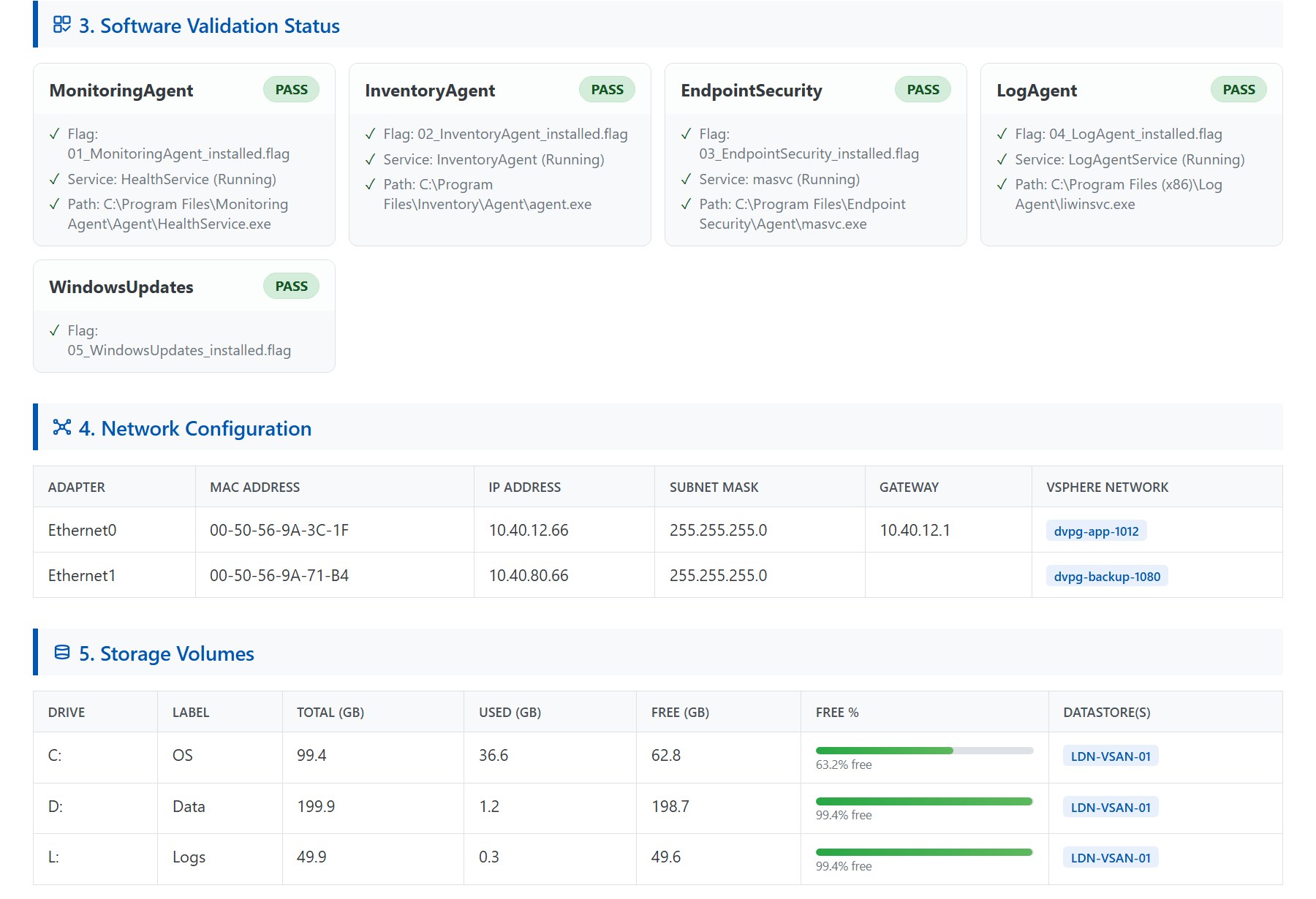 Sections 3 to 5: one card per agent with its three checks; adapters joined to their portgroups; volumes with their backing datastore.
The network table is the one that gets the “oh” reaction. The guest knows its adapters and vCenter knows the portgroups. The guestinfo bridge from part 1 lets one table show both, joined on MAC, with no credentials crossing the boundary.
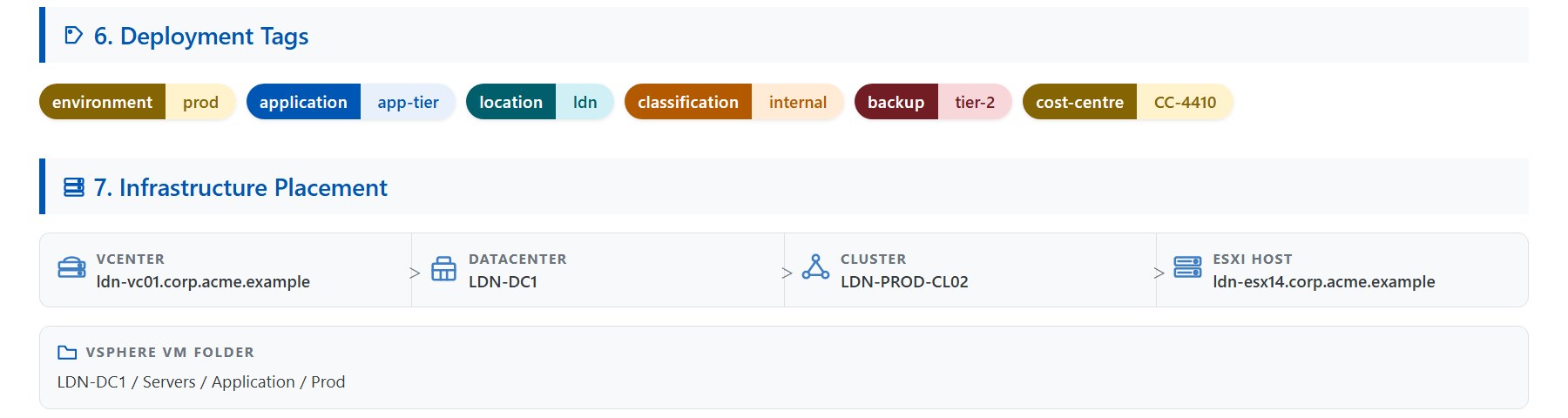 Tags and placement: all of it from the request and from
 guestinfo, none of it from a credential in the guest.
The Gantt chart is the one operations teams use. When a build takes 90 minutes instead of 40, the chart shows why. It might be the updates step, or a slow installer. Or it might be a 20-minute gap where the machine sat at a boot prompt, waiting patiently for someone to notice.
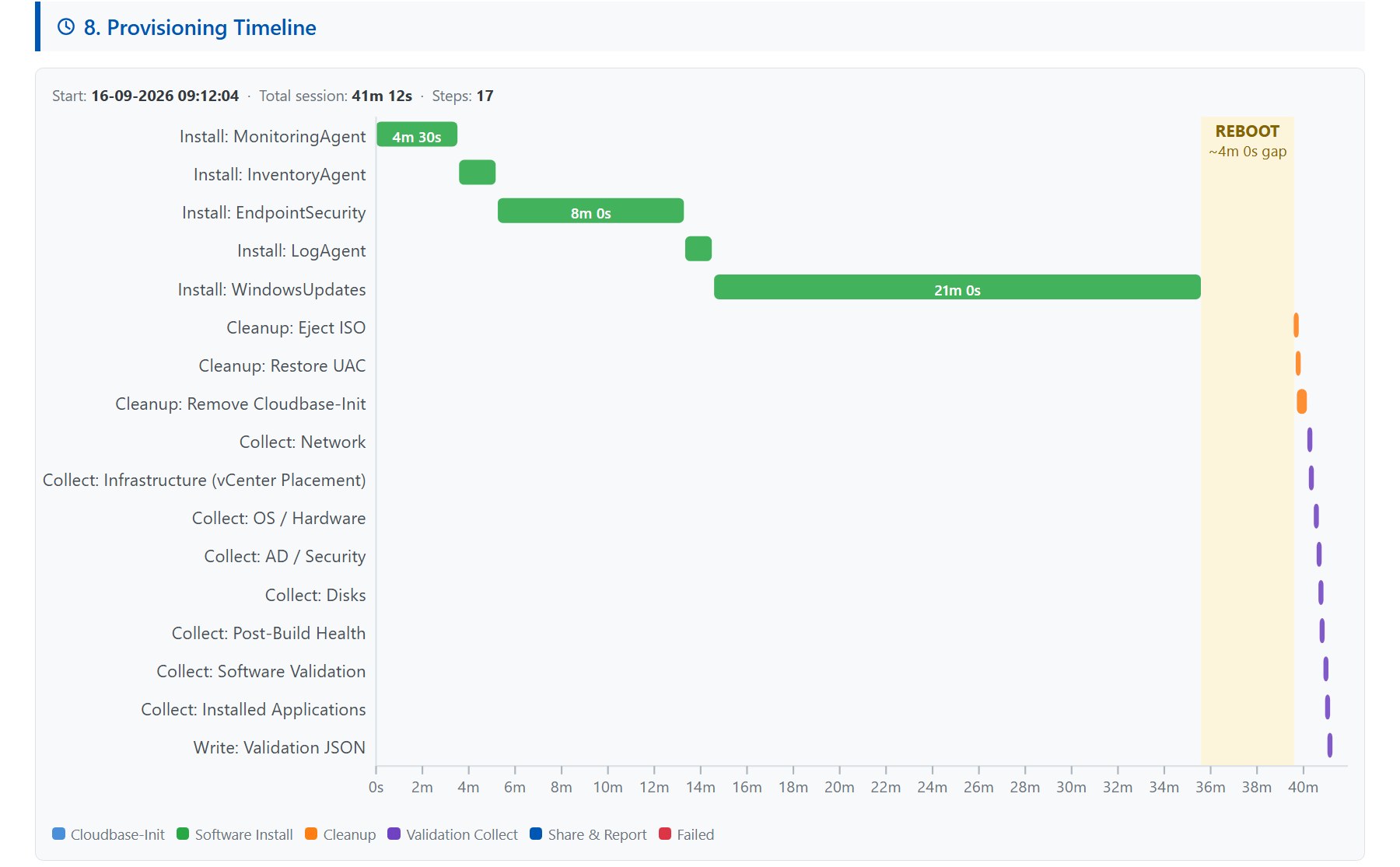 Section 8. Phase colours, true wall-clock positions, and the reboot detected from a gap over 30 seconds — nothing logged “rebooting now”.
The details that hurt
Every one of these cost hours, and none of them is in a manual.
vmtoolsd mangles arguments under SYSTEM in Session 0
Reading guestinfo.vra.infrastructure with
& vmtoolsd.exe --cmd "info-get guestinfo.vra.infrastructure" works
interactively. It fails silently as SYSTEM in a startup task, because
the argument quoting gets mangled on the way through.
The fix is to build the process explicitly with
System.Diagnostics.Process. Set Arguments as one string, redirect
stdout, and read it yourself. Also retry (15 × 10 s), because the vRO
subscription that writes the value can land after the guest starts
looking.
Ejecting an ISO with no Explorer
Session 0 has no shell, so Shell.Application ejection does nothing. A
P/Invoke to winmm.dll:
[mciSend]::mciSendString("set cdaudio door open", $null, 0, [IntPtr]::Zero)
opens the tray. It feels like 1998. It works.
Exit 1003 is the only reboot you should ever request from cloudbase-init
Call Restart-Computer from a cloudbase-init script, and you race the
plugin’s own state tracking. Exit 1003 instead. cloudbase-init reboots,
runs the part again on next boot, and your flag file short-circuits it.
The installers’ 3010 is a different animal. That one means “success, reboot wanted”, and the build master decides when.
cloudbase-init has to remove itself
A delivered server with cloudbase-init still installed has an unattended execution surface. Anyone who can present a config drive owns the box.
The cleanup phase stops the service, kills the processes, runs the uninstaller silently and deletes the directory. It does all that before validation, so the report can confirm it’s gone.
UAC was off. Turn it back on.
The base image relaxes EnableLUA and FilterAdministratorToken so the
build runs without prompts. If the cleanup forgets to restore them, you
ship a server with UAC disabled and a report that says SUCCESS with a
perfectly straight face. The “UAC enabled” card in the security section
exists so this can never be silent.
Secrets: encrypt to the machine, then scrub
The two share passwords are the only secrets that ever touch the guest’s
disk. They’re AES-encrypted with a key derived from the BIOS UUID
(Win32_ComputerSystemProduct.UUID), so they’re useless off the box.
They’re decrypted only in memory, and overwritten with *** SCRUBBED ***
before the final reboot.
That’s the right containment for a transient build secret. It’s not a vault, and shouldn’t be described as one.
The requester is told too early
The “your deployment completed” email fires at Compute Post Provision. That’s when vCenter has finished, not when the guest has. So users open a server that’s mid-Windows-Updates, which is nobody’s idea of a warm welcome. Move the email to a deployment-completion topic, or at least include the report’s future share path.
Hostname allocation has a race
Read-then-allocate against AD isn’t synchronised. Two deployments running
at the same time can see the same highest suffix and pick the same name.
Within one multi-machine deployment, the count-based batch is safe. Across
deployments, wrap the search-and-generate in a vRO LockingSystem lock.
What I’d carry to any build pipeline
Strip out the Windows specifics (a fair few of them reboots), and five ideas survive:
- The report is the deliverable. Build it from a single JSON document so it’s testable without a build.
- Join guest facts to platform facts via a one-way metadata channel.
- Detect reboots from timing gaps, not from logging “rebooting now”.
- Health is three checks, never the installer’s exit code.
- Clean up before you validate, so “clean” is a checkable claim.
Why this matters outside the lab
The report is the part customers remember. It replaces “your server is ready” with evidence:
- what was installed, and whether it’s healthy;
- where the server landed in vCenter;
- how the network was configured;
- how long each step took, and where the reboots were.
Service desks use it to close the request. Security teams use it to confirm the controls, and platform teams use the timeline to spot regressions. The same idea (validate, then publish proof) carries over to any provisioning pipeline, Windows or not.
Rules learned
- Ship a report, not a status. Self-contained HTML, one JSON source.
- Under SYSTEM in Session 0: build processes explicitly, eject media via
mciSendString, expect no shell. - Exit 1003 for cloudbase-init reboots; 3010 is the installer’s word for “later”.
- Remove cloudbase-init and restore UAC, and make both of them checks in the report.
- Machine-keyed encryption + scrub is right for transient secrets. Say what it is.
- Fix the two timing bugs: the early requester email, and the hostname race under parallel deployments.
Broadcom documentation
- Event topics provided with Automation Assembler: Compute post provision against Deployment completed, for the requester’s email
- Create an extensibility subscription: subscribing an Orchestrator workflow to an event topic, with a filter and blocking
- Query Information using GuestInfo Variable:
vmtoolsd --cmdwithinfo-getandinfo-setforguestinfovariables - Windows Automation Assembler image for vSphere: how Cloudbase-Init is installed on the template, before the build removes it
Previously: the state machine. This VM is also where the Telegraf and fluent-bit Windows agents land.
Lab write-up of a production pattern; customer specifics removed. Opinions my own.